
Introduction
Structured data is one of the most misunderstood parts of SEO.
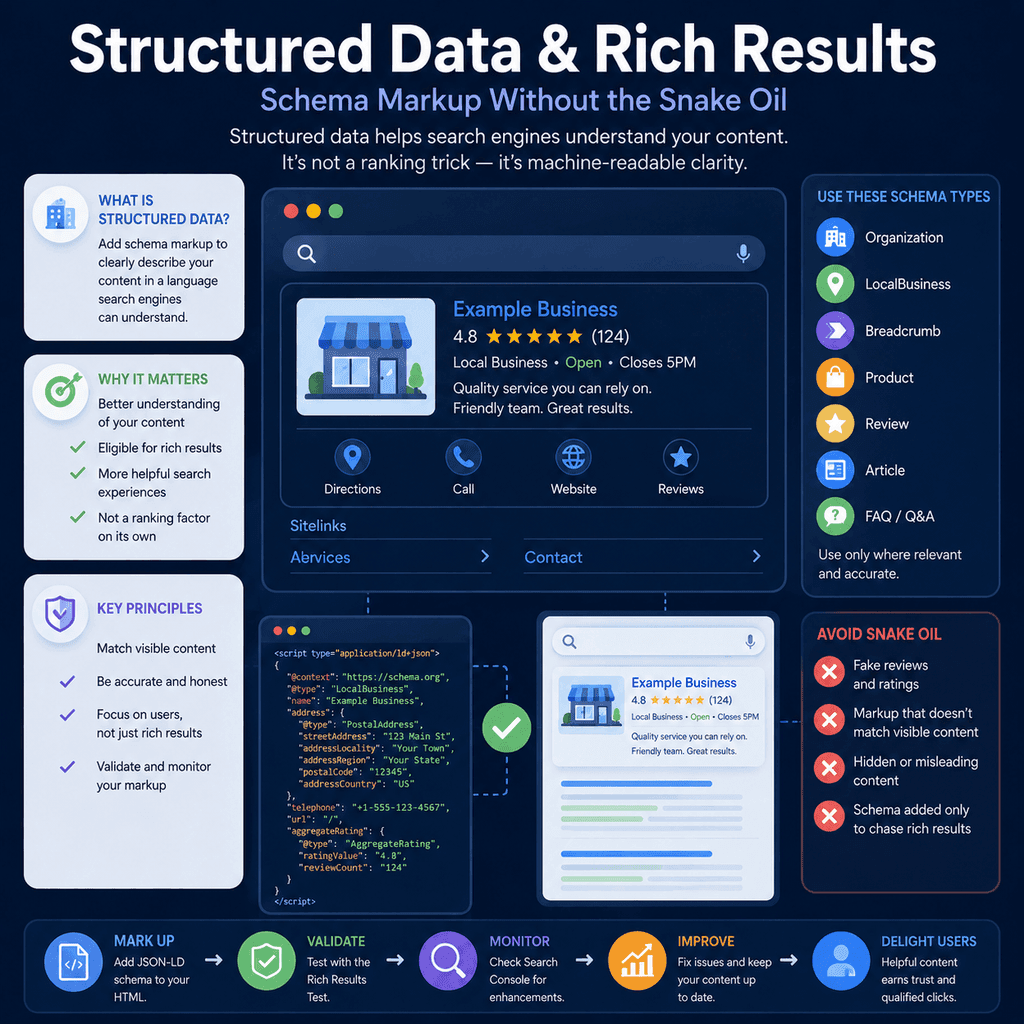
It is often sold as if it is a shortcut to better rankings, automatic rich results, or instant search visibility. That is the snake oil version. The useful version is more practical: structured data helps search engines understand the content and entities on a page in a clearer, machine-readable format.
For a small business website, structured data can help clarify who the business is, where it operates, what a page is about, how a page sits within the site, what products are being sold, and whether certain visible page details are eligible for richer search features.
It does not replace good content, technical SEO, useful page design, clear navigation, accurate business information, or genuine reviews. It should describe what is already true on the page. If the visible page is thin, misleading, outdated, or unhelpful, schema markup will not fix that.
This guide explains structured data and rich results in plain English, with a focus on the schema types that commonly matter for web design and SEO projects: Organization, LocalBusiness, Breadcrumb, Product, Review, Article, FAQPage, and QAPage.
This YouTube video by Google is a great starting point for learning about Schema too.
What Structured Data Means
Structured data is a standardised way of describing page information so software can understand it more reliably.
Google explains structured data as a format for providing information about a page and classifying the page content. In practice, that means a page can contain human-readable content for visitors and machine-readable markup that gives search systems explicit clues about the same content.
For example, a normal visitor can read a product page and see the product name, price, availability, image, and description. Structured data can label those same details as product information in a predictable format.
The important word is clarification. Structured data is not supposed to invent extra meaning. It should make existing page information easier for search engines to interpret.
Google’s introduction to structured data markup in Search is a useful starting point for the underlying concept.
What Schema Markup Means
Schema markup is the code used to add structured data to a webpage.
Most SEO discussions use “schema” as shorthand for the vocabulary at Schema.org. Schema.org provides shared names for things such as organizations, local businesses, products, reviews, articles, breadcrumbs, questions, answers, events, recipes, and many other entities.
Search engines can then interpret a page more consistently because the markup uses agreed names and properties rather than relying only on visual layout or free-form text.
For example, the words “Digi Example Ltd” could appear in a footer, a heading, a review, or a legal notice. Organization schema can clarify that this is the organization being described, and properties such as name, logo, URL, address, and contact details can clarify specific facts about it.
What Rich Results Are
Rich results are enhanced search result features that go beyond the standard blue link, URL, and snippet.
Depending on the content type and eligibility, rich results may include product information, breadcrumb paths, article details, review snippets, local business details, images, or other enhanced presentation features.
Structured data can make a page eligible for certain rich result features, but eligibility is not the same as a guarantee. Google may choose a normal text result even when the markup is technically valid. Search appearance depends on the query, device, search context, page quality, eligibility rules, and Google’s own systems.
Google maintains a search gallery of supported structured data features. That gallery is more reliable than generic SEO lists because it shows which structured data features Google currently documents for Search.
What Structured Data Can and Cannot Do
Structured data can help search engines understand content more clearly. It can also make pages eligible for some enhanced search appearances where the page meets the relevant guidelines.
Structured data cannot make a weak page useful. It cannot make a page rank purely because markup exists. It cannot force Google to show stars, FAQs, product details, breadcrumbs, or article enhancements. It cannot safely display information that users cannot see on the page. It cannot make fake ratings legitimate.
A sensible way to think about schema is this:
- Good content answers the user’s need.
- Good technical SEO lets the page be crawled, rendered, indexed, and served.
- Good structured data labels the page accurately.
Those jobs are related, but they are not interchangeable.
Why JSON-LD Is Usually the Best Format
Structured data can be added in several formats, including JSON-LD, Microdata, and RDFa. For most modern websites, JSON-LD is usually the easiest format to maintain because it can sit as a separate block of data rather than being woven through every visible HTML element.
Google’s structured data guidelines list JSON-LD, Microdata, and RDFa as supported formats for rich result eligibility, with JSON-LD recommended.
A simple JSON-LD pattern looks like this:
<script type=”application/ld+json”>{ “@context”: “https://schema.org”, “@type”: “Organization”, “name”: “Example Business”, “url”: “https://www.example.com/”, “logo”: “https://www.example.com/images/logo.png”}</script>This example describes an organization. The exact properties should be adapted to the real business and the specific page.
The Main Rule: Mark Up What Users Can See
The most important practical rule is that structured data should match the visible page content.
If a product page says a product is out of stock, the markup should not claim it is in stock. If the page does not show reviews, the markup should not include hidden ratings. If a service page does not mention a location, the markup should not invent local relevance. If a page is an article, the markup should not pretend it is a product or event.
Google’s structured data guidelines warn against marking up content that is not visible to readers, irrelevant, misleading, fake, or unrelated to the main focus of the page. This is why schema added only to chase rich results is risky. It may pass a basic syntax test but still fail quality guidelines.
Structured data should be a faithful label, not a sales pitch hidden in code.
Organization Schema
Organization schema describes the business, charity, publisher, ecommerce brand, or other organization behind a website.
For many small business websites, Organization markup is useful for clarifying the business identity. It can include details such as the business name, logo, URL, contact information, address where appropriate, and profiles on trusted external platforms.
Google’s Organization structured data guidance recommends using the most specific applicable subtype and focusing on properties that are useful to users, such as name, address, telephone, URL, and logo.
A basic Organization example:
<script type=”application/ld+json”>{ “@context”: “https://schema.org”, “@type”: “Organization”, “name”: “Example Business”, “url”: “https://www.example.com/”, “logo”: “https://www.example.com/images/logo.png”, “contactPoint”: { “@type”: “ContactPoint”, “telephone”: “+44 0000 000000”, “contactType”: “customer support” }, “sameAs”: [ “https://www.linkedin.com/company/example-business” ]}</script>Only include details that are accurate and appropriate for the business. Do not add social profiles, addresses, identifiers, or contact information that are not genuinely associated with the organization.
LocalBusiness Schema
LocalBusiness schema is a subtype of Organization and Place. It is used when the page describes a specific local business or branch.
This can be useful for businesses with a real local presence, such as clinics, trades, restaurants, shops, studios, professional practices, and local service providers. It can describe details such as name, address, phone number, opening hours, geographic area served, and business type.
Google’s LocalBusiness structured data guidance explains that local business markup can help provide business details such as opening hours and departments where the page and business are suitable.
A simplified LocalBusiness example:
<script type=”application/ld+json”>{ “@context”: “https://schema.org”, “@type”: “LocalBusiness”, “name”: “Example Clinic”, “url”: “https://www.example.com/”, “telephone”: “+44 0000 000000”, “address”: { “@type”: “PostalAddress”, “streetAddress”: “1 Example Street”, “addressLocality”: “Example Town”, “postalCode”: “EX1 1EX”, “addressCountry”: “GB” }, “openingHours”: “Mo-Fr 09:00-17:00”}</script>LocalBusiness schema should be used carefully. If a business is online-only, does not have a public local presence, or serves multiple locations in a more complex way, the implementation needs more thought. The markup should reflect the real business model, not the location keywords someone wants to rank for.
Breadcrumb Schema
Breadcrumb schema describes where a page sits in the site’s hierarchy.
This is useful because many websites have a structure such as Home, Services, Website Design, or Home, Resources, SEO Guides, Structured Data. Breadcrumb markup can help search engines understand that hierarchy and may influence the breadcrumb-style path shown in search results.
Google’s Breadcrumb structured data guidance uses BreadcrumbList markup for this purpose.
A basic breadcrumb example:
<script type=”application/ld+json”>{ “@context”: “https://schema.org”, “@type”: “BreadcrumbList”, “itemListElement”: [ { “@type”: “ListItem”, “position”: 1, “name”: “Home”, “item”: “https://www.example.com/” }, { “@type”: “ListItem”, “position”: 2, “name”: “Resources”, “item”: “https://www.example.com/resources/” }, { “@type”: “ListItem”, “position”: 3, “name”: “Structured Data Guide”, “item”: “https://www.example.com/resources/structured-data-guide/” } ]}</script>Breadcrumb markup works best when it matches a real, useful site structure. It should not be used to invent a fake hierarchy that users cannot navigate.
Product Schema
Product schema describes a product page.
For ecommerce websites, product markup can clarify details such as product name, image, description, brand, price, availability, shipping information, return policy, and reviews where valid. Google explains that product structured data can make product pages eligible for richer search appearances, including product information in Search and other Google surfaces.
A cautious product example without ratings:
<script type=”application/ld+json”>{ “@context”: “https://schema.org”, “@type”: “Product”, “name”: “Example Product”, “image”: “https://www.example.com/images/example-product.jpg”, “description”: “A short, accurate description of the product shown on the page.”, “brand”: { “@type”: “Brand”, “name”: “Example Brand” }, “offers”: { “@type”: “Offer”, “url”: “https://www.example.com/products/example-product/”, “priceCurrency”: “GBP”, “price”: “49.99”, “availability”: “https://schema.org/InStock” }}</script>Product markup should stay in sync with the live product page. Price, availability, variants, shipping, and returns can change. If the structured data becomes stale, the page may communicate the wrong expectation to users and search systems.
For products with variants, such as size, colour, or model options, markup can become more complex. The implementation should match the real product structure rather than simplifying everything into one generic product if that would mislead users.
Review and AggregateRating Schema
Review and AggregateRating markup is where a lot of schema misuse happens.
Review markup can be valid when it describes genuine visible reviews for a supported item type, such as a product, book, course, event, movie, recipe, software app, or another eligible reviewed item. AggregateRating can describe an average rating based on real rating data.
The dangerous version is adding star ratings because stars look attractive in search results. Fake ratings, invented review counts, hidden review content, copied third-party reviews, and self-serving local business review markup are not sound SEO practice.
Google’s review snippet documentation gives specific review guidelines. In particular, local business and organization review markup has additional restrictions where the entity being reviewed controls the reviews about itself.
For a small business website, the safer practical rule is simple:
- Do not invent ratings.
- Do not copy ratings from other websites into your markup.
- Do not mark up reviews that users cannot see on the page.
- Do not add review schema to every page just because you want stars.
- Only use review markup where the page genuinely contains eligible review content for the specific item being reviewed.
Review schema should reflect real evidence, not marketing ambition.
Article Schema
Article schema describes article pages, such as blog posts, guides, news articles, or resource content.
For a resources section, Article markup can help clarify the headline, author or publisher, publication date, modification date, featured image, and article identity. Google’s Article structured data guidance explains that article markup can help Google understand article pages and show better title text, image, and date information where eligible.
A basic Article example:
<script type=”application/ld+json”>{ “@context”: “https://schema.org”, “@type”: “Article”, “headline”: “Structured Data and Rich Results: Schema Markup Without the Snake Oil”, “description”: “A practical guide to structured data, rich results, and schema markup for small business websites.”, “image”: “https://www.example.com/images/structured-data-guide.png”, “datePublished”: “2026-01-15”, “dateModified”: “2026-01-15”, “author”: { “@type”: “Organization”, “name”: “Example Business” }, “publisher”: { “@type”: “Organization”, “name”: “Example Business”, “logo”: { “@type”: “ImageObject”, “url”: “https://www.example.com/images/logo.png” } }}</script>Article markup should not be treated as a content quality substitute. A thin page does not become a strong guide because it has Article schema. The article still needs to be useful, accurate, and aligned with the title and search intent.
FAQPage Schema
FAQPage schema is used when a page contains a list of questions and answers on a topic.
This type has been heavily overused in SEO because FAQ rich results were once a visible opportunity for many websites. That does not mean every page needs FAQ markup. It also does not mean a business should add fake questions at the bottom of every service page.
Google’s current FAQPage guidance is especially narrow for rich result eligibility, focusing on government-focused or health-focused sites. For most ordinary small business websites, the practical value of FAQ content should be judged by whether the questions help users, not by whether the markup might create a visible FAQ result.
A simple FAQPage example, only suitable where the page visibly contains the same question and answer:
<script type=”application/ld+json”>{ “@context”: “https://schema.org”, “@type”: “FAQPage”, “mainEntity”: [ { “@type”: “Question”, “name”: “What is structured data?”, “acceptedAnswer”: { “@type”: “Answer”, “text”: “Structured data is machine-readable markup that describes page content in a standard format.” } }, { “@type”: “Question”, “name”: “Does schema markup guarantee rich results?”, “acceptedAnswer”: { “@type”: “Answer”, “text”: “No. Valid structured data can make a page eligible for some rich results, but Google does not guarantee that they will appear.” } } ]}</script>The visible page should contain those same questions and answers. Do not hide FAQ content purely in JSON-LD.
QAPage Schema
QAPage schema is different from FAQPage schema.
A FAQ page usually contains questions and answers supplied by the site owner. A Q&A page is built around one question followed by one or more answers, often with users able to submit answers.
Google’s QAPage structured data guidance says QAPage markup should only be used when the page has a question-and-answer format and users can submit answers to the question. If the page has one question and one fixed answer with no way for users to add alternatives, QAPage is usually the wrong type.
This matters for forums, community support platforms, product support communities, and specialist Q&A websites. It is usually not relevant to a normal service page, contact page, homepage, or standard blog article.
Using More Than One Schema Type on a Page
A page can describe more than one thing.
For example, an article page may also have breadcrumb markup. A product page may have Product markup and breadcrumb markup. A local business homepage may have Organization or LocalBusiness markup. A resources section may use Article markup on individual guides and BreadcrumbList markup for page hierarchy.
The main type should reflect the primary purpose of the page. Supporting markup can describe secondary information where it is visible and relevant.
For example:
- A guide page: Article plus BreadcrumbList.
- A product page: Product plus BreadcrumbList.
- A local clinic homepage: LocalBusiness, possibly with Organization details where appropriate.
- A blog category page: usually not Article for every listing unless each listed item is represented correctly in the chosen implementation.
Do not add every schema type a plugin offers. More markup is not automatically better. Accurate markup is better.
Schema Markup and WordPress Plugins
Many websites use WordPress SEO plugins or schema plugins to generate structured data.
Plugins can be useful because they reduce manual implementation work. They can also create problems when settings are wrong, templates are reused carelessly, or the plugin outputs markup that does not match the visible page.
Common plugin-related problems include:
- the wrong organization type;
- staging URLs in schema output;
- missing logo or image URLs;
- old business addresses;
- review markup added where reviews are not visible;
- Article markup on pages that are not articles;
- FAQ markup generated from content that is not visible to users;
- duplicate or conflicting schema from multiple plugins.
Using a plugin does not remove the need to check the output.
Common Mistake: Treating Schema as a Ranking Trick
The biggest strategic mistake is treating schema markup as a ranking trick.
That creates poor decisions. People add schema types that do not match the page. They invent review ratings. They mark up hidden content. They install several schema plugins and assume more output means better SEO.
A better question is: what does this page genuinely contain, and which structured data type helps describe it accurately?
For many pages, the answer is simple. A service page may not need complex schema beyond site-level Organization or LocalBusiness information and breadcrumbs. A strong article can use Article markup. A genuine product page can use Product markup. A genuine FAQ page can use FAQPage where appropriate.
Schema should clarify the page, not decorate it.
Common Mistake: Marking Up Hidden Content
Structured data should not be used to show search engines information that users cannot see.
For example, a product page should not hide extra reviews in JSON-LD. A service page should not include FAQ answers in schema if the page does not visibly show them. A local page should not include a full list of cities served if the page gives no real information about those locations.
This is not only a policy issue. It is also a trust issue. If search results communicate one thing and the page delivers another, users are being misled.
Common Mistake: Invalid Review Markup
Review markup deserves special caution because it is commonly abused.
Invalid patterns include:
- using star ratings for a local business’s own testimonials in a way that violates Google’s review snippet guidelines;
- marking up Google Business Profile reviews copied or embedded from another platform;
- adding five-star ratings without real user reviews;
- marking up a category page as if the whole category has one specific product rating;
- using editor-created ratings as if they were user review data;
- hiding review text from visitors but exposing it in structured data.
For many small service businesses, the safest approach is to display testimonials for users where helpful, but avoid chasing star snippets through questionable review markup.
Common Mistake: Outdated Business Information
Structured data should be maintained when business details change.
That includes:
- business name;
- logo;
- phone number;
- address;
- opening hours;
- service areas;
- product price and availability;
- article publication and modified dates;
- social and profile URLs.
Outdated schema can create confusion because the page, search result, business profile, and other online references may start to disagree.
Testing Structured Data
Structured data should be tested before and after launch.
Google’s Rich Results Test can show which Google rich result types may be generated from a page’s structured data. The Schema Markup Validator can also help check schema syntax more generally.
Testing can identify technical errors, missing required fields, unsupported types, and malformed JSON-LD. It cannot fully judge whether the markup is honest, useful, or representative of the page. That still needs human review.
When testing, check:
- the live page URL, not only copied code;
- whether Google can access the page;
- whether the structured data uses final live URLs;
- whether images are crawlable;
- whether required properties are present;
- whether warnings indicate useful improvements;
- whether the markup matches visible content.
A page can pass a technical test and still be a poor implementation if the markup misrepresents the page.
Using Search Console After Launch
After structured data is deployed, Google Search Console can help monitor eligible rich result types and structured data issues.
This is especially useful after a redesign or template change. A single template error can affect many pages. For example, a product template may stop outputting availability, an article template may lose image data, or a plugin conflict may create duplicate schema graphs.
After launch, check for:
- new structured data errors;
- sudden drops in valid structured data items;
- unexpected increases in invalid items;
- pages where schema uses staging URLs;
- templates where schema no longer matches the visible page;
- manual action messages relating to structured data.
Do not panic over every warning. Some warnings are recommendations rather than critical errors. But critical errors and misleading markup should be fixed.
A Practical Structured Data Checklist
Use this checklist before adding schema markup to a page.
- What is the main purpose of the page?
- Which schema type best describes that main purpose?
- Is the marked-up information visible to users?
- Is the information accurate and current?
- Are all URLs final live URLs rather than staging URLs?
- Are images crawlable and relevant?
- Are review ratings genuine, visible, and eligible?
- Does the markup avoid hidden claims or invented details?
- Has the page been tested with the Rich Results Test?
- Will the implementation be monitored after launch?
If you cannot answer these questions clearly, the page probably needs better planning before schema is added.
Which Schema Types Matter Most for Small Business Websites?
For many small business websites, the useful schema types are fairly simple.
Organization or LocalBusiness markup can clarify the business identity. BreadcrumbList can clarify site structure. Article markup can support guides and resources. Product markup can support genuine ecommerce product pages. FAQPage can be used where the page genuinely has FAQ content and the use case is valid. QAPage is only for genuine question-and-answer pages where users can submit answers.
Review markup should be treated cautiously. If the implementation relies on fake, hidden, copied, self-serving, or unsupported ratings, it should not be used.
Most businesses do not need a huge schema graph on every page. They need accurate, maintainable markup that describes the page honestly.
When Not to Add Schema
Sometimes the correct decision is not to add more structured data.
A page may not need schema if:
- the page is thin or unfinished;
- the visible content does not support the markup;
- the proposed schema type does not match the page purpose;
- the business information is uncertain or likely to change immediately;
- the markup is being added only because a plugin recommends it;
- the goal is to chase a rich result rather than clarify the page.
It is better to have less structured data that is accurate than a large amount of markup that is inaccurate, stale, or misleading.
Conclusion
Structured data is useful when it is treated as machine-readable clarification.
It helps search systems understand the page, the business, the product, the article, the review, the breadcrumb path, or the question-and-answer format more clearly. It can also make some pages eligible for richer search appearances where the page and markup meet the relevant guidelines.
But structured data is not a ranking shortcut. It should not be used to invent relevance, fake trust, hide content, or force rich results. The foundation is still the same: useful pages, accurate information, clean technical implementation, and honest communication with users.
The best schema markup is boring in the right way. It says what the page really is, labels the important details clearly, and stays aligned with what visitors can see.