
Introduction
CSS selectors let you choose which HTML elements to style.
You can use simple selectors such as type, class, and ID selectors:
p { color: #333333;} .card { padding: 24px;} #main-content { max-width: 1000px;}CSS also has modern selector functions.
These functions let you write more flexible selectors.
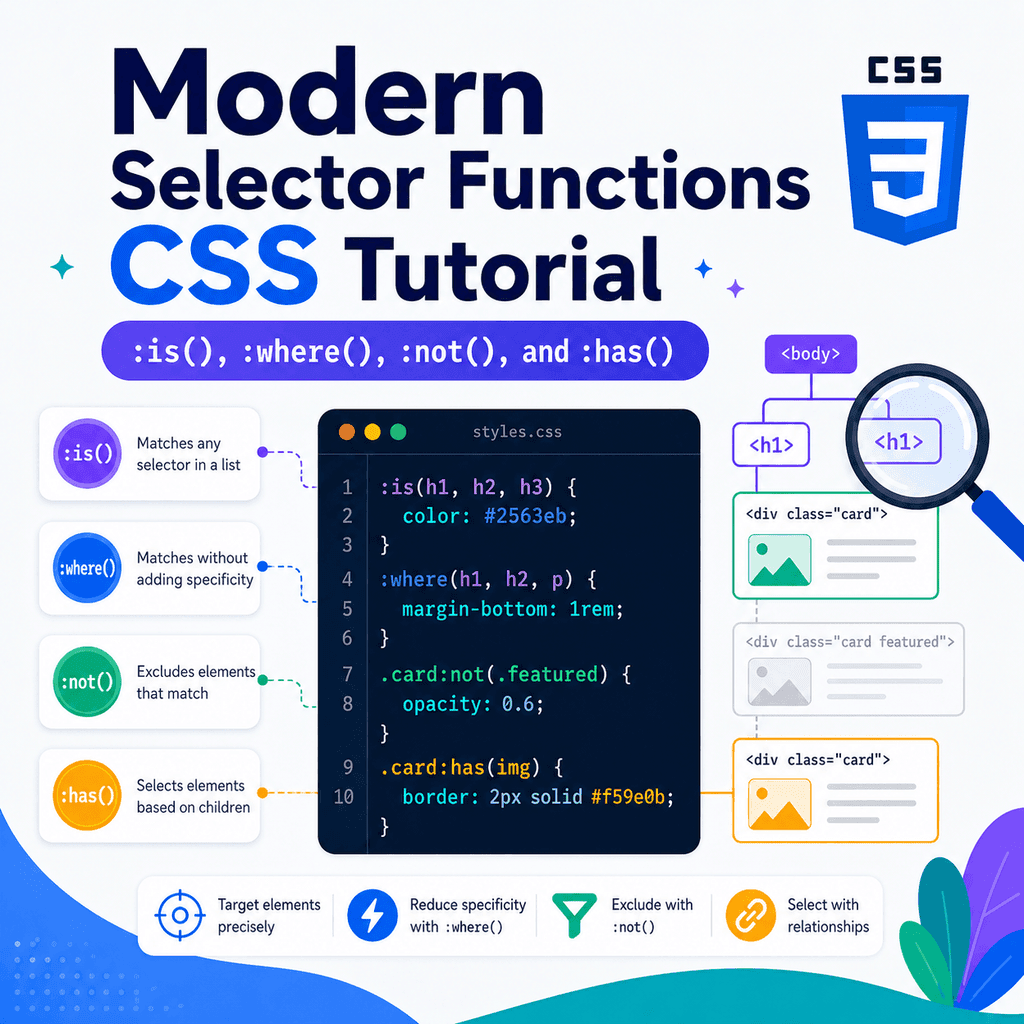
Some of the most useful selector functions are:
:is():where():not():has()They are written like pseudo-classes, but they accept selectors inside parentheses.
For example:
:is(h1, h2, h3) { line-height: 1.2;}This selects all <h1>, <h2>, and <h3> elements.
Another example:
.card:not(.featured) { border: 1px solid #dddddd;}This selects cards that do not have the class featured.
Modern selector functions can make CSS shorter, clearer, and more powerful.
However, they should be used carefully because they can also make selectors harder to read if overused.
What Are Selector Functions?
Selector functions are pseudo-class-like selectors that contain other selectors inside parentheses.
Example:
:is(h1, h2, h3) { color: navy;}The function is:
:is()The selectors inside it are:
h1, h2, h3This rule applies to all matching headings.
Selector functions are useful because they let you combine, simplify, or conditionally match selectors.
They can help you write selectors such as:
.card :is(h2, p, a) { margin-top: 0;}This selects <h2>, <p>, and <a> elements inside .card.
The Four Functions in This Article
This article focuses on four modern selector functions:
:is():where():not():has()A simple overview:
:is() helps group selector options:where() helps group selector options with zero specificity:not() excludes matching elements:has() selects elements based on what they contain or relate toEach function solves a different problem.
The :is() Function
The :is() function lets you provide a list of selectors.
If an element matches any selector in the list, it matches :is().
Example:
:is(h1, h2, h3) { line-height: 1.2;}This is similar to writing:
h1,h2,h3 { line-height: 1.2;}Both examples style <h1>, <h2>, and <h3> elements.
The difference is that :is() can be especially helpful when the grouped selectors are part of a longer selector.
Why :is() Is Useful
Without :is(), longer grouped selectors can become repetitive.
Example:
.card h2,.card h3,.card p,.card a { margin-top: 0;}This repeats .card several times.
With :is():
.card :is(h2, h3, p, a) { margin-top: 0;}This means:
inside .card, select h2, h3, p, and a elementsThe :is() version is shorter and easier to scan.
:is() with Navigation
Imagine this HTML:
<nav class=”site-nav”> <a href=”index.html”>Home</a> <a href=”lessons.html”>Lessons</a> <button type=”button”>Menu</button></nav>You might want links and buttons in the navigation to share some styles.
Without :is():
.site-nav a,.site-nav button { font: inherit; padding: 10px 12px;}With :is():
.site-nav :is(a, button) { font: inherit; padding: 10px 12px;}This styles both links and buttons inside .site-nav.
:is() with Components
HTML:
<article class=”card”> <h2>CSS Selectors</h2> <p>Selectors choose which elements to style.</p> <a href=”selectors.html”>Read more</a></article>CSS:
.card :is(h2, p, a) { margin-top: 0;}This selects the heading, paragraph, and link inside .card.
You can also combine it with other selectors:
.card :is(h2, h3):first-child { margin-top: 0;}This selects an <h2> or <h3> inside .card if it is the first child of its parent.
:is() and Specificity
The specificity of :is() is based on the most specific selector inside it.
Example:
:is(h1, .title, #main-title) { color: navy;}Inside the function, the most specific selector is:
#main-titleBecause ID selectors are highly specific, this can make the whole rule more specific than you might expect.
This matters when trying to override styles later.
Use :is() carefully when mixing type, class, and ID selectors.
The :where() Function
The :where() function is similar to :is().
It also accepts a selector list.
Example:
:where(h1, h2, h3) { line-height: 1.2;}This selects <h1>, <h2>, and <h3> elements.
The important difference is specificity.
:where() always has zero specificity.
That makes it useful for base styles that should be easy to override.
:where() vs :is()
These two selectors may match the same elements:
:is(h1, h2, h3) { line-height: 1.2;}:where(h1, h2, h3) { line-height: 1.2;}Both select headings.
The difference is how strong the selector is.
:is() takes the specificity of the most specific selector inside it.
:where() adds no specificity.
This means styles written with :where() are generally easier to override.
Why :where() Is Useful
:where() is useful when you want to write broad base styles without making them difficult to override.
Example:
:where(h1, h2, h3, p, ul, ol) { margin-top: 0;}This removes top margin from several common content elements.
Because :where() has zero specificity, later class selectors can override these styles easily.
For example:
.article-title { margin-top: 2rem;}The class selector can override the base style without needing a complicated selector.
:where() for Low-Specificity Components
You can use :where() inside component styles.
Example:
.card :where(h2, p, a) { margin-top: 0;}This targets headings, paragraphs, and links inside .card.
The .card part still has class specificity.
The :where(h2, p, a) part adds no extra specificity.
This can help keep component styles easier to override.
A more specific rule can still adjust one part later:
.card .special-link { margin-top: 1rem;}The :not() Function
The :not() function excludes elements that match a selector.
Example:
.card:not(.featured) { border: 1px solid #dddddd;}This means:
select elements with class=”card”but not elements that also have class=”featured”HTML:
<article class=”card”>Normal card</article><article class=”card featured”>Featured card</article>The first card matches.
The second card does not match because it has the featured class.
:not() with Links
You can use :not() to exclude certain links.
HTML:
<a href=”about.html”>About</a><a href=”https://example.com” class=”external-link”>External</a>CSS:
a:not(.external-link) { color: navy;}This selects links that do not have class="external-link".
You can also use attribute selectors inside :not():
a:not([target=”_blank”]) { text-decoration: underline;}This selects links that do not open in a new tab.
:not() with Form Controls
HTML:
<input type=”text”><input type=”email”><input type=”checkbox”><input type=”radio”>CSS:
input:not([type=”checkbox”]):not([type=”radio”]) { width: 100%;}This selects inputs that are not checkboxes and not radio buttons.
It can be useful when styling text-like inputs.
However, this selector may be harder to read than a positive selector list:
input[type=”text”],input[type=”email”],input[type=”password”],input[type=”search”] { width: 100%;}Use :not() when exclusion makes the selector clearer.
Do not use it when a direct positive selector is easier to understand.
:not() with Multiple Selectors
Modern CSS allows multiple selectors inside :not().
Example:
button:not(.primary, .secondary) { border: 1px solid #cccccc;}This selects buttons that do not have primary or secondary.
Another example:
.article-content :not(h1, h2, h3) { line-height: 1.6;}This selects descendants inside .article-content that are not headings.
Be careful with broad :not() selectors.
They can match more elements than expected.
:not() and Specificity
Like :is(), :not() takes specificity from the most specific selector inside it.
Example:
.card:not(#featured-card) { border: 1px solid #dddddd;}The ID selector inside :not() affects specificity.
This can make the rule harder to override.
A simpler class-based approach is often easier:
.card:not(.featured) { border: 1px solid #dddddd;}Avoid putting highly specific selectors inside :not() unless you have a clear reason.
The :has() Function
The :has() function selects an element based on what it contains or relates to.
It is often described as a parent-aware selector.
Example:
.card:has(img) { padding: 0;}This means:
select .card elements that contain an img elementHTML:
<article class=”card”> <img src=”photo.jpg” alt=”Example image”> <h2>Card with image</h2></article> <article class=”card”> <h2>Card without image</h2></article>The first card matches.
The second card does not.
Why :has() Is Powerful
Before :has(), CSS could easily select children based on parents:
.card img { max-width: 100%;}But it could not easily select a parent based on whether it contained a child.
:has() changes that.
Example:
form:has(input:invalid) { border: 2px solid red;}This selects a <form> if it contains an invalid input.
That is powerful because the form is being styled based on the state of something inside it.
:has() with Cards
HTML:
<article class=”card”> <img src=”lesson.jpg” alt=”CSS lesson preview”> <h2>CSS Layout</h2> <p>Learn layout techniques.</p></article> <article class=”card”> <h2>CSS Selectors</h2> <p>Learn selector patterns.</p></article>CSS:
.card:has(img) { border-top: 4px solid navy;}This styles only cards that contain an image.
You can also be more specific:
.card:has(> img) { border-top: 4px solid navy;}This selects cards that have an image as a direct child.
:has() with Forms
HTML:
<form class=”signup-form”> <label for=”email”>Email address</label> <input type=”email” id=”email” required> <button type=”submit”>Subscribe</button></form>CSS:
.signup-form:has(input:focus) { border-color: #0055cc;}This styles the form when an input inside it has focus.
Another example:
.signup-form:has(input:invalid) { border-color: red;}This styles the form if it contains an invalid input.
Use validation styling carefully because invalid states can appear before the user has interacted with a field.
:has() with Layout
:has() can be useful for layout decisions.
Example:
.card:has(.card-image) { display: grid; grid-template-columns: 1fr 2fr;}This applies a grid layout only to cards that contain .card-image.
HTML:
<article class=”card”> <img class=”card-image” src=”lesson.jpg” alt=””> <div> <h2>Card with image</h2> <p>Text content.</p> </div></article> <article class=”card”> <h2>Text-only card</h2> <p>Text content.</p></article>Only the first card gets the grid layout.
This avoids adding an extra class such as card-with-image.
:has() with Sibling Relationships
:has() can also work with relationships inside its parentheses.
Example:
h2:has(+ p) { margin-bottom: 0.5rem;}This selects an <h2> that is immediately followed by a paragraph.
HTML:
<h2>Section Title</h2><p>Intro paragraph.</p>The heading matches because it has a next sibling paragraph.
This is different from a normal adjacent sibling selector:
h2 + p { margin-top: 0.5rem;}The normal adjacent sibling selector styles the paragraph.
The :has(+ p) selector styles the heading.
:has() Can Style Earlier Elements
Most CSS selectors select elements that come after or inside another selector.
:has() can sometimes let you style an earlier element based on a later one.
Example:
label:has(+ input:required)::after { content: ” *”;}HTML:
<label for=”email”>Email address</label><input type=”email” id=”email” required>This selects the label if it is followed by a required input.
The label can then show an asterisk.
This is powerful, but it depends on the exact HTML structure.
If the input is not immediately after the label, the selector will not match.
:has() and Readability
:has() can make CSS very expressive, but it can also become hard to read.
Example:
.card:has(.media):not(:has(.badge)) > .content:is(section, div) { padding: 24px;}This may be valid, but it is difficult to understand quickly.
A clearer approach may be to add a class in the HTML:
<article class=”card card-with-media”>CSS:
.card-with-media .content { padding: 24px;}Use modern selector functions when they make CSS clearer.
Do not use them only because they are clever.
Combining Selector Functions
Selector functions can be combined.
Example:
.card:is(.featured, .highlighted):not(.disabled) { border-color: navy;}This means:
select .card elementsthat are featured or highlightedbut not disabledHTML:
<article class=”card featured”>Featured card</article><article class=”card highlighted”>Highlighted card</article><article class=”card featured disabled”>Disabled featured card</article>The first two cards match.
The disabled featured card does not.
Combined selector functions can be useful, but keep them readable.
:is() vs Grouped Selectors
These are similar:
h1,h2,h3 { line-height: 1.2;}:is(h1, h2, h3) { line-height: 1.2;}For simple top-level grouping, a normal selector list is often clearer.
:is() becomes more useful when avoiding repetition in longer selectors:
.article-content :is(h2, h3, h4) { margin-top: 2rem;}Instead of:
.article-content h2,.article-content h3,.article-content h4 { margin-top: 2rem;}:where() for Resets and Base Styles
Because :where() has zero specificity, it is useful in resets and base styles.
Example:
:where(h1, h2, h3, p, ul, ol) { margin-top: 0;}This creates a broad base.
Later styles can override it easily:
.article-title { margin-top: 3rem;}A class selector can override the :where() rule because :where() itself adds no specificity.
This makes :where() useful for low-specificity foundations.
:not() for Exceptions
:not() is useful when most elements should be styled except a specific group.
Example:
.button:not(.button-secondary) { background-color: navy; color: white;}This selects buttons that are not secondary buttons.
However, consider whether a positive selector would be clearer:
.button-primary { background-color: navy; color: white;}In many component systems, explicit classes such as .button-primary are easier to understand than exclusion-based selectors.
Use :not() for clear exceptions, not as a replacement for good naming.
:has() for Parent-Aware Styling
:has() is useful when a parent or container should change based on its contents.
Example:
.field:has(input:required) label::after { content: ” *”;}HTML:
<div class=”field”> <label for=”email”>Email address</label> <input type=”email” id=”email” required></div>This adds an asterisk to labels inside fields that contain required inputs.
Without :has(), you might need to add an extra class to the field:
<div class=”field field-required”>Both approaches can work.
:has() can reduce extra classes when the relationship is already clear in the HTML.
A Complete Example
HTML:
<!DOCTYPE html><html lang=”en”><head> <meta charset=”UTF-8″> <title>Modern Selector Functions Example</title> <link rel=”stylesheet” href=”styles.css”></head><body> <main class=”container”> <h1>Modern Selector Functions</h1> <article class=”card featured”> <img src=”selectors.jpg” alt=”CSS selector diagram”> <div class=”card-content”> <h2>Featured Lesson</h2> <p>Learn how modern CSS selectors work.</p> <a href=”lesson.html”>Read more</a> </div> </article> <article class=”card”> <div class=”card-content”> <h2>Text-Only Lesson</h2> <p>This card does not contain an image.</p> <a href=”lesson.html”>Read more</a> </div> </article> <form class=”signup-form”> <div class=”field”> <label for=”email”>Email address</label> <input type=”email” id=”email” required> </div> <div class=”field”> <label for=”name”>Name</label> <input type=”text” id=”name”> </div> <button class=”button” type=”submit”>Subscribe</button> <button class=”button button-secondary” type=”button”>Cancel</button> </form> </main> </body></html>CSS:
/* Low-specificity base styles */:where(h1, h2, p) { margin-top: 0;} /* Use :is() to reduce repetition inside cards */.card :is(h2, p, a) { margin-bottom: 1rem;} /* Style cards that contain images */.card:has(img) { border-top: 4px solid navy;} /* Style non-featured cards */.card:not(.featured) { border: 1px solid #dddddd;} /* Add a marker to fields that contain required inputs */.field:has(input:required) label::after { content: ” *”;} /* Shared button styles */.button { padding: 10px 16px;} /* Style buttons except secondary buttons */.button:not(.button-secondary) { background-color: navy; color: white;}This example uses all four selector functions in practical situations.
How the Complete Example Works
This rule uses :where() for low-specificity base styling:
:where(h1, h2, p) { margin-top: 0;}This rule uses :is() to style several elements inside cards:
.card :is(h2, p, a) { margin-bottom: 1rem;}This rule uses :has() to style cards that contain images:
.card:has(img) { border-top: 4px solid navy;}This rule uses :not() to style cards that are not featured:
.card:not(.featured) { border: 1px solid #dddddd;}This rule uses :has() to mark fields that contain required inputs:
.field:has(input:required) label::after { content: ” *”;}This rule uses :not() to style buttons except secondary buttons:
.button:not(.button-secondary) { background-color: navy; color: white;}Each function helps express a different selector relationship.
Common Mistake: Using :is() When a Normal Selector List Is Clearer
This is fine:
:is(h1, h2, h3) { line-height: 1.2;}But this may be clearer:
h1,h2,h3 { line-height: 1.2;}Use :is() when it reduces repetition or improves readability.
Do not use it just because it is modern.
Common Mistake: Forgetting the Specificity Difference Between :is() and :where()
These can match the same elements:
:is(h1, h2, h3) { margin-top: 0;}:where(h1, h2, h3) { margin-top: 0;}But :where() has zero specificity.
That makes it easier to override.
Use :where() for low-specificity defaults.
Use :is() when you want normal selector specificity.
Common Mistake: Making :not() Too Broad
This selector can match many elements:
:not(.card) { box-sizing: border-box;}It selects every element that is not .card.
That is probably far more than intended.
Better:
.article > :not(.card) { margin-bottom: 1rem;}This limits the selector to direct children of .article that are not cards.
When using :not(), keep the context clear.
Common Mistake: Using :has() Instead of Clear HTML Classes
This can work:
.card:has(img) { display: grid;}But sometimes a class is clearer:
<article class=”card card-with-image”>.card-with-image { display: grid;}Use :has() when the relationship is naturally part of the HTML.
Use a class when it makes the component purpose clearer or easier to manage.
Common Mistake: Writing Hard-to-Read Function Selectors
Less readable:
main:has(.card:not(.disabled):has(img)) :is(h2, h3):not(.small) { color: navy;}This may be technically possible, but it is hard to understand.
Better:
.card-with-image .card-title { color: navy;}Readable CSS is usually better than clever CSS.
Modern selector functions should simplify your code, not make it more obscure.
Common Mistake: Expecting :has() to Ignore Structure
This selector depends on the child structure:
.card:has(> img) { border-top: 4px solid navy;}It matches a card with a direct child image:
<article class=”card”> <img src=”photo.jpg” alt=””></article>It does not match if the image is nested deeper:
<article class=”card”> <div> <img src=”photo.jpg” alt=””> </div></article>If the image can be nested anywhere inside the card, use:
.card:has(img) { border-top: 4px solid navy;}Choose the selector based on the actual HTML structure.
Best Practices
Use :is() to reduce repetition in longer selector lists.
Use :where() for low-specificity base styles and defaults.
Use :not() for clear exclusions.
Use :has() when a container should change based on its contents or related elements.
Keep selector functions readable.
Avoid mixing too many conditions in one selector.
Be careful with specificity, especially inside :is() and :not().
Use :where() when you want styles to be easy to override.
Use classes when they communicate purpose more clearly than a complex selector.
Check your selectors in browser developer tools.
Test structure-sensitive selectors such as :has(> img) against your actual HTML.
Summary
Modern selector functions make CSS selectors more flexible.
The :is() function lets you group selector options:
.card :is(h2, p, a) { margin-top: 0;}The :where() function also groups selector options, but adds zero specificity:
:where(h1, h2, p) { margin-top: 0;}The :not() function excludes matching elements:
.card:not(.featured) { border: 1px solid #dddddd;}The :has() function selects elements based on what they contain or relate to:
.card:has(img) { border-top: 4px solid navy;}The main idea is simple:
:is() groups options.:where() groups options with low specificity.:not() excludes matches.:has() selects based on relationships.Used carefully, these selector functions can make your CSS more expressive, more maintainable, and less repetitive.