
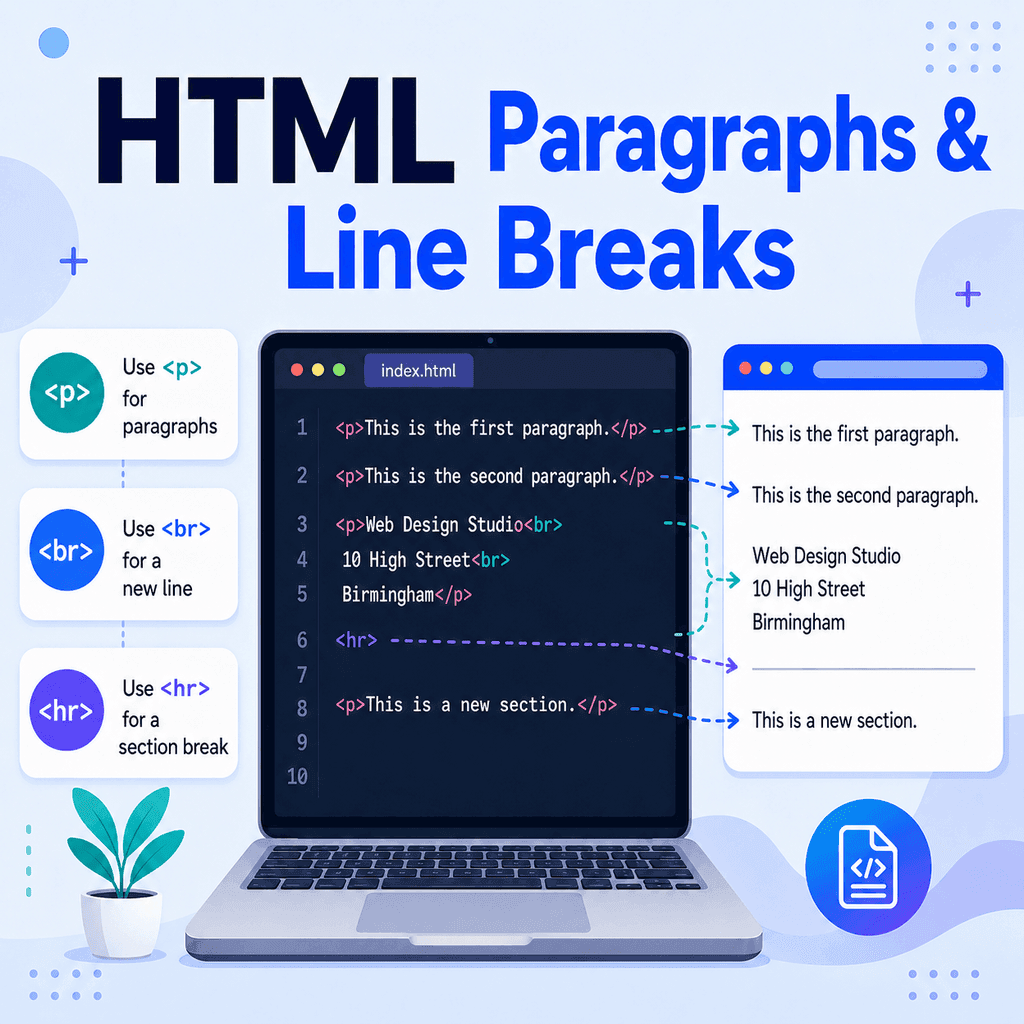
Introduction
Two of the most common HTML elements for controlling text layout are:
<p>and:
<br>The <p> element is used to create paragraphs.
The <br> element is used to create line breaks.
They may seem similar at first, but they are used for different purposes.
The Paragraph Element
Paragraphs are created using the <p> element.
The letter p stands for “paragraph”.
Here is a basic example:
<p>This is a paragraph.</p>This tells the browser that the text is a paragraph.
A paragraph has an opening tag:
<p>It also has a closing tag:
</p>The text goes between the opening and closing tags:
<p>This text is inside a paragraph.</p>Creating Multiple Paragraphs
If you want more than one paragraph, use a separate <p> element for each paragraph.
<p>HTML is used to structure content on a web page.</p> <p>CSS is used to control how that content looks.</p> <p>JavaScript can be used to add interactivity.</p>In the browser, these will appear as separate blocks of text.
Most browsers automatically add some space before and after paragraphs. This makes the text easier to read.
Why Paragraphs Are Important
Paragraphs are not just for appearance. They also give your content structure.
A paragraph should usually contain one idea or a small group of related sentences.
For example:
<p>HTML is the language used to structure web pages.</p> <p>It uses elements to describe different types of content, such as headings, paragraphs, links, and lists.</p>This is better than putting everything into one large block:
<p>HTML is the language used to structure web pages. It uses elements to describe different types of content, such as headings, paragraphs, links, and lists.</p>Both examples are valid HTML, but the first version is easier to scan and read.
The Line Break Element
A line break is created using the <br> element.
The letters br stand for “break”.
Here is an example:
<p>First line<br>Second line</p>This displays as:
First lineSecond lineUnlike <p>, the <br> element does not have a closing tag.
Write this:
<br>Do not write this:
<br></br>When to Use <br>
Use <br> when the line break is part of the content.
A common example is an address:
<p> Web Design Studio<br> 10 High Street<br> Birmingham<br> B1 1AA</p>Another example is a poem, where each line matters:
<p> The sun is low<br> The sky is bright<br> The evening settles in</p>In these examples, the line breaks are part of the meaning or expected format of the text.
When Not to Use <br>
Do not use repeated <br> elements just to create extra space between sections.
Avoid this:
<p>About us</p><br><br><p>We build simple websites for small businesses.</p>A better version is:
<p>About us</p> <p>We build simple websites for small businesses.</p>If you want more space between paragraphs, use CSS:
p { margin-bottom: 20px;}HTML should describe the structure of the content. CSS should control the visual spacing.
Paragraphs vs Line Breaks
The difference between <p> and <br> is important.
Use <p> for separate blocks of text:
<p>This is the first paragraph.</p><p>This is the second paragraph.</p>Use <br> for a new line inside the same block of text:
<p>First line<br>Second line</p>A paragraph creates a separate section of text.
A line break only moves the text onto the next line.
Pressing Enter in HTML Does Not Usually Create a Line Break
Beginners often expect line breaks in their code editor to appear in the browser.
For example:
<p>This is line one.This is line two.This is line three.</p>In the browser, this will usually appear as one paragraph:
This is line one. This is line two. This is line three.This happens because HTML collapses most extra spaces and line breaks in the source code.
If you want visible line breaks, use <br>:
<p>This is line one.<br>This is line two.<br>This is line three.</p>Do Not Use Empty Paragraphs for Spacing
Another common mistake is using empty paragraphs to create space.
Avoid this:
<p>First paragraph.</p><p></p><p></p><p>Second paragraph.</p>Empty paragraphs do not add meaningful content.
Use normal paragraphs:
<p>First paragraph.</p><p>Second paragraph.</p>Then use CSS if you need to adjust the spacing:
p { margin-bottom: 24px;}The Horizontal Rule Element
Another simple element that affects text flow is <hr>.
The <hr> element creates a thematic break between sections.
For example:
<p>This section introduces the topic.</p> <hr> <p>This section moves on to a different but related point.</p>Browsers usually display <hr> as a horizontal line.
Like <br>, the <hr> element does not need a closing tag.
Write this:
<hr>Do not write this:
<hr></hr>Use <hr> when there is a real break or shift between sections of content. Do not use it only as decoration.
A Complete Example
Here is a simple HTML page using paragraphs, line breaks, and a horizontal rule:
<!DOCTYPE html><html lang=”en”><head> <meta charset=”UTF-8″> <title>Paragraphs and Line Breaks Example</title></head><body> <h1>Paragraphs and Line Breaks</h1> <p>Paragraphs are used for separate blocks of text.</p> <p>Each paragraph should contain one idea or a small group of related sentences.</p> <hr> <p> Web Design Studio<br> 10 High Street<br> Birmingham<br> B1 1AA </p> </body></html>This example uses:
<p>for paragraphs,
<br>for line breaks inside an address,
and:
<hr>for a thematic break between sections.
Common Mistakes to Avoid
One common mistake is using <br> instead of paragraphs.
Incorrect:
First paragraph.<br><br>Second paragraph.<br><br>Third paragraph.Better:
<p>First paragraph.</p><p>Second paragraph.</p><p>Third paragraph.</p>Another common mistake is using paragraphs without closing them.
Incorrect:
<p>This is the first paragraph.<p>This is the second paragraph.Better:
<p>This is the first paragraph.</p><p>This is the second paragraph.</p>A third mistake is using empty paragraphs for spacing.
Incorrect:
<p>First paragraph.</p><p></p><p>Second paragraph.</p>Better:
<p>First paragraph.</p><p>Second paragraph.</p>Then use CSS to control spacing.
Best Practices
Use <p> for normal paragraphs of text.
Use a new <p> element for each separate paragraph.
Use <br> only when a line break is part of the content, such as an address or poem.
Do not use repeated <br> elements for spacing.
Do not use empty <p> elements for spacing.
Use CSS margins and padding to control visual space.
Use <hr> only when there is a real thematic break between sections.
Summary
The <p> element creates a paragraph:
<p>This is a paragraph.</p>The <br> element creates a line break inside the same block of text:
<p>First line<br>Second line</p>The <hr> element creates a thematic break between sections:
<hr>Use paragraphs for separate blocks of text. Use line breaks only when the break is part of the content. Use CSS, not repeated <br> tags or empty paragraphs, when you want to control spacing.
Understanding the difference between paragraphs and line breaks will help you write cleaner, clearer, and more readable HTML.