
Introduction
HTML includes many elements that describe specific types of content. For example, headings use <h1> to <h6>, paragraphs use <p>, navigation areas use <nav>, and main content areas use <main>.
Sometimes, however, you need a container that does not add any special meaning. That is where <div> and <span> are useful.
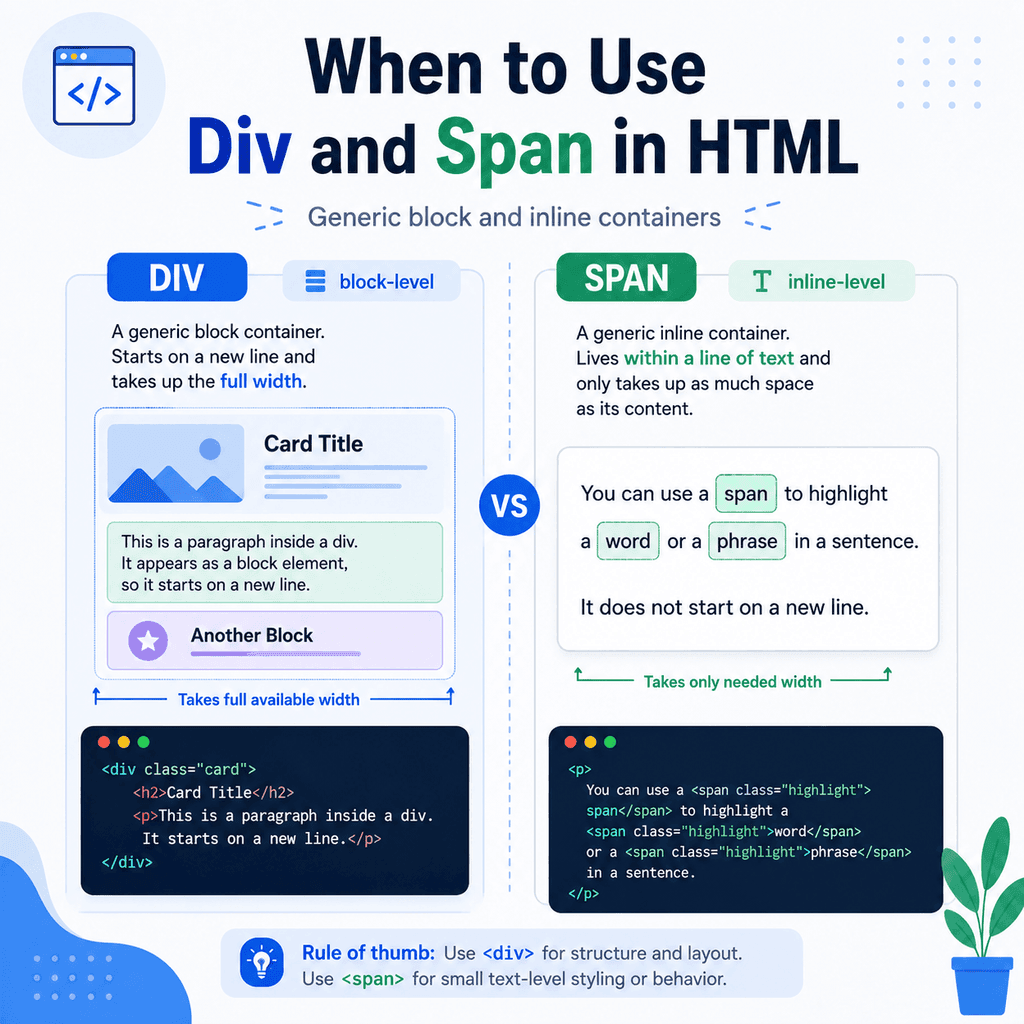
The <div> element is a generic block container.
The <span> element is a generic inline container.
They are both useful, but they should be used carefully. If a more meaningful HTML element fits, use that instead.
What Are Generic Containers?
A generic container is an element that groups content without saying much about what the content means.
For example:
<div> <h2>Our Services</h2> <p>We build websites for small businesses.</p></div>The <div> groups the heading and paragraph together, but it does not tell the browser that the content is a section, article, navigation area, header, footer, or anything more specific.
A <span> works in a similar way, but it is used inside a line of text:
<p>Our most popular package is <span>Website Starter</span>.</p>The <span> groups the words “Website Starter”, but it does not give them any special meaning by itself.
The Difference Between <div> and <span>
The main difference is how they behave in the page layout.
A <div> is a block-level container.
A <span> is an inline container.
This means a <div> usually starts on a new line and takes up the full available width by default.
A <span> stays within the flow of the text and does not start a new line by default.
Example using <div>:
<div>This is the first div.</div><div>This is the second div.</div>These usually appear as separate blocks.
Example using <span>:
<p>This is a <span>span inside a paragraph</span>.</p>The span stays inside the sentence.
What Is a <div>?
The <div> element is a generic block-level container.
The name div comes from “division”.
It is commonly used to group larger parts of a page, especially when you need a container for CSS or JavaScript.
For example:
<div class=”card”> <h2>Web Design</h2> <p>Simple website design for small businesses.</p></div>In this example, the <div> groups the heading and paragraph into a card.
The class attribute gives CSS a way to style the card.
.card { border: 1px solid #ddd; padding: 20px;}The <div> itself does not mean “card”. The meaning comes from the content and the class name.
When to Use <div>
Use <div> when you need a block-level wrapper and no more specific semantic element fits.
Common uses include:
layout wrapperscardsgrid itemscontainers for CSS stylingcontainers for JavaScript behaviourgroups of elements that do not form a semantic sectionFor example:
<div class=”page-wrapper”> <header> <h1>My Website</h1> </header> <main> <p>This is the main content.</p> </main></div>The <div class="page-wrapper"> exists mainly to help with layout.
It does not need to describe a meaningful section of content, so <div> is reasonable.
When Not to Use <div>
Do not use <div> when a more meaningful element would be better.
Less meaningful:
<div class=”nav”> <a href=”index.html”>Home</a> <a href=”about.html”>About</a> <a href=”contact.html”>Contact</a></div>Better:
<nav> <a href=”index.html”>Home</a> <a href=”about.html”>About</a> <a href=”contact.html”>Contact</a></nav>The second version is better because the content is navigation, and <nav> describes that purpose.
Another example:
Less meaningful:
<div class=”footer”> <p>© 2026 My Website</p></div>Better:
<footer> <p>© 2026 My Website</p></footer>If the content is footer content, use <footer>.
What Is a <span>?
The <span> element is a generic inline container.
It is used to wrap a small part of text or inline content without creating a new block.
For example:
<p>Save <span class=”highlight”>20%</span> when you book today.</p>The <span> wraps “20%” so it can be styled separately.
CSS might look like this:
.highlight { font-weight: bold;}The sentence stays as one paragraph, but the selected text can be styled or targeted.
When to Use <span>
Use <span> when you need to target part of a line of text and no more meaningful inline element fits.
Common uses include:
styling one word or phrasemarking part of text for JavaScriptwrapping icons or labels inside textapplying a class to inline contentFor example:
<p>Your order status is <span class=”status”>Processing</span>.</p>The span allows the word “Processing” to be styled or updated with JavaScript.
Another example:
<p>Total: <span class=”price”>£29.99</span></p>The price can now be targeted with CSS or JavaScript.
When Not to Use <span>
Do not use <span> when a more meaningful inline element fits.
For example, if text is important, use <strong>:
Less meaningful:
<p><span class=”bold”>Warning:</span> Save your work before closing the page.</p>Better:
<p><strong>Warning:</strong> Save your work before closing the page.</p>The <strong> element means the text is important.
The <span> only groups the text without adding meaning.
If text should be emphasised, use <em>:
Less meaningful:
<p>You should <span class=”italic”>not</span> use headings only for size.</p>Better:
<p>You should <em>not</em> use headings only for size.</p>The <em> element adds emphasis. The <span> only provides a styling hook.
Block vs Inline Behaviour
A block-level element usually starts on a new line.
An inline element stays within the current line of text.
For example:
<p>Before the div.</p><div>This is a div.</div><p>After the div.</p>The <div> appears as its own block.
Now compare that with a span:
<p>This sentence contains a <span>span element</span> inside it.</p>The span stays inside the sentence.
This is why <div> is useful for grouping larger layout areas, while <span> is useful for small parts of text.
Using <div> for Layout
A common use of <div> is to create layout wrappers.
For example:
<div class=”container”> <main> <h1>Welcome</h1> <p>This is the main content.</p> </main></div>The <div class="container"> can be used to control the page width:
.container { max-width: 1000px; margin: 0 auto; padding: 24px;}The <main> element gives semantic meaning.
The <div> helps with layout.
This is a good combination because each element has a clear job.
Using <div> for Cards
Cards are common in web design.
A card may be a visual layout pattern rather than a specific semantic structure.
For example:
<div class=”card”> <img src=”images/service.jpg” alt=”Laptop on a desk”> <h2>Website Design</h2> <p>Simple websites for small businesses.</p> <a href=”services.html”>Learn more</a></div>This may be acceptable if the card is mainly a layout component.
However, if the card represents a standalone article, product, or tutorial, a more meaningful element may be better.
For example:
<article class=”card”> <h2>How to Use the Main Element in HTML</h2> <p>Learn how to mark the main content of a page.</p> <a href=”main-element.html”>Read article</a></article>Here, <article> is better because the card is a standalone content item.
Using <span> for Small Styling Changes
The <span> element is useful when you need to style a small part of text.
For example:
<p>Price: <span class=”price”>£49</span></p>CSS:
.price { font-weight: bold;}Another example:
<p>This course is <span class=”badge”>New</span>.</p>CSS:
.badge { padding: 4px 8px; border-radius: 4px;}The span allows the badge text to be styled without creating a new block.
Using <span> with JavaScript
The <span> element is often used when JavaScript needs to update part of a sentence.
For example:
<p>You have <span id=”message-count”>3</span> new messages.</p>JavaScript could later update the number inside the span.
The sentence structure stays intact, while the value can change.
You do not need to understand JavaScript to use <span>, but this is one common reason developers use it.
Div and Span Do Not Add Meaning
The most important thing to remember is that <div> and <span> do not add much semantic meaning.
They are useful containers, but they do not describe the content in the way that elements like <header>, <nav>, <main>, <section>, <article>, <aside>, or <footer> do.
For example:
<div class=”main”> <h1>About Us</h1></div>This may work, but this is more meaningful:
<main> <h1>About Us</h1></main>Use semantic elements first when they fit.
Use <div> and <span> when you need generic containers.
Class and ID with Div and Span
The <div> and <span> elements are often used with class and id attributes.
For example:
<div class=”card”> <h2>Website Design</h2> <p>Simple websites for small businesses.</p></div>The class can be reused on multiple elements:
<div class=”card”>First card</div><div class=”card”>Second card</div><div class=”card”>Third card</div>An id should be unique on the page:
<span id=”total-price”>£49</span>Use class when you want to style or select multiple elements.
Use id when you need to identify one specific element.
A Complete Example
Here is a simple page using <div> and <span> appropriately:
<!DOCTYPE html><html lang=”en”><head> <meta charset=”UTF-8″> <title>Div and Span Example</title></head><body> <header> <h1>Bright Web Studio</h1> </header> <main> <div class=”card”> <h2>Website Starter Package</h2> <p>Build a simple website from <span class=”price”>£499</span>.</p> <a href=”services.html”>Learn more</a> </div> <div class=”card”> <h2>Website Maintenance</h2> <p>Ongoing support from <span class=”price”>£49 per month</span>.</p> <a href=”maintenance.html”>Learn more</a> </div> </main> <footer> <p>© 2026 Bright Web Studio</p> </footer> </body></html>In this example:
The <header>, <main>, and <footer> elements describe the main page structure.
The <div class="card"> elements create generic card containers.
The <span class="price"> elements target small pieces of text inside paragraphs.
Each element has a sensible role.
Common Mistake: Using Too Many Divs
A common problem is using too many <div> elements when semantic elements would be better.
Less meaningful:
<div class=”header”> <div class=”title”>My Website</div></div> <div class=”nav”> <a href=”index.html”>Home</a> <a href=”about.html”>About</a></div> <div class=”main”> <div class=”section”> <div class=”heading”>Welcome</div> <div class=”text”>This is the main content.</div> </div></div>More meaningful:
<header> <h1>My Website</h1></header> <nav> <a href=”index.html”>Home</a> <a href=”about.html”>About</a></nav> <main> <section> <h2>Welcome</h2> <p>This is the main content.</p> </section></main>The second version is easier to understand because the element names describe the structure.
Common Mistake: Using Span Instead of Meaningful Inline Elements
Do not use <span> when an element like <strong>, <em>, <code>, or <a> is more appropriate.
Less meaningful:
<p><span class=”important”>Important:</span> Check your file paths carefully.</p>Better:
<p><strong>Important:</strong> Check your file paths carefully.</p>Less meaningful:
<p>Use the <span class=”code”>img</span> element for images.</p>Better:
<p>Use the <code>img</code> element for images.</p>The more specific elements give the browser and users more information.
Common Mistake: Using Div as a Button or Link
A <div> should not be used as a fake button or fake link.
Less appropriate:
<div class=”button”>Contact Us</div>Better if it links to another page:
<a href=”contact.html” class=”button”>Contact Us</a>Better if it performs an action:
<button class=”button”>Open menu</button>Use the element that matches the purpose.
A link navigates somewhere.
A button performs an action.
A div is only a generic container.
Common Mistake: Using Div When Main, Section, or Article Fits
A <div> is not wrong by itself, but it should not replace meaningful elements.
Less meaningful:
<div class=”article”> <h2>How to Add Images Using HTML</h2> <p>This tutorial explains the img element.</p></div>Better if it is standalone content:
<article> <h2>How to Add Images Using HTML</h2> <p>This tutorial explains the img element.</p></article>Less meaningful:
<div class=”main”> <h1>About Us</h1></div>Better:
<main> <h1>About Us</h1></main>Choose the element that best describes the content.
Best Practices
Use semantic HTML elements first when they fit.
Use <div> for generic block-level containers.
Use <span> for generic inline containers.
Use <div> for layout wrappers, card containers, and grouping elements for CSS or JavaScript.
Use <span> for styling or targeting small parts of text.
Do not use <div> when <header>, <nav>, <main>, <section>, <article>, <aside>, or <footer> would be more meaningful.
Do not use <span> when <strong>, <em>, <code>, or <a> would be more meaningful.
Use class for reusable styling.
Use id for one unique element.
Use CSS to control appearance.
Use HTML to describe meaning and structure.
Summary
The <div> and <span> elements are generic containers.
Use <div> for block-level grouping:
<div class=”card”> <h2>Website Design</h2> <p>Simple websites for small businesses.</p></div>Use <span> for inline grouping:
<p>Price: <span class=”price”>£49</span></p>The <div> element is useful for layout wrappers and larger containers.
The <span> element is useful for small parts of text inside a line.
Neither element adds much meaning by itself.
Use semantic elements when they fit, and use <div> or <span> when you need a neutral container for styling, layout, or JavaScript.