
Introduction
Search appearance is how a page is presented in search results.
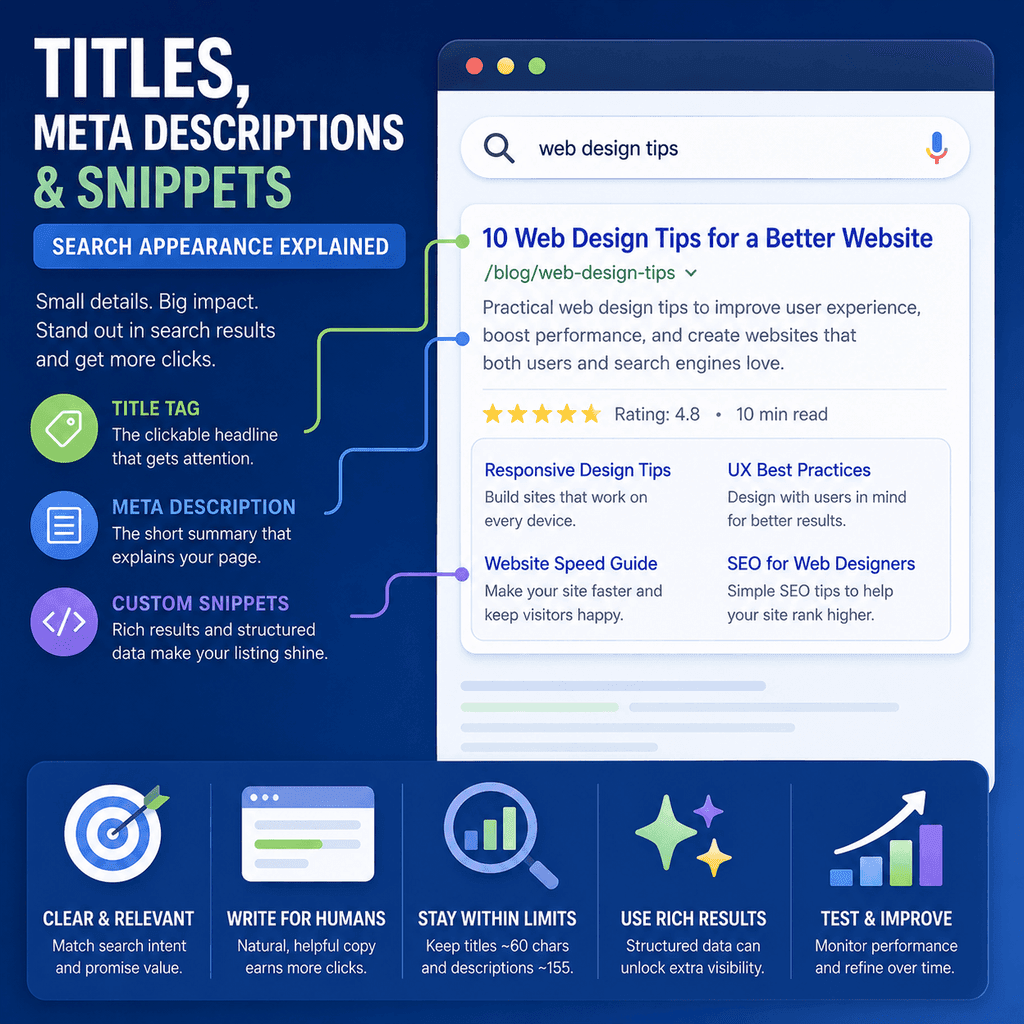
For a normal organic result, that usually includes a title link, a visible URL or breadcrumb-style path, and a snippet. Some results may also show sitelinks, images, dates, product details, ratings, local information, or other enhancements depending on the page, the query, the device, the user’s location, and Google’s systems.
This matters because search appearance is the bridge between being visible and being chosen. A page can appear in search results, but the result still needs to communicate the right expectation. If the title is vague, the snippet is misleading, or the page structure is confusing, the searcher may not understand why the result is relevant.
For small business owners and small webmasters, the goal is not to manipulate search results with magic wording. The goal is to make every important page clear, specific, honest, and aligned with what the searcher is trying to do.
Google’s documentation is clear that title links and snippets are generated automatically. You can influence them, but you do not fully control them. Google may use the <title> element, the main visual title, headings, prominent text, page content, anchor text, and other signals to generate title links. For snippets, Google primarily uses page content and may use the meta description when it provides a more accurate description than visible page text.
What Search Appearance Includes
Search appearance can include several visible parts of a result.
| Element | What it means | What you can influence |
|---|---|---|
| Title link | The clickable title shown for a result. | The <title> element, main page heading, prominent page text, and internal link text. |
| Visible URL or breadcrumb path | The visible address or path that helps users understand where the page sits. | Readable URLs, site structure, breadcrumbs, and breadcrumb structured data. |
| Snippet | The summary or preview text below the title link. | Clear page content, useful introductions, descriptive headings, and page-specific meta descriptions. |
| Sitelinks | Additional links Google may show beneath some results. | Logical site structure, clear page titles, headings, and concise internal link text. You cannot manually choose sitelinks. |
| Rich result features | Additional result features such as product details, ratings, events, recipes, or other structured enhancements where eligible. | Accurate structured data that follows Google’s guidelines and reflects visible page content. |
Not every result will show every feature. Search appearance changes by query, device, location, search context, page type, and Google’s own systems.
The sensible approach is to improve the signals that search engines and people can both use: clear titles, clear headings, useful page copy, descriptive internal links, logical site architecture, and accurate metadata.
The Title Link
The title link is the clickable title of a search result.
It is often the most prominent part of a result, so it has an important communication job. It should quickly tell the searcher what the page is about and why it may match their search.
Many people call this the “title tag”, but the visible search result title is more accurately called the title link. The <title> element is one important source Google may use to create it, but it is not the only source.
A page title should be:
- descriptive;
- concise;
- specific to the page;
- consistent with the visible page heading;
- written for the searcher, not stuffed with repeated keywords;
- accurate to what the landing page actually delivers.
The <title> Element
The <title> element sits in the HTML <head> and gives the page a formal title.
<head> <title>Boiler Servicing in Stockport | Example Plumbing</title></head>This title may be used in search results, browser tabs, bookmarks, and some link previews.
For SEO and usability, each important page should have its own title element. Reusing the same title across many pages makes it harder for people and search engines to distinguish one page from another.
A good title element is not just a keyword container. It is a short description of the page’s purpose.
Good and Bad Title Examples
A weak title is often vague, repetitive, or too broad.
<title>Home</title>This does not explain what the business does.
A better homepage title is more specific.
<title>Family Dental Clinic in York | Example Dental</title>A weak service page title might repeat keywords unnaturally.
<title>Plumber, Plumbing, Best Plumber, Emergency Plumber, Plumbing Services</title>This looks spammy and does not help the searcher make a decision.
A better title describes the page clearly.
<title>Emergency Plumbing Repairs in Bolton | Example Plumbing</title>For an ecommerce category page, a clear title might be:
<title>Women’s Trail Running Shoes | Example Outdoors</title>For a restaurant page, a clear title might be:
<title>Lunch Menu | Example Café in Leeds</title>The best version depends on the page, business, location, and search intent. The principle is stable: be clear, specific, and honest.
Why Google May Rewrite Title Links
Google may show a title link that differs from the page’s <title> element.
This is not automatically a penalty. It usually means Google’s systems believe another piece of text better represents the page for that result.
Google says it can use multiple sources to generate title links, including:
- the
<title>element; - the main visual title shown on the page;
- heading elements such as
<h1>; og:titlemetadata;- large or prominent text on the page;
- other page text;
- anchor text on the page;
- text in links pointing to the page;
- website structured data.
This has a practical consequence: the visible page title, headings, navigation labels, internal link text, and title element should not contradict one another.
If the <title> says one thing, the <h1> says another, and internal links use a third description, search engines may choose a different title link than the one you expected.
Headings and the Main Page Title
Headings help people scan a page and help search engines understand page structure.
The main visible title of the page is usually the <h1>. In WordPress, the theme often supplies the post or page title as the visible <h1>.
The <h1> should normally match the page’s actual subject. It does not need to be identical to the title element, but it should be consistent.
Example:
<title>Sports Injury Physiotherapy in Bristol | Example Physio</title> <h1>Sports Injury Physiotherapy</h1>These two signals are consistent. One is more complete for search appearance; the other is clean as the page heading.
A confusing mismatch would be:
<title>Sports Injury Physiotherapy in Bristol | Example Physio</title> <h1>Movement Solutions for Active People</h1>The second example is vague and makes the page’s main subject less clear.
Meta Descriptions
A meta description is a short page summary placed in the HTML <head>.
<meta name=”description” content=”Sports injury physiotherapy in Bristol for runners, gym users, and active adults. Learn what we treat, how appointments work, and how to book.”>Meta descriptions are often misunderstood.
They are not magic ranking levers. Their value is communication. A good meta description helps the searcher understand what the page offers, whether it matches their need, and whether the click is likely to be worthwhile.
Google may use the meta description as the snippet when it provides a better summary than visible page text. But Google may also generate a snippet from the page content, especially when another section better matches the user’s specific query.
Meta Descriptions and Rankings
Meta descriptions should not be treated as direct ranking buttons.
The practical reason to write them is that they may be shown in search results and can improve the clarity of the result. Google’s documentation frames the meta description as a possible source for snippets, not as a way to force rankings upward.
This distinction matters.
Bad SEO advice often says, “Add keywords to your meta description to rank higher.” A better approach is, “Write a useful page-specific description so the result communicates clearly if Google uses it.”
If the description is just a keyword list, it is less useful to people and less likely to make a strong snippet.
What Meta Descriptions Are Good For
A good meta description can help qualify the click.
That means it can encourage the right people to visit and discourage the wrong people from clicking when the page is not for them.
For example, a clear service page description might say:
<meta name=”description” content=”Boiler servicing in Stockport for homeowners and landlords, including annual service checks, safety advice, and appointment booking.”>This tells the searcher what is offered, where it is relevant, and who the page may suit.
A vague description is less useful:
<meta name=”description” content=”We provide high-quality solutions for all your needs. Contact us today to learn more.”>The second example could apply to almost any business. It does not help the searcher understand the page.
How to Write Better Meta Descriptions
A strong meta description usually answers four questions quickly:
- What is the page about?
- Who is it for?
- What useful detail does the page provide?
- What expectation should the searcher have before clicking?
For a local service page, include the service, location if relevant, and useful scope.
<meta name=”description” content=”Emergency plumbing repairs in Bolton, including leaks, burst pipes, blocked sinks, and urgent callouts. See availability and how to contact us.”>For a clinic page, include the treatment or condition and what the visitor can do next.
<meta name=”description” content=”Back pain physiotherapy appointments in Bristol. Learn what to expect, who the service is for, prices, and how to book an assessment.”>For a product or ecommerce page, include details that help the user qualify the click, such as product type, key attributes, delivery information, price range, or availability where appropriate and kept current.
<meta name=”description” content=”Shop waterproof walking boots for day hikes and everyday outdoor use, with UK delivery, size guidance, and free returns on eligible orders.”>For an article, summarise what the reader will learn.
<meta name=”description” content=”Learn how title links, meta descriptions, snippets, sitelinks, and structured data affect how pages appear in Google Search.”>Do not write the same meta description for every page. Repetition makes pages harder to distinguish.
Snippet Generation
The snippet is the short summary or preview text shown below a result’s title link.
Snippets are query-dependent. Google may show different snippets for the same page depending on the search because different parts of the page may be more relevant to different queries.
This means you should not think of the meta description as the only snippet source. The visible content on the page matters.
To improve the material Google can use for snippets, make the page itself clear:
- answer the main question directly;
- use descriptive headings;
- write clear introductory text;
- avoid vague marketing filler;
- include useful page-specific details;
- structure content so important answers are easy to identify.
If the page content is unclear, Google has weaker material to use when generating a snippet.
Controlling Snippet Visibility
In some cases, site owners may want to limit or prevent snippets.
Google supports robots meta directives such as nosnippet and max-snippet, and it supports the data-nosnippet attribute for excluding specific parts of a page from snippets.
Example of preventing a snippet:
<meta name=”robots” content=”nosnippet”>Example of setting a maximum snippet length:
<meta name=”robots” content=”max-snippet:160″>Example of excluding a specific visible section from snippets:
<span data-nosnippet>This text should not be used in a search snippet.</span>These controls should be used carefully. For most normal business pages, a useful snippet is desirable because it helps searchers understand the result.
Snippet controls are more relevant when there is a specific reason to restrict preview text, such as protecting paid content previews, avoiding sensitive text appearing as a snippet, or managing how much content is shown before a user visits the page.
Sitelinks
Sitelinks are additional links that Google may show beneath some search results.
They usually appear when Google’s systems believe they will help the user navigate to useful sections or pages.
Site owners cannot directly choose sitelinks for a result. Google says sitelinks are automated. However, site owners can influence the quality of potential sitelinks by building a clear site structure.
Good sitelink foundations include:
- clear page titles;
- informative headings;
- logical navigation;
- important pages linked from relevant pages;
- concise and relevant internal link text;
- avoiding repetitive or unclear page labels.
For a small business, this means pages such as Services, Shop, Menu, Prices, Reviews, About, Contact, Delivery, Returns, Treatments, Locations, and Booking should be easy to navigate and clearly named if they matter to users.
Structured Data and Rich Results
Structured data is standardised markup that helps search engines understand information on a page.
For some page types, structured data can make a page eligible for richer search features. For example, appropriate structured data may support product information, breadcrumb information, event details, recipe features, review snippets, or other eligible enhancements.
Structured data is not a guarantee that a rich result will appear. It is an eligibility and understanding signal. Google’s systems still decide whether a feature is shown for a particular result.
The most important rule is accuracy. Structured data should describe the real content visible to users on the page. Do not add structured data for reviews, products, prices, FAQs, events, or services that are not actually present on the page.
Examples where structured data may be relevant:
- A local business may use appropriate local business or organisation information.
- An ecommerce product page may use product structured data where product details are visible on the page.
- An article may use article structured data where suitable.
- A page with visible breadcrumbs may use breadcrumb structured data.
- An events page may use event structured data if the event details are real and visible.
Use Google’s Rich Results Test when implementing structured data, and review Search Console enhancement reports where available.
Expectation Matching
Expectation matching means the search result should accurately prepare the user for the landing page.
If the result promises a price list, the page should discuss prices. If the title says “Lunch Menu”, the page should show the lunch menu or clearly link to it. If the snippet suggests same-day appointments, the page should explain availability. If the title says “Walking Boots Size Guide”, the page should provide useful sizing information.
Poor expectation matching creates frustration. Users click, realise the page does not match what they expected, and leave. Even if the page technically receives traffic, the visit is not useful.
Good expectation matching connects:
- the title element;
- the visible page heading;
- the meta description;
- the page introduction;
- the main content;
- the call to action.
All of these should describe the same real page from slightly different angles.
Click Qualification
Not every click is a good click.
A search result should help the right users choose the page. It should not trick people into visiting when the page cannot satisfy their need.
For example:
- If a service is only available in one region, the result should not imply nationwide availability.
- If a restaurant page is only a sample menu, it should not suggest that it shows the full current menu.
- If a guide is introductory, it should not pretend to be an advanced technical manual.
- If a product is for a specific use case, the description should not hide that limitation.
- If appointments are not available on weekends, the page should not imply seven-day booking.
Qualified clicks are usually better than broad, disappointed clicks because they are more likely to lead to useful engagement, enquiries, purchases, bookings, or informed decisions.
That is why clear titles and meta descriptions are not only SEO details. They are part of user experience.
Search Appearance and Trust
A search result is often a user’s first impression of a business.
If the title is stuffed with repeated phrases, the snippet is vague, and sitelinks are confusing, the business can look less trustworthy before the user even visits the site.
Search appearance should communicate:
- what the page is about;
- who it is for;
- why it is relevant;
- what type of page it is;
- what the user can expect after clicking.
This is especially important for local businesses, appointment-based services, professional services, and ecommerce stores. People often compare several options quickly. A clear result can help a credible business stand out without exaggeration.
Common Mistake: Keyword-Stuffed Titles
Keyword stuffing makes a title harder to read and can make a result look spammy.
Bad:
<title>Florist, Flowers, Wedding Flowers, Best Florist, Cheap Flowers</title>Better:
<title>Wedding Flowers in Harrogate | Example Florist</title>The better version is clearer. It still describes the page, but it does not repeat the same idea unnaturally.
Common Mistake: Same Title on Every Page
Repeated titles make pages difficult to distinguish.
Bad:
<title>Example Clinic</title>If that title appears on every treatment page, it does not explain which treatment each page covers.
Better:
<title>Back Pain Treatment | Example Clinic</title><title>Sports Injury Treatment | Example Clinic</title><title>Post-Surgery Rehabilitation | Example Clinic</title>Each title describes a distinct page.
Common Mistake: Meta Descriptions That Say Nothing
Many meta descriptions are technically present but practically useless.
Bad:
<meta name=”description” content=”Welcome to our website. We offer professional services and high-quality solutions. Contact us today.”>Better:
<meta name=”description” content=”Private physiotherapy appointments in Exeter for back pain, sports injuries, and rehabilitation. View prices, clinic location, and booking options.”>The better version tells the searcher what the page actually covers.
Common Mistake: Treating Meta Descriptions as Ranking Tricks
Meta descriptions are often sold as if they are magic ranking controls.
That is the wrong framing.
The better framing is communication. A meta description may be used as a snippet. If it is used, it can help the user decide whether the page matches their need. If it is not used, the visible page content still matters because Google may generate the snippet from that content instead.
Write meta descriptions because they make important pages clearer. Do not write them as a place to hide keyword lists.
Common Mistake: Page Content That Contradicts the Result
A title and snippet can only do so much. If the landing page does not deliver, the search appearance has failed.
Examples:
- The title promises prices, but the page never discusses cost.
- The meta description promises a checklist, but the page is a sales pitch.
- The result suggests a local service, but the page does not mention the service area.
- The title says “menu”, but the page only has a booking form.
- The title says “guide”, but the content is only a short overview.
Search appearance should set an honest expectation. The page should then satisfy it.
Common Mistake: Ignoring Internal Link Text
Internal link text helps users and search engines understand destination pages.
Bad:
<a href=”/appointments/”>Click here</a>Better:
<a href=”/appointments/”>Book a physiotherapy appointment</a>Google lists anchor text as one of the sources it may use when generating title links. Descriptive internal links are therefore useful for both navigation and page understanding.
How to Review a Page’s Search Appearance
For each important page, review the result signals as a set.
| Check | Why it matters | What to improve |
|---|---|---|
| Is the title element specific and concise? | The title is often the main text users consider before clicking. | Remove vague wording, repeated phrases, and boilerplate text. |
| Does the visible page heading match the same topic? | Inconsistent headings can make the page harder to understand. | Align the <h1> with the real purpose of the page. |
| Is the meta description page-specific? | Google may use it as a snippet if it describes the page well. | Write a useful summary that reflects the actual page. |
| Does the introduction answer the main expectation quickly? | Snippets are often generated from page content. | Replace vague openings with clear, page-specific information. |
| Are internal links to the page descriptive? | Anchor text can help users and search engines understand the destination. | Replace “click here” style links with natural, descriptive wording. |
| Does the page deliver what the title and snippet suggest? | Misleading expectations create poor user experience. | Revise the page, title, or description so they match honestly. |
This review is more useful than obsessing over a fixed character count.
Search results are displayed on different devices and can be rewritten. Clarity matters more than trying to hit a universal pixel-perfect title length.
Using Search Console
Google Search Console can help you see how pages perform in search.
Useful checks include:
- which queries show a page;
- which pages receive impressions;
- which pages receive clicks;
- whether the query matches the page purpose;
- whether low click-through may indicate unclear search appearance;
- whether a page is being shown for unexpected queries;
- whether certain search appearance features are associated with performance changes.
Click-through rate should be interpreted carefully. It depends on ranking position, query intent, device, brand familiarity, competing results, ads, local packs, rich results, and other search features. Do not treat CTR as a simple content score.
Still, Search Console can reveal whether searchers are seeing pages and whether those pages are attracting relevant clicks.
How to Improve Existing Titles and Descriptions
When improving old pages, start with the page purpose.
Ask:
- What is this page actually about?
- Who is it for?
- What search intent should it satisfy?
- What makes it different from similar pages?
- What should the visitor expect after clicking?
- What action, if any, should the visitor be able to take next?
Then rewrite the title and meta description around that purpose.
Example:
<title>Boiler Servicing in Stockport | Example Plumbing</title><meta name=”description” content=”Annual boiler servicing in Stockport for homeowners and landlords, including service checks, safety advice, and appointment booking.”>This is clear, specific, and aligned with a real page.
Best Practices
Give every important page a unique and descriptive <title> element.
Keep titles concise, but do not obsess over exact character counts.
Make the visible page title and headings consistent with the title element.
Avoid keyword stuffing and repeated boilerplate title text.
Write page-specific meta descriptions for important pages.
Use meta descriptions to communicate relevance and qualify clicks, not as ranking tricks.
Remember that Google may generate snippets from page content instead of the meta description.
Use clear headings and useful introductory copy so page content can support better snippets.
Build logical site navigation and descriptive internal links to support page understanding and possible sitelinks.
Use structured data only when it accurately describes visible page content and follows Google’s guidelines.
Make sure the search result expectation matches what the landing page actually delivers.
Evidence and Source Quality
SEO advice varies widely in quality. Some advice is based on official documentation, standards, and direct observation. Some is based on outdated tests, tool-provider marketing, or repeated claims that are not well evidenced.
For search appearance decisions, use the strongest available sources first:
- Official Google Search Central documentation for title links, snippets, sitelinks, structured data, robots meta tags, and Search Console.
- Primary data from your own site, especially Search Console performance data and real enquiry, booking, or sales data.
- Manual review of your own live search results, while remembering that results can vary by user, device, location, and time.
- Accessibility and usability principles where navigation, headings, and link clarity affect real users.
Be cautious with generic SEO blog posts, unsupported ranking-factor lists, social media claims, and news articles. They can sometimes provide ideas, but they should not be treated as the same standard of evidence as official documentation or primary data from your own site.
Useful Sources for Further Reading
- Google Search Central: Visual Elements Gallery — explains the visible parts of Google Search results, including title links, snippets, visible URLs, breadcrumbs, sitelinks, images, and rich attributes.
- Google Search Central: Influencing Title Links — directly relevant to writing title elements and understanding why Google may show a different title link.
- Google Search Central: Control Your Snippets in Search Results — explains how snippets are generated and how meta descriptions may be used.
- Google Search Central: Robots Meta Tag, Data-Nosnippet, and X-Robots-Tag — relevant for controlling snippet visibility with
nosnippet,max-snippet, anddata-nosnippet. - Google Search Central: Sitelinks — explains that sitelinks are automated and gives best practices for improving their quality.
- Google Search Central: Introduction to Structured Data — explains how structured data helps Google understand pages and may support rich results.
- Google Search Console Help: Performance Report — explains clicks, impressions, CTR, average position, and dimensions such as queries and pages.
Quick Summary
Titles, meta descriptions, snippets, sitelinks, URLs, breadcrumbs, and structured data shape how pages are presented in search results.
The <title> element is an important source for title links, but Google may also use headings, prominent page text, anchor text, and other signals.
Meta descriptions are not magic ranking levers. Their value is communication, relevance, and click qualification. Google may use them as snippets when they describe the page better than visible page content, but snippets are often generated from the content itself.
Sitelinks are automated. You cannot manually choose them, but clear page titles, headings, site structure, and internal links can help Google understand which pages may be useful.
Structured data can help search engines understand page content and may make pages eligible for richer search features, but it must be accurate and reflect visible content.
The main principle is expectation matching: the search result should accurately describe the landing page, and the landing page should satisfy the expectation created by the result.