
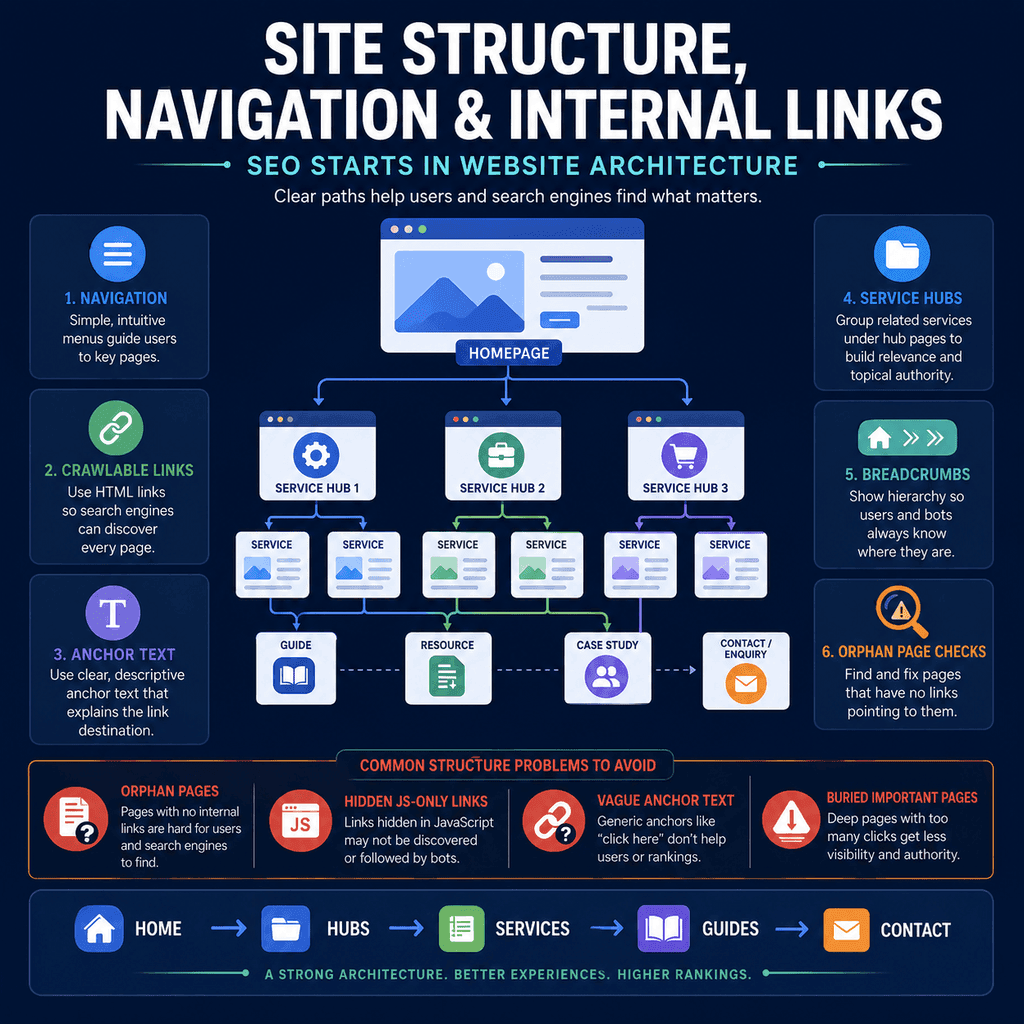
Introduction
SEO does not start after a website has been designed. It starts with the way the website is organised.
Before a page can appear in search results, search engines need to discover it, crawl it, understand what it is about, and understand how it relates to the rest of the site. Visitors need something similar: they need to find the right page, understand where they are, and know what to do next.
That makes site structure a practical SEO and usability issue. Navigation, internal links, hub pages, breadcrumbs, page hierarchy, and URL structure are not just design details. They affect how people move through a website and how search engines discover and interpret pages.
This does not mean every small business website needs a complicated structure. A five-page local business site does not need the same architecture as a large ecommerce site. The goal is simpler than that: make the site easy to explore, easy to crawl, and easy to understand.
What Site Structure Means
Site structure is the way pages are organised and connected.
It includes:
- main navigation
- footer navigation
- service, product, or category groupings
- internal links inside page content
- breadcrumbs
- URL structure
- hub pages and supporting pages
- how easily important pages can be reached
A clear structure helps a visitor answer basic questions: where am I, what does this business offer, where should I go next, and how is this page related to the rest of the website?
The same structure also helps search engines discover pages and understand relationships between pages. Google’s SEO Starter Guide says that organising a site logically can help users and search engines understand how pages relate to the rest of the site. Google also explains that it primarily finds pages through links from pages it has already crawled.
Why Structure Comes Before Final Copywriting
Copywriting can explain a service, product, process, or offer. But copywriting cannot fully fix a confused structure.
If a business has important services that are not linked from the navigation, a service hub, or relevant supporting pages, visitors may not find them. If helpful guides never link to related service or product pages, users may read useful advice but miss the next practical step. If all pages sit in isolation, search engines receive fewer contextual signals about how the pages fit together.
Good structure gives copywriting a stronger foundation. It helps decide which pages need to exist, how they relate, and what each page should help the visitor do.
In practice, structure and copy should be planned together. The structure defines the page’s job. The copy then fulfils that job.
Clear Navigation Helps People Find What Matters
Main navigation is one of the clearest ways a website tells users what matters.
A small business website usually needs navigation that quickly answers:
- what the business does
- who it helps
- where services are available, if location matters
- how to see products, services, examples, prices, or proof
- how to contact, book, buy, or enquire
Navigation should not be treated as a last-minute menu design task. It is part of the content strategy. If the navigation is vague, cluttered, or based only on internal business language, visitors have to work harder.
Common Navigation Problems
Weak navigation often creates the same problems:
- important services or product categories are hidden
- too many pages are squeezed into one dropdown
- menu labels use business jargon instead of customer language
- location pages are buried or disconnected
- contact, booking, or checkout routes are unclear
- guides and commercial pages are not connected
- the mobile menu is harder to use than the desktop menu
Navigation should be simple enough to use, but specific enough to communicate what the website offers.
Use Crawlable Internal Links
Google recommends links that can be crawled, using an <a> element with an href attribute. This matters because links help Google discover pages and understand relationships between them.
Recommended:
<a href=”/services/boiler-servicing/”>Boiler servicing</a>Risky for important navigation:
<span onclick=”openBoilerServicePage()”>Boiler servicing</span>The second example may be clickable for some users, but it is not a normal crawlable link. Important navigation and internal links should use real links.
JavaScript can still be used to enhance menus and interactions. The key point is that important links should exist in a form that search engines and assistive technologies can interpret reliably.
Internal Links Are Not Just for Search Engines
Internal links help people move from one useful page to the next.
For example:
- A guide about what to do when a boiler loses pressure can link to a boiler repair page.
- A page about sports injury treatment can link to physiotherapy appointments, pricing, and relevant exercise advice.
- A product category page for running shoes can link to a size guide, delivery information, and returns policy.
- A restaurant menu page can link to booking, allergens, opening hours, and location information.
- A wedding florist page can link to gallery examples, seasonal flower advice, pricing guidance, and enquiry forms.
These links are useful for users because they support the next step. They are useful for search engines because they show how pages relate.
Descriptive Anchor Text Matters
Anchor text is the visible text in a link.
Good anchor text tells users what they will get if they click. Google’s link guidance also says anchor text helps people and Google understand the page being linked to.
Weak:
<a href=”/appointments/”>Click here</a>Better:
<a href=”/appointments/”>Book an appointment</a>Weak:
<a href=”/delivery/”>More information</a>Better:
<a href=”/delivery/”>Delivery and collection information</a>The better versions are clearer for the reader and give more context about the destination page.
Descriptive does not mean overloaded with keywords. A link should read naturally in the sentence.
Avoid Repeating Exact-Match Anchor Text Everywhere
Descriptive anchor text is helpful. Repeating the same exact phrase unnaturally across every page is not.
Risky:
Best emergency plumber in Manchester repeated in every internal link.
Better:
emergency plumbing helpbook a plumberboiler and leak repairssame-day plumbing appointmentscontact the plumbing team
Use anchor text that fits the sentence, the page, and the reader’s next step. Google’s spam policies warn against manipulative keyword stuffing and link practices. Internal links should help people navigate, not create a page full of forced phrases.
Hub Pages Create Useful Topic Structure
A hub page is a central page that introduces a topic and links to important subpages.
For a small business, a hub page might be:
- a services page that links to individual service pages
- a treatments page for a clinic
- a product category page for an online shop
- a locations page for a business serving several areas
- a resources page that groups useful guides by topic
The hub page helps users choose the right path. It also gives search engines a clearer view of how the site is organised.
Example Hub Structures
A small service business might use this structure:
Home├── Services│ ├── Boiler Servicing│ ├── Boiler Repairs│ ├── Bathroom Plumbing│ └── Emergency Plumbing├── Reviews├── Advice└── ContactA local clinic might use this structure:
Home├── Treatments│ ├── Back Pain│ ├── Sports Injuries│ ├── Shoulder Pain│ └── Post-Surgery Rehabilitation├── Prices├── About├── Advice└── Book AppointmentA small online shop might use this structure:
Home├── Shop│ ├── Running Shoes│ ├── Walking Shoes│ ├── Insoles│ └── Accessories├── Size Guide├── Delivery and Returns├── Advice└── ContactThese structures are not the only correct answers. The principle is that important pages are grouped, named clearly, and easy to reach.
Different Sites Need Different Structures
A good structure depends on the type of website.
| Website type | Pages that usually matter | Useful structure principle |
|---|---|---|
| Local service business | Services, locations, reviews, contact, FAQs, practical advice. | Make the main services and contact route easy to find. |
| Clinic or appointment-based business | Treatments, conditions, practitioner information, prices, booking, location, policies. | Connect symptoms, treatments, trust information, and booking paths. |
| Small ecommerce site | Categories, product pages, size guides, delivery, returns, support, buying guides. | Group products clearly and support purchase decisions with helpful information. |
| Restaurant, café, or hospitality business | Menu, booking, opening hours, location, dietary information, events, contact. | Make practical decision information visible quickly. |
| Professional service business | Services, industries or client types, process, proof, fees, resources, enquiry route. | Help users understand fit, trust, and next steps. |
The details change by business type. The underlying question stays the same: can users and search engines understand what matters and how pages connect?
Important Pages Should Not Be Isolated
An important page should not be a dead end.
A service page, treatment page, product category, or location page should usually link to useful supporting pages such as:
- related services or categories
- reviews, examples, case studies, or gallery pages
- pricing or process information
- FAQs
- guides that answer common questions
- contact, booking, enquiry, or checkout pages
For example, a sports injury treatment page might link to appointment booking, prices, practitioner information, rehabilitation advice, and related treatment pages.
A boiler repair page might link to emergency contact details, boiler servicing, common fault advice, reviews, and service area information.
A product category page might link to a size guide, delivery information, returns, related categories, and buying advice.
Resource Pages Should Support the Rest of the Site
Guides, tutorials, and advice pages often attract people earlier in the decision process.
They should still connect to relevant service, product, or contact pages when it is genuinely useful.
For example:
- A guide about “how to choose school shoes” can link to children’s shoes, measuring advice, and returns information.
- A guide about “when to see a physiotherapist for back pain” can link to back pain treatment, booking, and prices.
- A guide about “how often should a boiler be serviced?” can link to boiler servicing and safety information.
- A guide about “planning flowers for a spring wedding” can link to wedding flower packages, galleries, and enquiry forms.
This helps users move from learning about a problem to taking a suitable next step.
Breadcrumbs Help Orientation
Breadcrumbs show the path or hierarchy leading to a page.
Example:
<nav aria-label=”Breadcrumb”> <ol> <li><a href=”/”>Home</a></li> <li><a href=”/treatments/”>Treatments</a></li> <li>Sports Injuries</li> </ol></nav>Breadcrumbs can help users understand where they are and move back to broader sections. Google also supports breadcrumb structured data, which can help Google categorise breadcrumb information for eligible search features.
Breadcrumbs are most useful on websites with deeper sections, such as ecommerce sites, clinics with multiple treatment pages, resource libraries, or businesses with many service categories. Very small sites may not need visible breadcrumbs on every page.
Breadcrumb Structured Data
Breadcrumb structured data uses a BreadcrumbList to describe the breadcrumb trail.
<script type=”application/ld+json”>{ “@context”: “https://schema.org”, “@type”: “BreadcrumbList”, “itemListElement”: [ { “@type”: “ListItem”, “position”: 1, “name”: “Home”, “item”: “https://www.example.com/” }, { “@type”: “ListItem”, “position”: 2, “name”: “Treatments”, “item”: “https://www.example.com/treatments/” }, { “@type”: “ListItem”, “position”: 3, “name”: “Sports Injuries”, “item”: “https://www.example.com/treatments/sports-injuries/” } ]}</script>This example is shown as source code only. Replace example URLs with the real final URLs for the website.
Structured data should describe the real visible page. Do not add breadcrumb markup for a hierarchy that users cannot actually see or use.
Orphan Pages Are Easy to Create
An orphan page is a page that exists but is not linked from other pages on the site.
Orphan pages often happen when:
- a landing page is built for a campaign and then forgotten
- a service page is created but not added to navigation or a services hub
- a blog post is published without useful internal links
- old pages are removed from menus during a redesign
- location pages are created but not connected to the main site
- product or category pages are removed from menus but left live
If a page is important, it should be linked from somewhere relevant.
How to Check for Orphan Pages
Use a practical process:
- Export or list all live URLs from the website or CMS.
- Run a site crawl with a reputable crawling tool.
- Compare the CMS URL list with URLs found by the crawl.
- Check which important URLs have no internal links pointing to them.
- Add relevant links, merge weak pages, redirect obsolete pages, or remove pages that should not exist.
The aim is not to link every page from everywhere. The aim is to ensure each important page belongs somewhere in the structure.
Click Depth Matters Practically
Click depth means how many clicks it takes to reach a page from a starting point such as the homepage.
Important pages should not be unnecessarily buried. If a key service, treatment, product category, or contact page takes many clicks to find, users may miss it. Search engines may also receive less internal link context for that page.
Click depth should not be treated as a magic ranking formula. A page being “three clicks deep” is not automatically good or bad in isolation. The practical question is simpler: can people and crawlers reach important content through clear, relevant links?
Footer Links Have a Role
Footer links are useful when they help visitors find important utility pages, contact information, service sections, locations, policies, or trust pages.
A footer should not become a dumping ground for every keyword variation.
Good footer links are usually:
- concise
- useful
- stable
- organised by topic
- not overloaded with repetitive anchor text
For example, a footer might sensibly include contact, opening hours, main services, delivery information, returns, privacy policy, terms, accessibility information, or key locations. It should not contain a long block of near-identical town or service links created only for search engines.
URL Structure Should Be Clear and Stable
Google recommends simple, descriptive URLs that use readable words where possible. Google also recommends hyphens to separate words in URLs.
Clear:
/services/boiler-servicing//treatments/back-pain//shop/running-shoes//guides/how-to-choose-school-shoes/Less helpful:
/page?id=83920/service1-new-final/blog/post-17/product-category-old-copyURLs do not need to carry the entire site hierarchy. A short, stable, descriptive URL is often better than a long URL that changes whenever categories change.
For example, this can be perfectly reasonable:
/back-pain-treatment/And this can also be reasonable if the site uses a clear treatment hierarchy:
/treatments/back-pain/The best choice depends on the site. What matters most is that URLs are readable, consistent, and stable over time.
Do Not Build a Flat Site with No Grouping
A flat structure means every page appears to sit at the same level with little grouping.
For a very small site, this may not be a major issue. A five-page website may only need Home, Services, About, Reviews, and Contact.
As a site grows, however, a completely flat structure can make relationships harder to understand. A clinic with twenty treatment pages, an ecommerce site with hundreds of products, or a trades business with many locations usually needs some grouping.
Grouping related pages helps users understand context.
Do Not Build an Overcomplicated Site Either
Too much hierarchy can also cause problems.
Risky:
/services/local-services/home-services/plumbing-services/emergency-plumbing/manchester/Better:
/services/emergency-plumbing/Use enough structure to make relationships clear, but not so much that URLs, menus, or breadcrumbs become cumbersome.
Location Pages Need Real Local Usefulness
Location pages can be useful when a business genuinely serves different areas and the pages help people in those areas.
A useful location page might include:
- which services are available in that area
- clear service-area information
- local contact or booking information
- relevant examples, reviews, or proof
- practical information such as travel, parking, opening hours, or delivery coverage where relevant
A weak location page only swaps the town name and repeats the same text. If a website creates many near-identical pages mainly to capture search traffic, that can move toward doorway-style behaviour. Google’s spam policies warn against pages created primarily to manipulate search results rather than help users.
Sitemaps Help Discovery, But They Do Not Replace Internal Links
An XML sitemap can help search engines discover URLs and understand useful information such as when pages were last updated. Many content management systems, including WordPress, can generate a sitemap automatically.
However, a sitemap is not a substitute for a good internal link structure. Google explains that if pages are properly linked, it can usually discover most of a site. Important pages should still be reachable through navigation, hub pages, contextual links, or other relevant internal links.
Think of a sitemap as a support tool. Internal links are still essential for users and for showing how content fits together.
Avoid Navigation Labels That Are Too Clever
Navigation should be understandable quickly.
Risky labels:
- Solutions
- Experience
- Explore
- Growth
- Discover
These labels can work in some contexts, but they are often vague for small business websites.
Clearer labels:
- Services
- Shop
- Treatments
- Prices
- Reviews
- Advice
- Contact
- Book Appointment
A user should not have to guess what a menu item means.
Avoid Hidden or JavaScript-Only Menus
Modern menus can be built with JavaScript, but important links should remain accessible and crawlable.
If a menu only appears after a script runs, or if links are created in a way that does not use standard <a href=""> links, it can create avoidable problems.
For important pages, use normal links in the HTML.
<nav aria-label="Main navigation"> <a rel="noopener" target="_blank" href="/services/">Services</a> <a rel="noopener" target="_blank" href="/prices/">Prices</a> <a rel="noopener" target="_blank" href="/reviews/">Reviews</a> <a rel="noopener" target="_blank" href="/contact/">Contact</a></nav>JavaScript can enhance the menu, but it should not make important links unavailable.
Use HTML Landmarks for Clear Structure
HTML landmarks help identify major page regions. They are useful for accessibility, maintainability, and clear page structure.
<header> <nav aria-label="Main navigation"> <a rel="noopener" target="_blank" href="/services/">Services</a> <a rel="noopener" target="_blank" href="/prices/">Prices</a> <a rel="noopener" target="_blank" href="/contact/">Contact</a> </nav></header> <main> <h1>Sports Injury Treatment</h1> <p>Page content goes here.</p></main> <footer> <nav aria-label="Footer navigation"> <a rel="noopener" target="_blank" href="/privacy-policy/">Privacy policy</a> <a rel="noopener" target="_blank" href="/accessibility/">Accessibility</a> <a rel="noopener" target="_blank" href="/contact/">Contact</a> </nav></footer>This does not guarantee rankings. It is simply good web structure that helps people, assistive technologies, and future site maintenance.
Architecture and Accessibility Work Together
Good navigation is also an accessibility issue.
Users should be able to understand the menu, identify where they are, move through the page with a keyboard, and reach important content without being trapped or confused.
Clear headings, descriptive links, skip links, landmarks, consistent navigation, and breadcrumb navigation can all support this.
SEO and accessibility are not identical disciplines, but they often benefit from the same clarity.
Plan Internal Links Before the Site Is Finished
Internal links should be planned before the site is fully designed and published.
During planning, decide:
- which pages are primary
- which pages support each primary page
- where users should go next
- which links belong in body copy
- which links belong in cards, navigation, or footer areas
- which pages need breadcrumbs
- which pages should be merged, redirected, or removed
This prevents internal linking from becoming an afterthought.
Signs Your Site Structure Needs Work
Review the site for these warning signs:
- important pages are not linked in navigation or hub pages
- many pages have no internal links pointing to them
- navigation labels are vague
- service, product, or treatment pages do not link to related proof or next steps
- resource pages do not link to relevant commercial pages where useful
- URLs are inconsistent, unclear, or unstable
- breadcrumbs are missing on deeper sections where they would help
- users must rely on site search to find key information
- JavaScript-only controls replace important links
- location pages are near-duplicates with only place names changed
Launch Checklist for Site Architecture
Before a new website goes live, check the structure.
Navigation
- Main navigation includes the most important sections.
- Labels are clear and customer-friendly.
- Dropdowns are not overloaded.
- Contact, booking, enquiry, or checkout paths are easy to find.
- Mobile navigation is as usable as desktop navigation.
Internal Links
- Important pages have relevant internal links pointing to them.
- Internal links use crawlable
<a href="">markup. - Anchor text is descriptive and natural.
- Advice or resource pages link to relevant services, products, bookings, or contact routes where useful.
- Commercial pages link to related proof, FAQs, resources, policies, and next steps.
Hierarchy
- Services, treatments, products, categories, or resources are grouped logically.
- Location pages, if used, are connected to the wider site.
- Important pages are not buried unnecessarily deep.
- Hubs and category pages help users choose the right path.
Breadcrumbs and URLs
- Deeper pages have breadcrumb navigation where useful.
- Breadcrumb structured data is accurate if used.
- URLs are readable and stable.
- URL structure matches the site structure where practical.
- Old URLs are redirected if the site structure changes.
Orphan Pages and Sitemaps
- Important URLs are not orphaned.
- Old campaign pages are reviewed.
- Deleted or replaced pages are redirected where appropriate.
- Thin or duplicate pages are improved, merged, redirected, or removed.
- The XML sitemap contains the pages that should be discovered and indexed.
Common Mistakes
Mistake one: designing the menu after the pages are written. Navigation should reflect the structure of the business and the needs of users, not whatever pages were created last.
Mistake two: using vague anchor text. “Click here” and “learn more” are often less useful than descriptive links.
Mistake three: creating isolated important pages. Service, product, treatment, and location pages should connect to related pages, proof, policies, and next steps.
Mistake four: relying only on sitemaps. A sitemap can help discovery, but it does not replace useful internal links.
Mistake five: making every page one click from the homepage. This can create clutter. Use logical navigation and hub pages instead.
Mistake six: building pages without a place in the structure. If a page has no clear role or internal links, it may need to be improved, merged, redirected, or removed.
Mistake seven: creating near-duplicate location pages. Location pages need real local usefulness, not only town-name substitution.
Mistake eight: assuming structure alone guarantees rankings. A clear structure helps discovery, usability, and understanding, but it does not replace helpful content, trust, relevance, page quality, and a good user experience.
Practical Structure Audit
Use this simple audit when reviewing a small business website.
| Question | Why it matters | What to do if the answer is no |
|---|---|---|
| Can users reach the most important pages from the main navigation or a clear hub? | Important pages should be easy to find. | Add clearer navigation, a hub page, or contextual links. |
| Does each important page have at least one relevant internal link pointing to it? | Search engines and users need a route to the page. | Add links from related pages, hubs, guides, or menus. |
| Do link labels explain the destination? | Descriptive anchor text helps users and search engines understand links. | Replace vague labels with specific, natural wording. |
| Are URLs readable and stable? | Readable URLs are easier for users to understand and maintain. | Use short, descriptive slugs and avoid unnecessary changes. |
| Do deeper pages have orientation aids such as breadcrumbs where useful? | Breadcrumbs help users understand hierarchy and move up the site. | Add visible breadcrumbs and accurate structured data where appropriate. |
Evidence and Source Quality
SEO advice varies widely in quality. Some advice is based on official documentation, standards, and direct measurement. Some is based on outdated tests, repeated claims, tool-provider marketing, or anecdote.
For site structure decisions, use the strongest available sources first:
- Official Google Search Central documentation for crawling, links, sitemaps, URL structure, structured data, and spam policies.
- Primary data from your own site, such as Search Console, analytics, enquiry data, sales questions, and crawl reports.
- Accessibility standards such as WCAG for navigation, headings, link purpose, keyboard access, and readable structure.
- Manual review of the current website, used as practical evidence rather than guesswork.
Be more cautious with generic SEO blog posts, news articles, social media threads, and unsupported “ranking factor” lists. They can sometimes be useful for ideas, but they should not be treated as the same standard of evidence as official documentation, standards, or primary site data.
Useful Sources for Further Reading
- Google Search Central: SEO Starter Guide
- Google Search Central: Search Essentials
- Google Search Central: Link best practices
- Google Search Central: URL structure best practices
- Google Search Central: Learn about sitemaps
- Google Search Central: Breadcrumb structured data
- Google Search Central: Spam policies
- W3C: Web Content Accessibility Guidelines WCAG 2.2
Quick Summary
SEO starts in the website structure because structure affects discovery, crawling, understanding, usability, and page relationships.
Clear navigation helps people find what matters. Crawlable internal links help search engines discover pages. Descriptive anchor text gives useful context. Hub pages organise related services, products, treatments, locations, or resources. Breadcrumbs help orientation. Orphan page checks stop important content from being left outside the structure.
The aim is not to build a complicated website. The aim is to make important pages easy to reach, easy to understand, and properly connected.
The main idea is this: do not wait until after the website is written and designed to think about SEO. Plan the structure first, then write pages that fit naturally into that structure.