
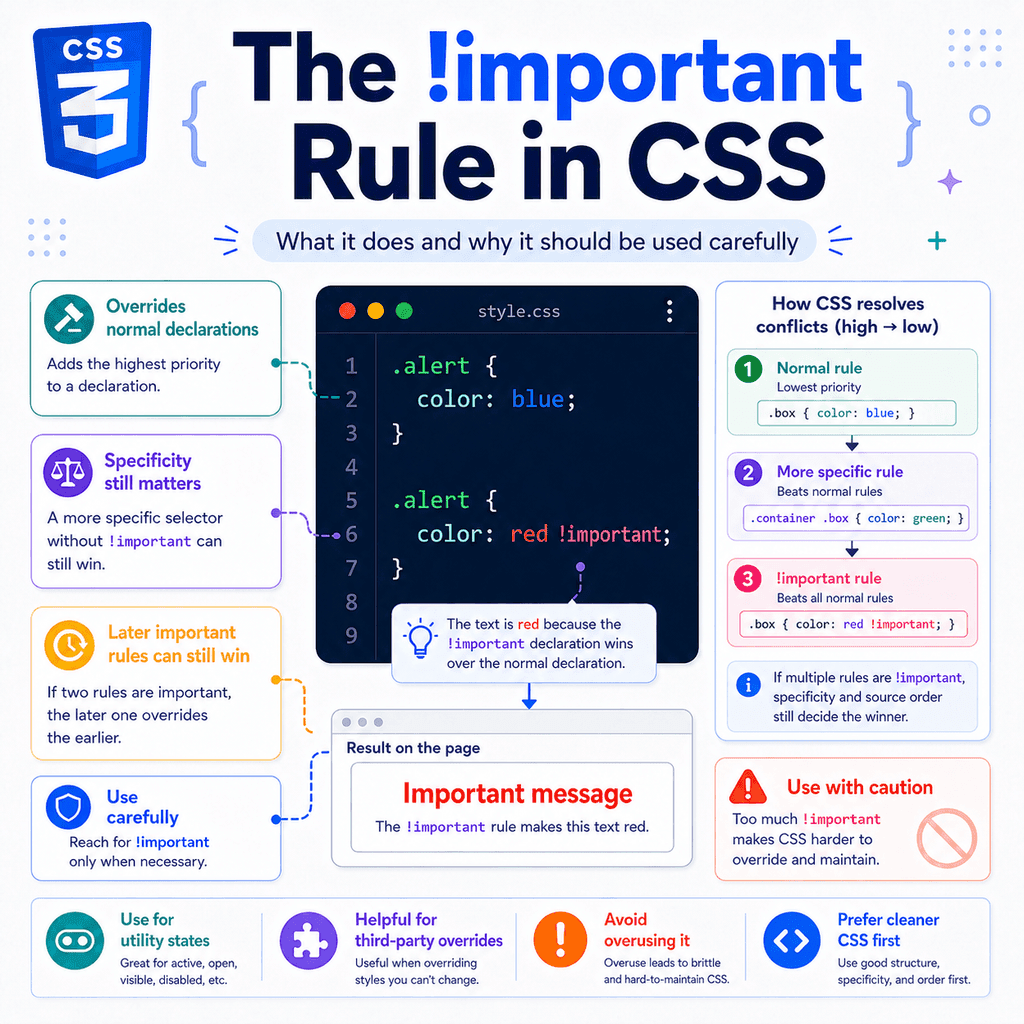
Introduction
CSS usually decides which style wins by using the cascade.
The cascade looks at things like:
where the CSS comes fromwhether a declaration is marked importantselector specificitysource orderMost of the time, you should let the normal cascade do its job.
But CSS also has a special rule called !important.
Example:
p { color: red !important;}The !important flag makes a CSS declaration harder to override.
It tells the browser:
Treat this declaration as more important than normal declarations.This can be useful in specific situations.
But it should be used carefully.
If you use !important too often, your CSS can become harder to understand, harder to override, and harder to maintain.
What Is !important?
!important is a special flag added to a CSS declaration.
A normal declaration looks like this:
p { color: blue;}An important declaration looks like this:
p { color: blue !important;}The !important part comes after the value and before the semicolon.
Correct:
p { color: blue !important;}Incorrect:
p { !important color: blue;}Incorrect:
p { color: !important blue;}The correct pattern is:
property: value !important;A Simple !important Example
CSS:
p { color: blue !important;} p { color: red;}HTML:
<p>This paragraph is blue.</p>The paragraph becomes blue.
Why?
The first rule uses !important.
The second rule is normal.
Even though the red rule comes later, the blue rule wins because it is marked important.
!important Works on Individual Declarations
!important does not make a whole CSS rule important.
It only affects the declaration where it appears.
Example:
.card { color: navy !important; background-color: white;} .card { color: red; background-color: yellow;}The final styles are:
color: navy;background-color: yellow;Why?
The first color declaration is important, so it beats the later normal color.
But background-color: white; is not important.
So the later background-color: yellow; wins.
This is important.
!important works property by property.
What !important Does
The !important flag changes the priority of a declaration in the cascade.
Example:
.alert { color: red;} .alert { color: green !important;}The text becomes green.
The green declaration wins because it is important.
A simple way to think about it is:
important declarations beat normal declarationsBut there is more detail.
If two declarations are both important, the browser still needs to decide which important declaration wins.
That is where specificity and source order still matter.
!important Does Not Mean “Always Wins”
This is a common mistake.
!important is powerful, but it does not mean the declaration can never be overridden.
Example:
.notice { color: blue !important;} #main-notice { color: red !important;}HTML:
<p id=”main-notice” class=”notice”> Important message</p>The paragraph becomes red.
Why?
Both declarations are important.
So the browser compares specificity.
The ID selector is more specific than the class selector.
Because both declarations are important, the more specific important declaration wins.
Normal Specificity Example
Without !important, specificity works like this:
p { color: black;} .intro { color: navy;}HTML:
<p class=”intro”>Welcome.</p>The paragraph becomes navy.
The class selector is more specific than the type selector.
!important Can Override Higher Specificity Normal Rules
Now add !important:
p { color: black !important;} .intro { color: navy;}HTML:
<p class=”intro”>Welcome.</p>The paragraph becomes black.
Why?
The p selector is less specific.
But its color declaration is important.
The .intro declaration is normal.
An important declaration can beat a normal declaration even when the normal declaration uses a more specific selector.
Important Declarations Still Compare Specificity
If both declarations are important, specificity matters again.
Example:
p { color: black !important;} .intro { color: navy !important;}HTML:
<p class=”intro”>Welcome.</p>The paragraph becomes navy.
Both declarations are important.
The .intro selector is more specific than p.
So .intro wins.
A useful rule is:
!important beats normal declarations.When both declarations are important, specificity still matters.Important Declarations Still Use Source Order
If two important declarations have the same specificity, the later one wins.
Example:
.message { color: green !important;} .message { color: blue !important;}HTML:
<p class=”message”>Your settings were saved.</p>The paragraph becomes blue.
Both selectors are the same.
Both declarations are important.
The second rule comes later.
So the second important declaration wins.
Source Order Example
Reverse the order:
.message { color: blue !important;} .message { color: green !important;}Now the paragraph becomes green.
The selector did not change.
The importance did not change.
Only the order changed.
Because the specificity is equal, the later important declaration wins.
!important and Inline Styles
Inline styles are written directly in the HTML element.
Example:
<p style=”color: red;”> This paragraph has an inline style.</p>Inline styles usually have very high priority compared with normal stylesheet rules.
Example:
<p class=”intro” style=”color: red;”> Welcome.</p>CSS:
.intro { color: blue;}The paragraph becomes red.
The inline style wins over the normal class rule.
!important Can Override Normal Inline Styles
An important stylesheet declaration can override a normal inline style.
Example:
<p class=”intro” style=”color: red;”> Welcome.</p>CSS:
.intro { color: blue !important;}The paragraph becomes blue.
Why?
The inline style is normal.
The stylesheet declaration is important.
Important declarations can override normal declarations, including normal inline styles.
Inline !important
You can also use !important inside an inline style:
<p class=”intro” style=”color: red !important;”> Welcome.</p>CSS:
.intro { color: blue !important;}The paragraph becomes red.
Both declarations are important.
The inline declaration has very high specificity.
So the inline important declaration wins.
For normal website styling, avoid inline !important.
It is difficult to override and usually makes CSS harder to maintain.
Why !important Exists
The !important rule exists because sometimes you need to override styles that are difficult to control.
Examples include:
overriding third-party CSScreating utility classeshandling emergency fixesworking with user stylesundoing overly specific CSSdealing with inline styles from JavaScriptIt is not automatically bad.
It is a tool.
The problem is using it when normal CSS structure would be better.
A Useful !important Example: Utility Classes
Some CSS systems use utility classes.
A utility class usually does one small job.
Example:
.hidden { display: none !important;}HTML:
<div class=”modal hidden”> This modal is hidden.</div>This can be useful because .hidden is expected to override other display rules.
Example:
.modal { display: block;} .hidden { display: none !important;}The element is hidden.
In this case, !important supports the purpose of the utility class.
The class is meant to force a clear state.
Another Utility Example
CSS:
.text-center { text-align: center !important;}HTML:
<p class=”article-intro text-center”> This text is centred.</p>The utility class clearly says:
Force this text to be centred.Some utility-first systems use this pattern intentionally.
But it should be a deliberate design choice, not a habit.
A Useful !important Example: Temporary Debugging
Sometimes you may use !important while debugging.
Example:
.card { outline: 3px solid red !important;}This can help you see which elements match a selector.
But this should usually be temporary.
After debugging, remove it.
Do not leave random important declarations in production CSS unless they serve a clear purpose.
A Useful !important Example: Third-Party Styles
Suppose a third-party widget adds styles you cannot easily change.
Example:
.widget-title { color: purple;}Your CSS:
.widget-title { color: navy !important;}This can override the third-party style.
This may be reasonable if you cannot control the original CSS.
However, first check whether you can override the style with better selector structure, stylesheet order, or configuration.
Use !important as a last resort, not the first option.
A Useful !important Example: Accessibility Overrides
Sometimes users need styles that override author styles.
For example, a user stylesheet might use important declarations to improve readability:
* { line-height: 1.6 !important;}or:
body { font-size: 20px !important;}This is one reason !important exists.
It can help user preferences override website styles.
As a website author, you should be cautious about using !important because it can make it harder for users to override your styles.
Why !important Should Be Used Carefully
The main problem with !important is that it makes CSS harder to override.
Example:
.card { color: navy !important;}Later, you want one special card to be green:
.card-success { color: green;}HTML:
<div class=”card card-success”> Success message</div>The text stays navy.
Why?
The .card colour is important.
The .card-success colour is normal.
To override it, you may feel forced to write:
.card-success { color: green !important;}Now you have two important declarations.
This can start a chain of increasingly difficult overrides.
The !important Chain Problem
A common problem looks like this:
.card { color: navy !important;} .card-success { color: green !important;} .page .card-success { color: darkgreen !important;}Each new rule needs !important because the earlier rules used it.
This makes the stylesheet harder to reason about.
Instead of asking:
Which selector is more specific?Which rule comes later?you now also need to ask:
Which declarations are important?Which important declaration has higher specificity?Which important declaration comes later?This adds complexity.
!important Can Hide CSS Design Problems
Sometimes !important is used to fix a style that is not working.
Example:
.button { background-color: gray !important;}This may work in the moment.
But it may hide the real problem.
The real problem might be:
the stylesheet order is wrongthe selector is too weakanother selector is too specificthe component CSS is poorly organisedthe same property is being set in too many placesBefore using !important, inspect the element and find out why your rule is not winning.
Better Fix: Change Source Order
Instead of this:
.button { background-color: gray !important;}you may only need to move the rule later:
.button { background-color: gray;}Example:
.button { background-color: blue;} .button { background-color: gray;}The later rule wins when specificity is equal.
No !important is needed.
Better Fix: Use a More Specific Selector
Instead of this:
button { background-color: gray !important;}you may need a more specific selector:
.primary-button { background-color: gray;}HTML:
<button class=”primary-button”> Save</button>Or:
.card .primary-button { background-color: gray;}Use specificity deliberately.
Do not increase specificity randomly.
But a clear component selector is usually better than adding !important.
Better Fix: Use a Modifier Class
Suppose you have a base button:
.button { background-color: gray; color: white;}Instead of overriding it with !important, use a modifier class:
.button-primary { background-color: blue;}HTML:
<button class=”button button-primary”> Save</button>The base class provides shared styling.
The modifier class changes one part.
This is usually cleaner than:
.button { background-color: gray !important;}Better Fix: Reduce Specificity
Sometimes the problem is that an earlier selector is too specific.
Example:
.page .main-content .card .title { color: navy;}This is hard to override.
You may be tempted to write:
.title { color: green !important;}A better long-term fix is to simplify the original selector if possible:
.card-title { color: navy;}Then override with a clear modifier:
.card-title-success { color: green;}HTML:
<h2 class=”card-title card-title-success”> Saved</h2>Lower, predictable specificity makes CSS easier to maintain.
Better Fix: Use the Cascade Intentionally
A good stylesheet often moves from general to specific:
.button { background-color: gray; color: white;} .button-primary { background-color: blue;} .button-danger { background-color: red;}HTML:
<button class=”button button-primary”>Save</button><button class=”button button-danger”>Delete</button>No !important is needed.
The structure makes the intended overrides clear.
!important and the Cascade
The cascade is the browser’s system for deciding which declaration wins.
A simplified order is:
importancespecificitysource orderThis means:
important declarations beat normal declarationsmore specific selectors beat less specific selectors when importance is equallater rules beat earlier rules when importance and specificity are equalThis is simplified, but it explains many everyday CSS conflicts.
Important vs Normal Declarations
Example:
.box { color: red !important;} .box { color: blue;}The result is red.
The important declaration wins over the normal declaration.
Important vs Important Declarations
Example:
.box { color: red !important;} .box.special { color: blue !important;}HTML:
<div class=”box special”> Text</div>The result is blue.
Both declarations are important.
.box.special is more specific than .box.
So blue wins.
Important with Equal Specificity
Example:
.box { color: red !important;} .box { color: blue !important;}The result is blue.
Both declarations are important.
Both selectors have the same specificity.
The later rule wins.
!important and Inheritance
!important can also affect inherited values, but direct styles still matter.
Example:
.parent { color: green !important;} .child { color: blue;}HTML:
<div class=”parent”> <p class=”child”>This text is blue.</p></div>The child text is blue.
This may seem surprising.
The parent has an important colour.
But the parent rule applies directly to the parent, not directly to the child.
The child has its own direct colour declaration.
A direct value on the child can beat an inherited value from the parent.
Important Inherited Values
Now remove the child’s direct colour:
.parent { color: green !important;}HTML:
<div class=”parent”> <p>This text inherits green.</p></div>The paragraph inherits green.
The parent’s final colour is green.
The child inherits that final value.
But the child is not receiving the parent selector’s specificity.
It is just inheriting the computed value.
Important Parent vs Direct Child Rule
Example:
#theme { color: green !important;} p { color: blue;}HTML:
<div id=”theme”> <p>This paragraph is blue.</p></div>The paragraph is blue.
The ID selector with !important styles the parent.
The p selector styles the paragraph directly.
The direct paragraph rule wins over the inherited colour.
This is a key point:
!important on a parent does not automatically beat direct styling on a child.!important and Custom Properties
CSS custom properties are variables.
Example:
:root { –brand-color: blue;}You can mark a custom property declaration as important:
:root { –brand-color: blue !important;}But the !important affects the custom property declaration itself in the cascade.
It does not become part of the custom property value.
Example:
:root { –brand-color: blue !important;} .button { color: var(–brand-color);}The button colour uses the custom property value.
The important flag helped decide which --brand-color declaration won.
It does not make color: var(--brand-color); automatically important.
If you want the color declaration itself to be important, you would write:
.button { color: var(–brand-color) !important;}Use this carefully.
!important and CSS Variables Example
CSS:
:root { –button-color: blue;} .theme { –button-color: green !important;} .button { color: var(–button-color);}HTML:
<div class=”theme”> <button class=”button”>Save</button></div>The button uses green.
Why?
The important custom property declaration helps --button-color become green inside .theme.
But the button’s color declaration is still normal.
The value is green, but the color declaration is not important.
!important and Shorthand Properties
!important can be used with shorthand properties.
Example:
.card { margin: 0 !important;}This makes all margin sides important:
margin-topmargin-rightmargin-bottommargin-leftSo this later rule will not override the top margin:
.card { margin-top: 2rem;}The top margin stays 0.
Why?
The earlier shorthand made the margin values important.
To override it, you would need another important declaration:
.card { margin-top: 2rem !important;}This is another reason to use !important carefully.
It can make future changes harder.
!important with Longhand Properties
Example:
.card { margin: 0 !important;} .card.featured { margin-top: 2rem !important;}HTML:
<div class=”card featured”> Featured card</div>The top margin becomes 2rem.
Both declarations are important.
The longhand margin-top declaration directly sets the top margin.
The selector .card.featured is more specific than .card.
So the top margin override wins.
!important and Media Queries
Important declarations can appear inside media queries.
Example:
.sidebar { display: block;} @media (max-width: 700px) { .sidebar { display: none !important; }}When the viewport is 700px wide or smaller, the sidebar is hidden.
The important declaration applies only when the media query condition is true.
If the media query condition is false, that rule does not apply.
Media Query Example Without !important
Often, you do not need !important in media queries.
Example:
.sidebar { display: block;} @media (max-width: 700px) { .sidebar { display: none; }}This works because the media query rule comes later and has the same specificity.
Use !important in media queries only when a normal rule cannot override the existing style.
!important and Animations
CSS animations and transitions have special cascade behaviour.
For beginner CSS, the main thing to know is this:
!important is part of the cascade, but CSS has a few advanced cascade rules for animations, transitions, origins, and layers.You do not need to master all of that immediately.
For everyday CSS, focus on this:
important beats normalimportant vs important uses specificity and source orderThat will explain most practical cases.
!important and CSS Layers
CSS cascade layers are an advanced feature.
They let you organise styles into named layers.
Example:
@layer base { button { color: black; }} @layer components { button { color: blue; }}!important interacts with layers in special ways.
For a beginner, the main lesson is:
Do not use !important as a replacement for understanding the cascade.If you are using cascade layers, learn how layers affect priority before adding !important.
For most basic CSS, you can avoid this topic until later.
When !important Is Usually a Bad Sign
!important is often a warning sign when it appears in normal component CSS.
Example:
.card-title { color: navy !important;}Ask:
Why does this need to be important?What rule is it trying to override?Can the CSS be reorganised?Can the selector be improved?Can the earlier rule be made less specific?Can a modifier class solve this?Sometimes !important is still the right choice.
But you should understand why you need it.
When !important Can Be Reasonable
!important can be reasonable when the class or rule is meant to force a state.
Examples:
.is-hidden { display: none !important;}.visually-hidden { position: absolute !important; width: 1px !important; height: 1px !important; overflow: hidden !important;}.no-scroll { overflow: hidden !important;}These are state or utility rules.
They are often expected to override normal component styles.
Even then, use them consistently.
Hidden Utility Example
CSS:
.modal { display: block;} .is-hidden { display: none !important;}HTML:
<div class=”modal is-hidden”> Modal content</div>The modal is hidden.
This is a clear use case.
The class name says the element is hidden.
The important declaration enforces that state.
Avoid Using !important for Everything
This is not a good pattern:
h1 { font-size: 3rem !important;} p { color: #333333 !important;} button { background-color: blue !important;} .card { padding: 2rem !important;}This makes almost every style difficult to override.
If everything is important, then nothing feels simple.
You will eventually need more important rules to override earlier important rules.
This is not a sustainable way to write CSS.
A Better Pattern
Better:
body { color: #333333; font-family: Arial, sans-serif;} h1 { font-size: 3rem;} .card { padding: 2rem;} .button { background-color: blue;}Then use modifier classes where needed:
.button-danger { background-color: red;}HTML:
<button class=”button button-danger”> Delete</button>This is easier to understand.
Debug Before Adding !important
When a style does not apply, do not immediately add !important.
First, inspect the element.
Ask:
Does my selector match the element?Is another rule setting the same property?Is the other rule more specific?Does the other rule come later?Is the other rule important?Is the style coming from inline CSS?Is the style coming from a media query?Is the style coming from a third-party stylesheet?Browser developer tools can show crossed-out declarations.
A crossed-out declaration means another declaration is winning.
Find the winning declaration before deciding what to do.
Debugging Example
CSS:
.button { background-color: blue;} .card .button { background-color: gray;}HTML:
<div class=”card”> <button class=”button”>Save</button></div>You might write:
.button { background-color: blue !important;}But the real issue is specificity.
.card .button is more specific than .button.
A cleaner fix might be:
.card .button { background-color: blue;}or a modifier:
.button-primary { background-color: blue;}HTML:
<button class=”button button-primary”>Save</button>Use Comments When !important Is Necessary
If you use !important, it can help to explain why.
Example:
/* Overrides third-party widget inline styles */.support-widget { z-index: 9999 !important;}or:
/* Utility class must override component display rules */.is-hidden { display: none !important;}A comment helps your future self and other developers understand that the important declaration is intentional.
!important and Maintainability
Maintainable CSS is predictable.
You should be able to answer:
Where is this style coming from?Why is this rule winning?How do I override it safely?Too many important declarations make those questions harder.
They create exceptions to the normal cascade.
Good CSS usually uses:
clear naminglow-to-moderate specificityconsistent source ordercomponent structuremodifier classeslimited utility classesUse !important only when it supports that structure.
A Practical Component Example
HTML:
<div class=”alert alert-success”> Your profile was updated.</div>CSS:
.alert { padding: 1rem; border-radius: 8px; color: #222222; background-color: #eeeeee;} .alert-success { color: #065f46; background-color: #d1fae5;}No !important is needed.
The base .alert class gives shared styles.
The .alert-success class changes colour and background.
This is clean and predictable.
The Same Example with Poor !important Use
CSS:
.alert { padding: 1rem !important; border-radius: 8px !important; color: #222222 !important; background-color: #eeeeee !important;} .alert-success { color: #065f46; background-color: #d1fae5;}The success alert does not get its success colour or background.
Why?
The base alert styles are important.
You would need this:
.alert-success { color: #065f46 !important; background-color: #d1fae5 !important;}Now the CSS is more difficult than it needs to be.
Avoid important declarations in base component styles unless there is a strong reason.
!important and State Classes
State classes are sometimes a better place for !important.
Example:
.dropdown { display: block;} .is-hidden { display: none !important;}The .is-hidden class represents a strong state.
It means:
This element should not be displayed.This can justify !important.
But if every state class uses !important, review your CSS structure.
You may be relying on forced overrides too often.
!important and JavaScript
JavaScript sometimes adds inline styles.
Example:
<div class=”panel” style=”display: block;”> Panel content</div>A stylesheet rule like this may not override the inline style:
.panel { display: none;}But this can:
.panel { display: none !important;}This can be useful if a script adds inline styles that you need to override.
However, it may be better to change the JavaScript if you control it.
For example, JavaScript can add a class instead:
<div class=”panel is-hidden”> Panel content</div>CSS:
.is-hidden { display: none;}This is usually cleaner than fighting inline styles.
Avoid Fighting Yourself
Many !important problems happen when your own CSS fights itself.
Example:
.sidebar .button { color: white;} .button { color: black !important;}This makes it unclear which rule should control the button.
A better structure is:
.button { color: black;} .sidebar .button { color: white;}The base style comes first.
The context-specific style comes later or uses a clearer selector.
No important flag is needed.
A Simple Decision Guide
Before using !important, ask:
Am I overriding a third-party style I cannot change?Am I creating a utility class that must force a state?Am I temporarily debugging?Am I overriding inline styles I cannot control?Is there a cleaner fix with source order, specificity, or a modifier class?If the cleaner fix is available, use that first.
If not, !important may be reasonable.
Use !important Sparingly
A good rule of thumb:
Use !important only when the override is intentional, limited, and difficult to solve cleanly another way.Avoid using it just because a style is not applying.
That usually means the cascade needs to be inspected.
Full Example: Normal Override
HTML:
<button class=”button button-primary”> Save</button>CSS:
.button { background-color: gray; color: white;} .button-primary { background-color: blue;}The button background becomes blue.
No !important is needed.
The CSS is clear.
The base class sets the default.
The modifier class changes the variant.
Full Example: Important Override
HTML:
<button class=”button button-primary”> Save</button>CSS:
.button { background-color: gray !important; color: white;} .button-primary { background-color: blue;}The button background stays gray.
The important base style blocks the modifier.
To fix it, you may write:
.button-primary { background-color: blue !important;}This works, but it makes the CSS harder to maintain.
A better fix is to remove !important from the base .button rule.
Full Example: Reasonable Important Utility
HTML:
<div class=”notification is-hidden”> New message received.</div>CSS:
.notification { display: block; padding: 1rem; background-color: #eff6ff;} .is-hidden { display: none !important;}The notification is hidden.
This is reasonable because .is-hidden is a utility/state class.
Its purpose is to force the element to be hidden.
Full Example: Third-Party Override
Suppose a third-party widget has this style:
.chat-widget { bottom: 20px;}You cannot edit that file.
Your site needs the widget higher:
.chat-widget { bottom: 80px !important;}This may be reasonable.
But add a comment:
/* Override third-party widget position */.chat-widget { bottom: 80px !important;}This explains why the important flag exists.
Full Example: Inline Style Override
HTML:
<div class=”banner” style=”display: block;”> Sale ends today.</div>CSS:
.banner { display: none !important;}The banner is hidden.
The important stylesheet rule can override the normal inline style.
This can be useful when inline styles are generated by code you cannot change.
If you control the HTML or JavaScript, prefer a class-based approach.
Best Practices for !important
Use !important only when there is a clear reason.
Avoid using it in base component styles.
Avoid using it to fix problems you have not debugged.
Prefer source order, specificity, and clear class names first.
Use modifier classes for component variations.
Use utility classes carefully when they are meant to force a state.
Add comments when an important declaration exists to override third-party or inline styles.
Do not use !important on every declaration.
Remember that important declarations can still be overridden by other important declarations.
Remember that specificity and source order still matter when declarations are equally important.
Be careful with shorthand properties marked important.
Avoid inline !important unless there is no better option.
Quick Summary
!important makes a CSS declaration more important in the cascade.
It is written after the value and before the semicolon:
color: red !important;Important declarations beat normal declarations.
If two declarations are both important, specificity still matters.
If two important declarations have equal specificity, the later one usually wins.
!important works on individual declarations, not entire rules.
It can override normal inline styles.
It can be useful for utility classes, third-party overrides, emergency fixes, and certain state classes.
It should be used carefully because it makes CSS harder to override.
Too much !important can create a chain where every future override also needs !important.
Before using it, check whether source order, specificity, better selectors, or modifier classes would solve the problem more cleanly.
Use !important as a deliberate tool, not as a default fix.