
Introduction
CSS usually gives each element a final style by combining several things.
Those things include browser defaults, inherited values, your own CSS rules, specificity, source order, and sometimes reset keywords.
Most of the time, you write normal values:
p { color: navy;}But CSS also has special keywords that can reset or control how a property gets its value.
The most useful ones are:
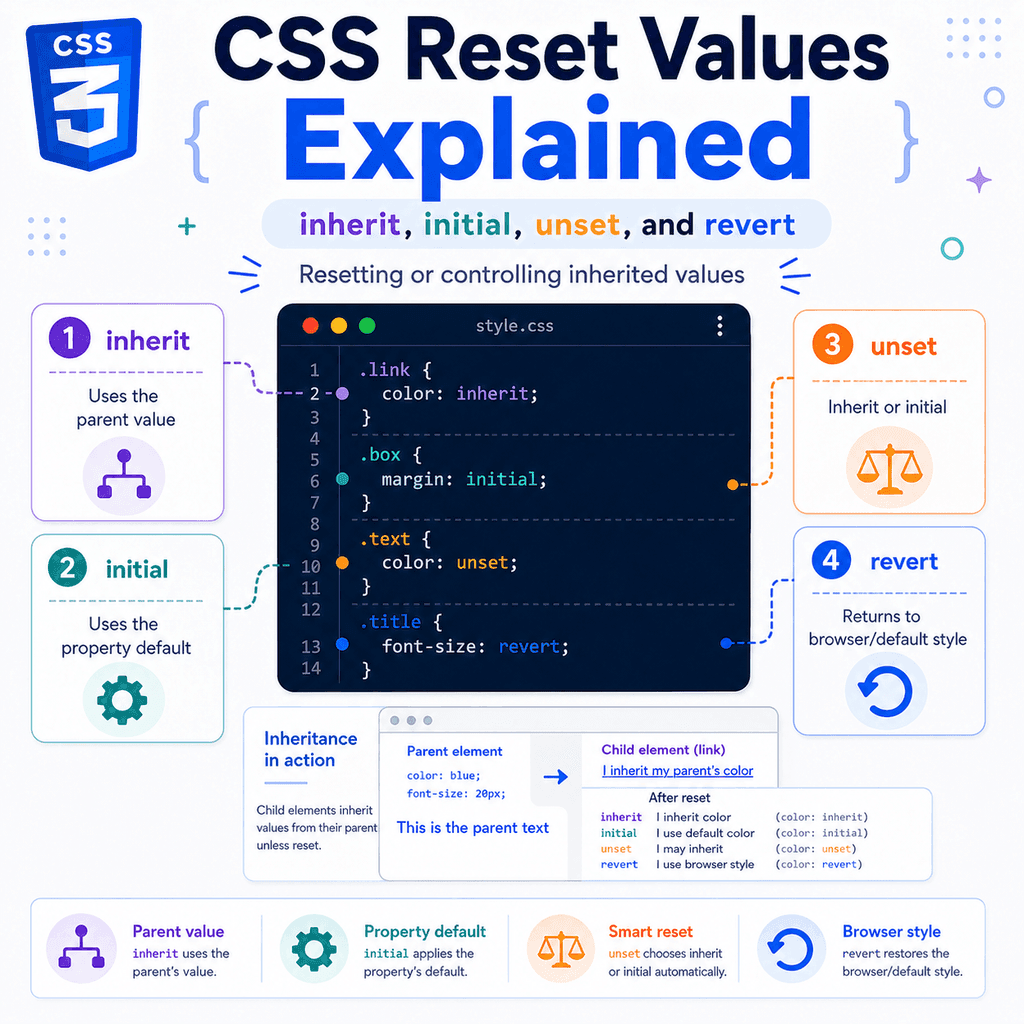
inheritinitialunsetrevertThese are called CSS-wide keywords.
That means they can be used with almost any CSS property.
They are useful when you want to control inheritance, undo a style, reset a property, or return an element closer to its default behaviour.
For example:
a { color: inherit;}This tells links to use the same text colour as their parent.
Another example:
button { all: unset;}This removes many default button styles.
These keywords are powerful, but they can also be confusing at first.
The key idea is this:
inherit = use the parent valueinitial = use the property’s initial valueunset = inherit if the property normally inherits, otherwise initialrevert = go back to the previous cascade origin, often the browser defaultThis guide explains what each value does and when to use it.
Why These Values Exist
CSS often has several possible sources for a property value.
For example, a paragraph might get its colour from:
the browser defaultthe body elementa class selectora more specific selectoran inherited parent valueExample:
body { color: #333333;} .card { color: navy;} .card p { color: green;}HTML:
<div class=”card”> <p>This paragraph is green.</p></div>The paragraph is inside .card.
It could inherit navy from .card.
But it has a direct rule:
.card p { color: green;}So it becomes green.
Sometimes you want to control this process more directly.
You may want an element to:
copy its parent valueignore an inherited valuereturn to a default valueremove framework stylingreset many properties at onceThat is where inherit, initial, unset, and revert are useful.
CSS-Wide Keywords
The values inherit, initial, unset, and revert are special keywords.
They are not tied to one specific property.
You can use them on many different properties.
Examples:
p { color: inherit;}.box { margin: initial;}button { font: unset;}h1 { font-size: revert;}They work differently from normal values such as:
color: blue;padding: 1rem;display: flex;font-size: 20px;Normal values directly choose a specific result.
CSS-wide keywords tell the browser how to choose or reset the value.
The inherit Value
The inherit value tells an element to use the value from its parent.
Example:
a { color: inherit;}This means:
Use the same color as the parent element.HTML:
<p class=”notice”> Read the <a href=”/guide”>full guide</a>.</p>CSS:
.notice { color: darkgreen;} .notice a { color: inherit;}The link becomes dark green because it inherits the colour from the paragraph.
Without color: inherit, the link might use the browser’s default link colour.
inherit Is Useful for Links
Links often have browser default styles.
For example, browsers commonly show links as blue and underlined.
That can be useful, but sometimes you want a link to match the surrounding text.
Example:
.card { color: navy;} .card a { color: inherit;}HTML:
<div class=”card”> <p>Read the <a href=”/article”>article</a>.</p></div>The link uses the card’s text colour.
This is useful in cards, buttons, navigation menus, and small UI components.
inherit With Buttons and Form Controls
Form controls often have browser-specific default styles.
A button may not automatically use the same font as the rest of your page.
Example:
body { font-family: Arial, sans-serif;}HTML:
<button>Save</button>The button might not look like it uses the same font in every browser.
A common fix is:
button,input,select,textarea { font: inherit;}This tells form controls to inherit font-related settings from their parent.
You may also see:
button { font-family: inherit;}or:
button { color: inherit;}These are common when building custom form styles.
inherit Can Force Non-Inherited Properties to Inherit
Some properties inherit naturally.
For example:
colorfont-familyfont-sizeline-heighttext-alignOther properties usually do not inherit:
marginpaddingborderbackgroundwidthheightdisplayBut inherit can force a property to inherit.
Example:
.card { border: 2px solid navy;} .card p { border: inherit;}Normally, border does not inherit.
But this tells the paragraph to use the same border value as its parent.
This is possible, but it is not common for most layout and box properties.
Usually, properties like border, padding, margin, and width do not inherit because copying them to every child would often create messy layouts.
inherit Example with currentColor
The currentColor keyword uses the current value of the color property.
This works well with inheritance.
Example:
.card { color: teal;} .card button { color: inherit; border: 2px solid currentColor;}HTML:
<div class=”card”> <button>Save</button></div>The button inherits teal from .card.
The border uses currentColor.
So the button text and border are both teal.
This pattern is useful for icons, borders, and buttons that should match surrounding text.
When to Use inherit
Use inherit when you want an element to intentionally copy a value from its parent.
Good examples:
a { color: inherit;}button { font: inherit;}svg { fill: currentColor;}input { font-family: inherit;}Use it when inheritance makes the design more consistent.
Avoid forcing inheritance on layout properties unless you have a clear reason.
This is usually not helpful:
* { padding: inherit;}That would make spacing hard to control.
The initial Value
The initial value resets a property to its initial value.
The initial value is the value defined by CSS for that property.
Example:
p { color: initial;}This does not mean:
Use the parent color.It means:
Use the initial value of the color property.For many situations, color: initial will look like black text.
But the important idea is not “black”.
The real idea is:
initial = the property’s default initial valueinitial Is Not Always the Browser Default
This is one of the most important details.
The initial value is not always the same as the browser’s default style for that element.
Example:
h1 { font-size: initial;}You might expect the heading to return to the browser’s normal large heading size.
But font-size: initial resets the property to the CSS initial value for font-size, not necessarily the browser’s default <h1> style.
Browser default styles are user agent stylesheet rules.
They are different from CSS initial values.
This distinction matters.
Example: display: initial
The display property is a good example.
HTML:
<div class=”box”>Box</div>CSS:
.box { display: initial;}The initial value of display is inline.
So the <div> may behave like an inline element.
That can be surprising because a normal <div> is usually block-level.
The normal block behaviour of a <div> comes from browser default CSS.
It is not the same thing as the initial value of the display property.
So be careful with initial.
It means “property initial value”, not “normal element default”.
initial Example with Text Colour
HTML:
<div class=”panel”> <p>This paragraph is reset.</p></div>CSS:
.panel { color: green;} .panel p { color: initial;}The paragraph does not inherit green from .panel.
It uses the initial value of color.
This can be useful when you want to stop inherited styling from affecting a child element.
initial Example with Margin
HTML:
<p class=”note”>This is a note.</p>CSS:
.note { margin: initial;}This resets margin to its initial value.
The initial value of margin is 0.
So this removes margin from the note.
This can be useful, but a clearer version is often:
.note { margin: 0;}Use the direct value when it is more readable.
When to Use initial
Use initial when you specifically want the CSS initial value of a property.
Example:
.special-text { color: initial;}.box { margin: initial;}.item { text-align: initial;}However, initial can be confusing because it does not always match browser element defaults.
For many beginner projects, direct values are clearer:
p { margin: 0;}instead of:
p { margin: initial;}Use initial when the reset behaviour is intentional and you understand what the property’s initial value does.
The unset Value
The unset value is a conditional reset.
It behaves differently depending on the property.
For inherited properties, unset acts like inherit.
For non-inherited properties, unset acts like initial.
The rule is:
If the property normally inherits: unset = inherit If the property does not normally inherit: unset = initialThis makes unset useful when you want to remove a declared value and let the property behave naturally.
unset with an Inherited Property
The color property normally inherits.
Example:
.card { color: navy;} .card p { color: unset;}HTML:
<div class=”card”> <p>This paragraph is navy.</p></div>Because color normally inherits, this behaves like:
.card p { color: inherit;}The paragraph inherits navy from .card.
unset with a Non-Inherited Property
The margin property does not normally inherit.
Example:
.card { margin: 40px;} .card p { margin: unset;}Because margin does not normally inherit, this behaves like:
.card p { margin: initial;}The paragraph does not copy the parent’s margin.
Instead, its margin is reset to the initial value.
For margin, the initial value is 0.
So the paragraph margin becomes 0.
unset Example with Mixed Properties
HTML:
<div class=”box”> <p>This paragraph uses unset.</p></div>CSS:
.box { color: green; padding: 2rem;} .box p { color: unset; padding: unset;}What happens?
For color:
color normally inheritsunset acts like inheritthe paragraph becomes greenFor padding:
padding does not normally inheritunset acts like initialthe paragraph padding becomes 0The same keyword behaves differently depending on the property.
Why unset Is Useful
The unset value is useful when you want a property to stop using a custom value.
Example:
.card p { color: red;} .card p.reset { color: unset;}HTML:
<div class=”card”> <p>This paragraph is red.</p> <p class=”reset”>This paragraph goes back to inherited color.</p></div>If .card has a colour, the reset paragraph can inherit it.
This is useful when you want to remove a more specific style and return to normal inheritance behaviour.
unset with the all Property
The all property applies a value to almost all CSS properties at once.
Example:
.reset-box { all: unset;}This resets most properties on .reset-box.
For inherited properties, they inherit.
For non-inherited properties, they return to their initial values.
This can be useful for removing default button styles:
button.reset { all: unset;}But be careful.
This also removes useful browser styles such as focus outlines unless you add them back.
A safer custom button reset might be:
button.reset { all: unset; cursor: pointer;} button.reset:focus-visible { outline: 2px solid #2563eb; outline-offset: 2px;}If you reset interactive elements, always make sure keyboard users still have a visible focus style.
When to Use unset
Use unset when you want a property to behave as if your custom value were removed.
Good examples:
.card p { color: unset;}.custom-button { all: unset;}.component { font-size: unset;}Remember the rule:
Inherited property? unset means inherit.Non-inherited property? unset means initial.If that behaviour is what you want, unset is a good choice.
If you want a more explicit result, use inherit or initial instead.
The revert Value
The revert value rolls a property back to the value it would have had from a previous cascade origin.
For many everyday author styles, this often means returning toward the browser default style.
Example:
h1 { font-size: revert;}This can make the heading use its browser default heading size again, assuming no other relevant styles are overriding it.
This is different from:
h1 { font-size: initial;}initial uses the CSS initial value.
revert goes back through the cascade to a previous origin, such as browser default styles.
What Is a Cascade Origin?
CSS can come from different origins.
A simplified version is:
browser default stylesuser stylesauthor stylesAuthor styles are the styles written by the website developer.
For example:
h1 { font-size: 2rem;}Browser default styles are built into the browser.
They are why headings are large, paragraphs have margins, and links are usually blue and underlined before you write any CSS.
The revert value can ignore the current origin’s changes and return to a previous origin’s value.
In normal website CSS, that often feels like:
Go back to the browser default.That is not the full technical definition, but it is a useful starting point.
revert vs initial
This difference is important.
Example:
h1 { font-size: initial;}This uses the CSS initial value for font-size.
Now compare:
h1 { font-size: revert;}This can return the heading to the browser’s default <h1> font size.
That means revert is often better when you want to undo your CSS and restore native element styling.
revert Example with a Heading
HTML:
<h1 class=”page-title”>Page Title</h1>CSS:
.page-title { font-size: 1rem; font-weight: normal;} .page-title.default { font-size: revert; font-weight: revert;}If the heading has only .page-title, it uses the custom small normal style.
If it also has .default, the font size and font weight can return toward browser heading defaults.
HTML:
<h1 class=”page-title default”>Page Title</h1>This is useful when you want to undo custom author styling.
revert Example with Links
Suppose you remove link styling globally:
a { color: inherit; text-decoration: none;}Then you want one section to use normal browser link styles again:
.legal-text a { color: revert; text-decoration: revert;}HTML:
<p class=”legal-text”> Read our <a href=”/terms”>terms</a>.</p>The link can return closer to its browser default appearance.
That may mean blue and underlined, depending on the browser and state.
This is often easier than manually recreating the default link styles.
revert with the all Property
You can use revert with all.
Example:
.native-button { all: revert;}This can return an element closer to native browser styling.
Example:
button.custom { all: unset; cursor: pointer;} button.native { all: revert;}The .custom button removes many styles.
The .native button returns toward normal browser button styling.
Be careful when using all.
It affects many properties at once.
When to Use revert
Use revert when you want to undo author styles and return an element closer to its browser default or previous cascade origin.
Good examples:
.article h1 { font-size: revert;}.content a { color: revert; text-decoration: revert;}.native-control { all: revert;}revert is especially useful when working with resets, design systems, or third-party styles.
It can help you restore default behaviour without manually knowing every default value.
Comparing inherit, initial, unset, and revert
Here is the basic difference:
inheritUse the parent value. initialUse the property’s initial CSS value. unsetUse inherit for inherited properties.Use initial for non-inherited properties. revertGo back to the value from a previous cascade origin.Often this means browser default styling in normal author CSS.A short version:
inherit = parentinitial = property defaultunset = natural resetrevert = browser/default-origin resetComparison Example with color
The color property normally inherits.
HTML:
<div class=”parent”> <p class=”example”>Example text</p></div>CSS:
.parent { color: green;} .example { color: red;}The paragraph is red because it has a direct value.
Now try inherit:
.example { color: inherit;}The paragraph becomes green.
Now try initial:
.example { color: initial;}The paragraph uses the initial value of color.
Now try unset:
.example { color: unset;}Because color normally inherits, this behaves like inherit.
The paragraph becomes green.
Now try revert:
.example { color: revert;}The paragraph goes back to the value it would have had without the current author declaration, based on the cascade.
In many simple cases, it may look like it is using inherited or browser default text colour, depending on the surrounding styles.
Comparison Example with margin
The margin property does not normally inherit.
HTML:
<div class=”parent”> <p class=”example”>Example text</p></div>CSS:
.parent { margin: 40px;} .example { margin: 20px;}Now try inherit:
.example { margin: inherit;}The paragraph copies the parent’s margin value.
This is forced inheritance.
Now try initial:
.example { margin: initial;}The paragraph margin becomes the initial margin value, which is 0.
Now try unset:
.example { margin: unset;}Because margin does not normally inherit, this behaves like initial.
The paragraph margin becomes 0.
Now try revert:
.example { margin: revert;}The paragraph returns to the margin it would have had from a previous cascade origin.
For a <p>, that may restore browser default paragraph margin.
This is a major difference between initial and revert.
initial vs revert with Paragraph Margins
Browsers commonly give paragraphs default margins.
Example:
<p>This paragraph has browser default margin.</p>If you write:
p { margin: initial;}The margin becomes the initial value of margin, which is 0.
If you write:
p { margin: revert;}The paragraph can return to the browser’s default paragraph margin.
This is why revert can be useful when undoing a CSS reset.
Practical Example: Resetting a Link
Suppose a card has custom link styling.
HTML:
<div class=”card”> <a href=”/guide”>Read the guide</a></div>CSS:
.card { color: navy;} .card a { color: inherit; text-decoration: none;}The link matches the card text and has no underline.
Now suppose one link should look like a normal link again.
HTML:
<div class=”card”> <a class=”normal-link” href=”/guide”>Read the guide</a></div>CSS:
.card a.normal-link { color: revert; text-decoration: revert;}The link can return closer to browser default link styling.
This is a good use of revert.
Practical Example: Resetting a Component Child
HTML:
<div class=”alert”> <p>This is alert text.</p> <p class=”plain”>This paragraph should be plain.</p></div>CSS:
.alert { color: darkred;} .alert p { font-weight: bold;} .alert .plain { font-weight: initial;}The alert text is dark red.
Both paragraphs inherit the dark red colour.
The first paragraph is bold.
The .plain paragraph resets font-weight to the initial value, which is normal.
This is a simple use of initial.
Practical Example: Making a Link Match Its Parent
HTML:
<p class=”notice”> Read the <a href=”/docs”>documentation</a>.</p>CSS:
.notice { color: purple;} .notice a { color: inherit;}The link becomes purple.
This is one of the most common uses of inherit.
It is clearer than manually writing:
.notice a { color: purple;}If the notice colour changes later, the link follows automatically.
Practical Example: Removing a Custom Value with unset
HTML:
<div class=”content”> <p class=”highlight”>Highlighted paragraph.</p> <p class=”highlight normal”>Normal paragraph.</p></div>CSS:
.content { color: #333333;} .highlight { color: orange;} .highlight.normal { color: unset;}The first paragraph is orange.
The second paragraph uses unset.
Because color normally inherits, unset acts like inherit.
So the second paragraph inherits #333333 from .content.
This is useful when you want to remove a custom colour and return to the surrounding text colour.
Practical Example: Removing Button Styles
HTML:
<button class=”link-button”> Learn more</button>CSS:
.link-button { all: unset; color: #2563eb; cursor: pointer; text-decoration: underline;} .link-button:focus-visible { outline: 2px solid #2563eb; outline-offset: 2px;}This turns a button into something that looks like a text link.
The all: unset declaration removes many default button styles.
Then the CSS adds back the styles needed for the design.
The focus style is added back for keyboard accessibility.
This pattern should be used carefully.
Do not remove default interactive styles unless you replace the important ones.
Practical Example: Restoring Native Button Styles
HTML:
<button class=”custom-button”>Custom</button><button class=”native-button”>Native</button>CSS:
button { border: 0; background: #2563eb; color: white; padding: 0.75rem 1rem; border-radius: 6px;} .native-button { all: revert;}The first button uses your custom author styles.
The second button reverts toward native browser button styling.
This can be useful when a global rule is too broad and you need one element to return to normal behaviour.
Practical Example: Undoing a Reset
Many projects remove default spacing:
h1,h2,p,ul { margin: 0;}Later, you may want article content to use browser-like spacing again.
You could write custom spacing manually:
.article p { margin-block: 1em;}Or you can use revert:
.article p,.article ul,.article h1,.article h2 { margin: revert;}This can restore default-like margins for article content.
That is useful when a global reset is helpful for UI components but too aggressive for long-form content.
The all Property
The all property is often used with these keywords.
It applies a keyword to almost every property at once.
Examples:
.box { all: unset;}.box { all: initial;}.box { all: inherit;}.box { all: revert;}This is powerful.
It can also be dangerous.
It can affect layout, typography, colours, interaction styles, and browser defaults.
Use it only when you really want a broad reset.
all: unset
The most common broad reset is:
button { all: unset;}This removes many default button styles.
But it also removes useful behaviour-related styling.
For example, you may need to add back:
button { cursor: pointer;} button:focus-visible { outline: 2px solid #2563eb; outline-offset: 2px;}The button still behaves like a button in HTML.
But visually, many CSS defaults are removed.
Use all: unset carefully on interactive elements.
all: initial
This sets almost all properties to their initial values.
Example:
.widget { all: initial;}This can make the element ignore many inherited styles.
However, it can produce surprising results.
For example, display can become inline.
Fonts, colours, layout, and spacing may reset in ways you did not expect.
Use all: initial with caution.
It is usually too broad for everyday beginner CSS.
all: inherit
This makes many properties inherit from the parent.
Example:
.child { all: inherit;}This is rarely what you want.
It can force layout and box properties to inherit even though they normally would not.
For example, the child may inherit width, padding, border, or other values in ways that make layout confusing.
Use direct properties instead:
.child { color: inherit; font: inherit;}That is usually clearer.
all: revert
This rolls many properties back toward values from previous cascade origins.
Example:
.default-content { all: revert;}This can be useful when you want a section to escape a global reset or framework styling.
However, it can affect many properties at once.
It is usually better to use targeted revert declarations when possible:
.article h1,.article p,.article ul { margin: revert;}This is more predictable than reverting everything.
Choosing the Right Keyword
Use this simple decision guide:
Do you want the parent value?Use inherit. Do you want the CSS property’s initial value?Use initial. Do you want the natural default behaviour for that property?Use unset. Do you want to undo your CSS and return toward browser/default-origin styling?Use revert.Examples:
a { color: inherit;}Use this when a link should match surrounding text.
p { margin: initial;}Use this when you specifically want the initial margin value.
.warning { color: unset;}Use this when you want to remove a custom colour and let normal inheritance happen.
.article p { margin: revert;}Use this when you want paragraph margins to return toward browser defaults.
Common Mistake: Thinking initial Means Browser Default
This is a very common mistake.
This:
h1 { font-size: initial;}does not mean:
Use the normal browser h1 size.It means:
Use the initial value of font-size.If you want browser default heading behaviour, revert is usually closer:
h1 { font-size: revert;}Remember:
initial = property initial valuerevert = previous cascade origin, often browser defaultCommon Mistake: Using unset Without Knowing the Property
This can be confusing:
.box { color: unset; padding: unset;}These do not behave the same way.
color normally inherits, so:
color: unset;acts like:
color: inherit;padding does not normally inherit, so:
padding: unset;acts like:
padding: initial;That means the padding becomes 0.
Always ask:
Does this property inherit by default?That tells you what unset will do.
Common Mistake: Removing Focus Styles
This can create an accessibility problem:
button { all: unset;}The button may lose its visible focus indicator.
Keyboard users need a visible focus style to know where they are on the page.
A better version is:
button { all: unset; cursor: pointer;} button:focus-visible { outline: 2px solid #2563eb; outline-offset: 2px;}If you reset interactive elements, add back clear focus styles.
Common Mistake: Overusing all
The all property is powerful, but it is often too broad.
This may cause unexpected results:
.component { all: unset;}The component might lose display behaviour, inherited fonts, layout settings, or other useful styles.
A more targeted reset is often safer:
.component { margin: 0; padding: 0; color: inherit;}Use all when you need a broad reset.
Use individual properties when you need control.
Common Mistake: Forcing Inheritance on Layout
This is usually not a good idea:
* { margin: inherit; padding: inherit;}Margins and padding do not normally inherit because that would make layout difficult.
Most of the time, layout styles should be applied directly to the elements that need them.
Better:
.card { padding: 1rem;} .card > * + * { margin-top: 1rem;}This gives the parent padding and controls spacing between children.
It does not force every child to inherit padding or margin.
Debugging These Values
When a reset keyword gives an unexpected result, ask these questions:
Which property is being reset?Does the property inherit by default?Is the value coming from a parent?Is the value coming from a browser default?Is a direct rule overriding inheritance?Is a CSS reset or framework involved?Is all being used?Would a direct value be clearer?Browser developer tools can help.
Inspect the element and check which declarations are active.
Look for inherited styles, crossed-out styles, and browser default styles.
This makes it easier to see whether inherit, initial, unset, or revert is doing what you expected.
Quick Reference Table
Value Meaninginherit Use the parent value.initial Use the property’s initial CSS value.unset Inherit if the property normally inherits; otherwise use initial.revert Return to the value from a previous cascade origin, often browser default.Quick Reference by Use Case
Make a link match surrounding text:color: inherit; Make a button use the page font:font: inherit; Remove a custom inherited value:color: unset; Remove spacing:margin: initial;ormargin: 0; Restore browser-like paragraph spacing:margin: revert; Remove most button styling:all: unset; Restore native styling:all: revert;Full Example: Link Styling
HTML:
<div class=”card”> <p> Read the <a href=”/guide”>full guide</a>. </p></div>CSS:
.card { color: #1e40af; font-family: Arial, sans-serif;} .card a { color: inherit; font-weight: bold;}The card sets the text colour and font.
The link inherits the card colour.
The link also gets direct bold styling.
This keeps the link visually connected to the card.
Full Example: Resetting One Paragraph
HTML:
<section class=”notice”> <p>This paragraph is bold.</p> <p class=”normal”>This paragraph is normal weight.</p></section>CSS:
.notice { color: darkgreen;} .notice p { font-weight: bold;} .notice p.normal { font-weight: initial;}The notice colour is inherited by both paragraphs.
Both paragraphs are bold because of the .notice p rule.
The .normal paragraph resets font-weight to its initial value.
The result is:
first paragraph: dark green and boldsecond paragraph: dark green and normal weightFull Example: unset on Inherited and Non-Inherited Properties
HTML:
<div class=”panel”> <p class=”reset”>This paragraph uses unset.</p></div>CSS:
.panel { color: purple; padding: 2rem;} .panel .reset { color: unset; padding: unset;}The paragraph colour becomes purple.
Why?
Because color normally inherits, so color: unset acts like color: inherit.
The paragraph padding becomes 0.
Why?
Because padding does not normally inherit, so padding: unset acts like padding: initial.
This example shows why unset depends on the property.
Full Example: Restoring Article Defaults
HTML:
<article class=”article”> <h1>Article Title</h1> <p>This article should use readable default spacing.</p> <p>This is another paragraph.</p></article>CSS:
h1,p { margin: 0;} .article h1,.article p { margin: revert;}The first rule removes heading and paragraph margins globally.
The second rule restores margins inside .article.
This is useful when a reset is helpful for UI components but not for article content.
Full Example: Custom Button Reset
HTML:
<button class=”text-button”> Learn more</button>CSS:
.text-button { all: unset; color: #2563eb; cursor: pointer; font: inherit; text-decoration: underline;} .text-button:focus-visible { outline: 2px solid #2563eb; outline-offset: 2px;}The button keeps its semantic HTML behaviour.
The default button appearance is removed.
Custom link-like styling is added.
A visible focus style is added for keyboard users.
This is a responsible use of a reset.
Full Example: Native Button Revert
HTML:
<button class=”primary-button”>Primary</button><button class=”default-button”>Default</button>CSS:
button { border: 0; border-radius: 8px; background-color: #2563eb; color: white; padding: 0.75rem 1rem;} .default-button { all: revert;}The primary button uses the custom button styles.
The default button reverts toward native browser button styling.
This is useful when a broad rule affects too many elements.
Best Practices
Use inherit for links, icons, and form controls that should match surrounding text.
Use initial when you specifically want the CSS initial value.
Use unset when you want to remove a custom value and let the property behave naturally.
Use revert when you want to undo author styles and return toward browser defaults.
Be careful with all.
Avoid removing focus styles from interactive elements.
Use direct values when they are clearer than reset keywords.
Remember that initial is not the same as browser default.
Remember that unset depends on whether the property normally inherits.
Use browser developer tools to check where final values come from.
Quick Summary
inherit, initial, unset, and revert are CSS-wide keywords.
They help control how CSS values are inherited, reset, or restored.
inherit makes a property use the parent value.
initial makes a property use its CSS initial value.
unset acts like inherit for inherited properties and initial for non-inherited properties.
revert rolls a property back to a value from a previous cascade origin, often browser default styling in normal author CSS.
These values are especially useful when working with inherited text styles, links, form controls, CSS resets, design systems, and third-party styles.
Use them deliberately.
They can make CSS cleaner when you understand them.
They can make CSS confusing when used broadly or accidentally.