
Introduction
HTML includes several elements that can change how text is presented and understood.
Some elements mark text as important. Some add emphasis. Some highlight text. Others make text smaller, move it slightly above or below the normal text line, or show that text has a particular role.
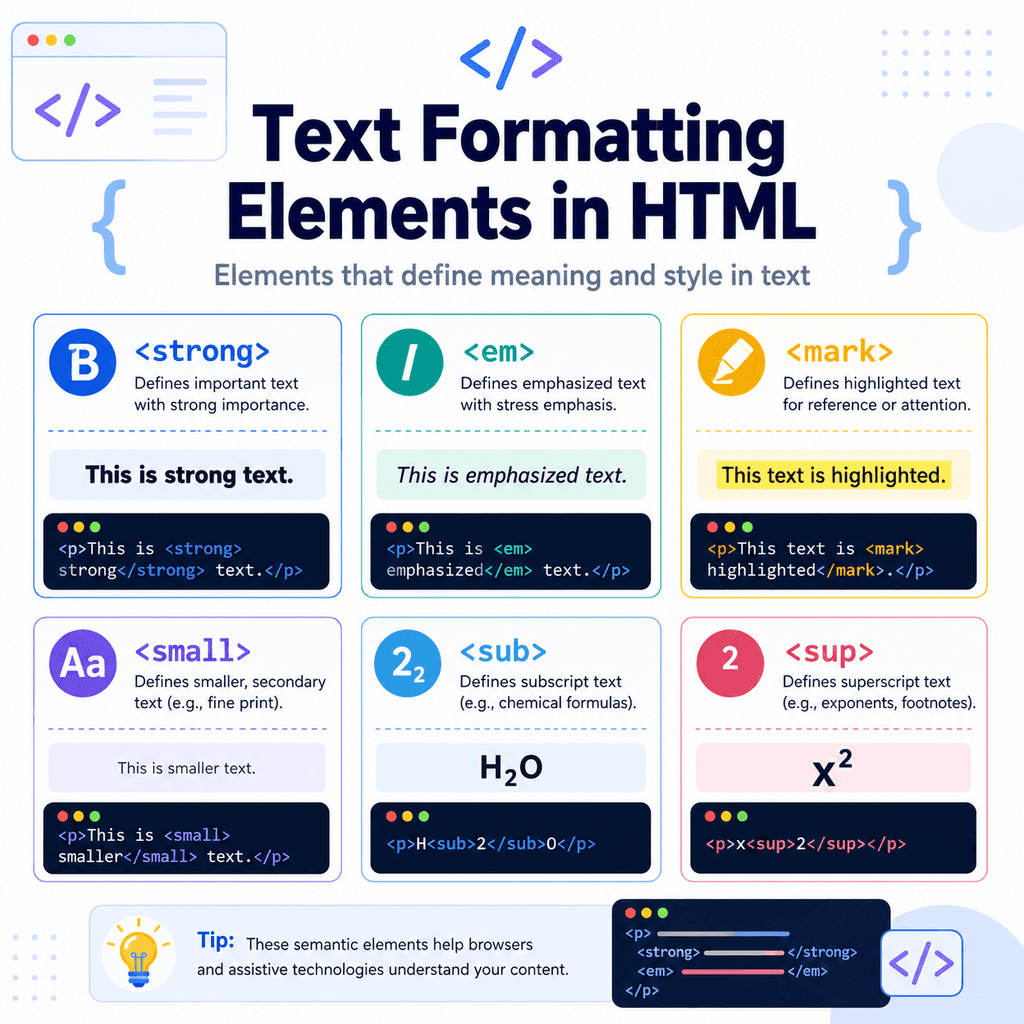
In this guide, we will focus on these common text formatting elements:
<strong><em><mark><small><sub><sup><b><i><u><s>These elements are usually used inside paragraphs, headings, list items, table cells, and other text content.
Text Formatting in HTML
Text formatting means changing or marking part of the text so it has a different role, meaning, or appearance.
For example:
<p>This is <strong>important</strong> information.</p>The word “important” is marked with the <strong> element.
In most browsers, this text will appear bold by default.
However, the main purpose of <strong> is not just to make text bold. Its purpose is to show that the text has strong importance.
This is an important idea in HTML: elements should usually be chosen for meaning first, not only for appearance.
Formatting Elements Are Usually Inline
The elements in this article are usually inline elements.
That means they stay inside the flow of text and do not start a new line by default.
For example:
<p>This sentence contains <em>emphasised text</em> inside it.</p>The <em> element does not create a new paragraph or section.
It only affects the words inside it.
This makes text formatting elements useful for marking specific words, phrases, symbols, numbers, or short pieces of text inside a larger sentence.
The <strong> Element
The <strong> element marks text as strongly important.
For example:
<p><strong>Warning:</strong> Save your work before closing the browser.</p>In most browsers, the text inside <strong> appears bold by default.
The visible result may look like this:
Warning: Save your work before closing the browser.The word “Warning” is marked as important.
Use <strong> when the text has importance, seriousness, or urgency.
When to Use <strong>
Use <strong> for text that needs to stand out because it is important.
For example:
<p><strong>Important:</strong> Your file must be saved with the .html extension.</p>Another example:
<p>Please check that your image has a <strong>valid src attribute</strong>.</p>In these examples, the marked text is not just decorative. It carries extra importance.
Do Not Use <strong> Only for Styling
A common mistake is using <strong> only because you want bold text.
For example:
<p><strong>Our Services</strong></p>If “Our Services” is a heading, use a heading element instead:
<h2>Our Services</h2>If you only want bold styling for visual design, CSS may be more appropriate:
<p class=”bold-text”>This text is styled with CSS.</p>.bold-text { font-weight: bold;}Use <strong> when the text is important, not just when you want it to look bold.
The <em> Element
The <em> element marks text as emphasised.
For example:
<p>You should <em>not</em> use headings only to make text bigger.</p>In most browsers, text inside <em> appears italic by default.
The word “not” is emphasised because it changes the meaning or tone of the sentence.
Compare these two sentences:
You should use headings only to make text bigger.You should not use headings only to make text bigger.The emphasised word is important because it affects how the sentence should be understood.
When to Use <em>
Use <em> when a word or phrase needs emphasis.
For example:
<p>This is <em>not</em> the same as a line break.</p>Another example:
<p>You can use CSS to change how the text looks, but HTML should describe what the text <em>means</em>.</p>The <em> element is useful when the stress or emphasis changes the meaning of the sentence.
<strong> vs <em>
The <strong> and <em> elements are similar because they both make text stand out.
However, they do different jobs.
Use <strong> for importance:
<p><strong>Warning:</strong> This action cannot be undone.</p>Use <em> for emphasis:
<p>You should <em>not</em> delete this file.</p>A simple way to remember the difference is:
<strong> = important<em> = emphasisedBy default, <strong> often looks bold and <em> often looks italic. However, their meaning matters more than their default appearance.
The <b> Element
The <b> element is used to draw attention to text without saying that the text is especially important.
For example:
<p>The product name is <b>Website Starter Package</b>.</p>In most browsers, text inside <b> appears bold by default.
However, <b> does not mean the same thing as <strong>.
The <strong> element marks text as important.
The <b> element simply draws attention to text.
When to Use <b>
Use <b> when you want to draw attention to a word or phrase, but the text does not need strong importance.
For example:
<p>The keyword for this lesson is <b>attribute</b>.</p>Another example:
<p>Popular topics include <b>HTML forms</b>, <b>semantic HTML</b>, and <b>accessibility</b>.</p>In these examples, the bold text is being picked out visually, but it is not necessarily urgent or strongly important.
<b> vs <strong>
The difference between <b> and <strong> can be confusing because both usually appear bold by default.
Use <strong> when the text is important:
<p><strong>Warning:</strong> This file will be deleted permanently.</p>Use <b> when you only want to draw attention to text:
<p>The term <b>HTML element</b> will be used throughout this guide.</p>A simple way to remember the difference is:
<strong> = important<b> = draw attentionIf you only want bold text for visual design, CSS is usually better:
<p class=”bold-text”>This text is styled bold with CSS.</p>.bold-text { font-weight: bold;}Use <b> carefully. In many cases, <strong>, a heading element, or CSS may be more appropriate.
The <i> Element
The <i> element is used for text that is set apart from the normal text for a particular reason.
For example:
<p>The word <i>hypertext</i> is part of the abbreviation HTML.</p>In most browsers, text inside <i> appears italic by default.
However, <i> does not mean the same thing as <em>.
The <em> element marks text as emphasised.
The <i> element is used for text in a different voice, mood, or category.
When to Use <i>
Use <i> when the text is different from the surrounding text, but is not necessarily being emphasised.
For example, <i> can be used for:
technical termsforeign words or phrasesthoughtsalternative voice or moodnames of some works, depending on the writing style being usedExample:
<p>The technical term <i>viewport</i> is often used when discussing responsive web design.</p>Another example:
<p>She thought, <i>I need to save this file before closing the browser.</i></p>In these examples, the text is set apart from the normal sentence, but it is not being stressed in the same way as <em>.
<i> vs <em>
The difference between <i> and <em> can also be confusing because both usually appear italic by default.
Use <em> when the text is emphasised:
<p>You should <em>not</em> leave the alt attribute empty when the image is meaningful.</p>Use <i> when the text is set apart from the surrounding text:
<p>The term <i>semantic HTML</i> means HTML that describes meaning.</p>A simple way to remember the difference is:
<em> = emphasised<i> = set apart from the normal textIf you only want italic text for visual design, use CSS instead:
<p class=”italic-text”>This text is styled italic with CSS.</p>.italic-text { font-style: italic;}The <mark> Element
The <mark> element highlights text that is relevant or worth noticing.
For example:
<p>Search results for <mark>HTML images</mark> are shown below.</p>In many browsers, text inside <mark> appears with a yellow highlight by default.
The <mark> element is often used to show text that has been highlighted because it is relevant in the current context.
When to Use <mark>
Use <mark> when you want to highlight text that is relevant to the user’s current task or context.
For example, on a search results page:
<p>Showing results for <mark>semantic HTML</mark>.</p>Another example:
<p>The important part of the code is the <mark>href attribute</mark>.</p>In these examples, the marked text is being highlighted because it is relevant to what the user is looking at or learning.
Do Not Use <mark> for General Decoration
Do not use <mark> just because you want a coloured background.
For example, this may not be the best use:
<p><mark>Welcome to our website</mark></p>If you only want decorative styling, use CSS instead:
<p class=”highlight-box”>Welcome to our website</p>.highlight-box { background-color: yellow;}Use <mark> when the text is highlighted for relevance, not only for decoration.
The <small> Element
The <small> element represents side comments or small print.
For example:
<p>Website Starter Package</p><p><small>Prices exclude VAT.</small></p>Browsers usually display <small> text smaller than normal text.
Common uses include:
small printlegal notescopyright notesside commentsdisclaimerssupporting detailsFor example:
<p>© 2026 Bright Web Studio. <small>All rights reserved.</small></p>When to Use <small>
Use <small> for text that is secondary or less prominent, but still meaningful.
For example:
<p>Free delivery on orders over £50.</p><p><small>Offer applies to UK orders only.</small></p>The small text adds a condition or detail.
Another example:
<p>Download the guide <small>(PDF, 2 MB)</small></p>The file size is useful supporting information, but it is not the main message.
Do Not Use <small> for Any Text You Want Smaller
A common mistake is using <small> only to reduce font size.
For example:
<small>This whole paragraph should look smaller because I prefer the design.</small>If the purpose is only visual styling, CSS is usually better:
<p class=”small-text”>This paragraph is styled smaller with CSS.</p>.small-text { font-size: 0.875rem;}Use <small> when the text is genuinely small print or secondary detail.
The <u> Element
The <u> element is used for text with a non-textual annotation.
That sounds complicated, but it means the text is being marked in a way that is not part of the normal wording.
For example, it may be used to mark a spelling mistake:
<p>The word <u>recieve</u> is spelt incorrectly.</p>In most browsers, text inside <u> appears underlined by default.
However, you should use <u> carefully because users often expect underlined text to be a link.
When to Use <u>
Use <u> when the underline has a specific meaning, not just because you want underlined text.
For example:
<p>Please correct the spelling of <u>adress</u>.</p>In this example, the underline shows that there is something unusual about the word.
Another example:
<p>The teacher marked <u>their</u> as the word that needed checking.</p>The underline is being used as an annotation.
Do Not Use <u> Just to Underline Text
A common mistake is using <u> only because you want text to be underlined.
For example:
<p><u>Welcome to my website</u></p>This may confuse users because underlined text often looks like a hyperlink.
If you only want underline styling, CSS is usually better:
<p class=”underlined-text”>This text is underlined with CSS.</p>.underlined-text { text-decoration: underline;}Use <u> only when the underline has meaning.
Also, be careful not to make normal text look like a link unless it actually is a link.
The <s> Element
The <s> element represents text that is no longer accurate or no longer relevant.
For example:
<p>Original price: <s>£49.99</s> Now £29.99</p>In most browsers, text inside <s> appears with a line through it.
This is often called strikethrough text.
The <s> element is useful when you want to show that something used to be true or relevant, but no longer is.
When to Use <s>
Use <s> for text that is no longer correct or no longer relevant.
For example:
<p>Course start date: <s>1 June</s> 15 June</p>Another example:
<p><s>Only 3 places left</s> Fully booked</p>In these examples, the old information is still shown, but the line through it tells the reader that it has been replaced or is no longer current.
<s> vs Deleted Text
The <s> element is not the same as deleted text.
Use <s> when something is no longer accurate or relevant:
<p>Price: <s>£99</s> £79</p>There is another HTML element called <del> that can be used when text has been deleted from a document.
For example:
<p>The meeting is on <del>Monday</del> Tuesday.</p>For most beginner projects, you can think of the difference like this:
<s> = no longer accurate or relevant<del> = deleted from the documentIf you are simply showing an old price or old information, <s> is often suitable.
The <sub> Element
The <sub> element creates subscript text.
Subscript text appears slightly below the normal text line.
For example:
<p>Water is written as H<sub>2</sub>O.</p>This displays the 2 slightly lower than the H and O.
Subscript is often used in:
chemical formulasmathematical notationscientific notationfootnote-style references in some contextsA common example is carbon dioxide:
<p>Carbon dioxide is written as CO<sub>2</sub>.</p>When to Use <sub>
Use <sub> when the text should be read as subscript.
For example:
<p>The chemical formula for glucose is C<sub>6</sub>H<sub>12</sub>O<sub>6</sub>.</p>Another example:
<p>The variable x<sub>1</sub> represents the first value.</p>The numbers are not simply smaller. Their lower position changes how the text is interpreted.
The <sup> Element
The <sup> element creates superscript text.
Superscript text appears slightly above the normal text line.
For example:
<p>Area is measured in m<sup>2</sup>.</p>This displays the 2 slightly above the m.
Superscript is often used in:
powers and exponentsordinal indicatorsfootnote referencesmathematical notationunitsFor example:
<p>Einstein’s equation includes c<sup>2</sup>.</p>Another example:
<p>This is the 1<sup>st</sup> example.</p>When to Use <sup>
Use <sup> when the text should be read as superscript.
For example:
<p>2<sup>3</sup> means 2 to the power of 3.</p>Another example:
<p>The result was significant at p < 0.05<sup>*</sup>.</p>The superscript position has meaning. It is not just a smaller font.
<sub> vs <sup>
The difference is position.
Use <sub> for text below the normal line:
<p>H<sub>2</sub>O</p>Use <sup> for text above the normal line:
<p>x<sup>2</sup></p>A simple way to remember this is:
sub = belowsup = aboveBoth elements are useful when the position of the text changes its meaning.
Combining Formatting Elements
You can sometimes combine formatting elements, but keep the structure simple.
For example:
<p><strong>Important:</strong> Do <em>not</em> delete your index.html file.</p>This uses <strong> for “Important” and <em> for “not”.
Another example:
<p>The formula H<sub>2</sub>O is <mark>important</mark> in this example.</p>This uses <sub> for the chemical formula and <mark> to highlight relevant text.
You can also combine different formatting elements in one paragraph:
<p>The term <b>HTML element</b> is used throughout this guide.</p><p>The technical term <i>viewport</i> is often used in responsive web design.</p><p>Original price: <s>£49.99</s> Now £29.99</p>Avoid over-formatting. If too much text is marked, the formatting becomes less useful.
Formatting Elements and CSS
The elements in this article have default browser styling.
For example:
<strong> often appears bold<em> often appears italic<mark> often appears highlighted<small> often appears smaller<sub> appears lower<sup> appears higher<b> often appears bold<i> often appears italic<u> often appears underlined<s> often appears with a line through itHowever, CSS can change how these elements look.
For example:
mark { background-color: lightblue;}Or:
small { font-size: 0.8rem;}Or:
.underlined-text { text-decoration: underline;}Even if CSS changes the appearance, the HTML element still carries meaning.
That is why you should choose the element based on purpose, not only on default style.
Semantic Formatting vs Visual Styling
Some HTML elements describe meaning.
Others are mainly used to draw attention or mark text in a specific way.
For example, <strong> means strong importance. <em> means emphasis. These are semantic formatting elements.
Elements such as <b> and <i> can make text appear bold or italic by default, but they do not carry exactly the same meaning as <strong> and <em>.
For most beginner projects, use:
<strong>when text is important,
and:
<em>when text is emphasised.
Use:
<b>when you want to draw attention to text without saying it is strongly important.
Use:
<i>when text is set apart from the surrounding text, such as a technical term or a thought.
Use:
<u>when text has a meaningful annotation, not just because you want it underlined.
Use:
<s>when text is no longer accurate or relevant.
Use CSS when you only want a visual effect without adding meaning.
A Complete Example
Here is a simple HTML page using several text formatting elements:
<!DOCTYPE html><html lang=”en”><head> <meta charset=”UTF-8″> <title>Text Formatting Example</title></head><body> <h1>Text Formatting in HTML</h1> <p><strong>Important:</strong> Save your file before refreshing the browser.</p> <p>You should <em>not</em> use HTML elements only for their default appearance.</p> <p>The highlighted term is <mark>semantic HTML</mark>.</p> <p>Website Starter Package <small>Prices exclude VAT.</small></p> <p>The keyword for this lesson is <b>attribute</b>.</p> <p>The technical term <i>viewport</i> is often used in responsive web design.</p> <p>Please check the spelling of <u>recieve</u>.</p> <p>Original price: <s>£49.99</s> Now £29.99</p> <p>Water is written as H<sub>2</sub>O.</p> <p>Area can be written as m<sup>2</sup>.</p> </body></html>This example uses:
<strong>for important text,
<em>for emphasised text,
<mark>for highlighted relevant text,
<small>for small print,
<b>to draw attention to a keyword,
<i>for a technical term,
<u>for a marked spelling issue,
<s>for information that is no longer accurate,
<sub>for subscript,
and:
<sup>for superscript.
Common Mistake: Using Formatting Elements Only for Appearance
A common mistake is choosing elements only because of how they look.
For example:
<p><strong>This looks bold</strong></p>If the text is important, this is fine.
But if you only want bold styling, CSS may be better:
<p class=”bold-text”>This text is styled bold.</p>.bold-text { font-weight: bold;}HTML should describe meaning. CSS should control appearance.
The same idea applies to italic, underlined, and strikethrough text.
If the effect is only visual, CSS is usually the better choice.
Common Mistake: Confusing <b> and <strong>
The <b> and <strong> elements often look the same in the browser.
However, they do not mean the same thing.
Avoid using <b> for important warnings:
<p><b>Warning:</b> This action cannot be undone.</p>Better:
<p><strong>Warning:</strong> This action cannot be undone.</p>Use <strong> when the text is important.
Use <b> when you want to draw attention to text without giving it strong importance.
Common Mistake: Confusing <i> and <em>
The <i> and <em> elements often look the same in the browser.
However, they do not mean the same thing.
Avoid using <i> when you mean emphasis:
<p>You should <i>not</i> ignore the closing tag.</p>Better:
<p>You should <em>not</em> ignore the closing tag.</p>Use <em> when the word is emphasised.
Use <i> when the text is set apart from the normal text, such as a technical term, a thought, or a phrase in a different voice.
Common Mistake: Using <u> for Links or Decoration
Underlined text is often understood as a link.
For that reason, avoid using <u> just to underline normal text:
<p><u>Click here to learn more</u></p>If the text should be a link, use the <a> element:
<p><a href=”about.html”>Click here to learn more</a></p>If the underline is only decorative, use CSS:
<p class=”underlined-text”>This text is underlined with CSS.</p>.underlined-text { text-decoration: underline;}Use <u> when the underline has meaning, such as marking a spelling issue or annotation.
Common Mistake: Using <s> When Text Has Been Deleted
The <s> element is for text that is no longer accurate or relevant.
For example:
<p>Original price: <s>£49.99</s> Now £29.99</p>If you are showing that text was deleted from a document, another element called <del> may be more suitable:
<p>The event is on <del>Monday</del> Tuesday.</p>For beginner projects, the most important thing to remember is:
<s> = no longer accurate or relevant<del> = deleted from the documentCommon Mistake: Using <small> for Long Sections
The <small> element is usually for short pieces of secondary text.
Avoid this:
<small> This entire long section of the page is smaller because it is less important. It contains several sentences and should probably be normal content styled with CSS instead.</small>Better:
<p class=”secondary-text”> This supporting paragraph is styled smaller with CSS.</p>Use <small> for small print or short side comments, not large blocks of content.
Common Mistake: Using <mark> for Decoration
The <mark> element should highlight relevant text.
Avoid using it only to create a coloured background:
<p><mark>Welcome to my website</mark></p>Better if the highlight is purely decorative:
<p class=”highlight”>Welcome to my website</p>Use <mark> when the text is being marked because it is relevant or important in the current context.
Common Mistake: Forgetting to Close Formatting Tags
Most formatting elements need closing tags.
Incorrect:
<p>This is <strong>important text.</p>Correct:
<p>This is <strong>important</strong> text.</p>Incorrect:
<p>Water is H<sub>2O.</p>Correct:
<p>Water is H<sub>2</sub>O.</p>Incorrect:
<p>The word <b>attribute is important in this lesson.</p>Correct:
<p>The word <b>attribute</b> is important in this lesson.</p>Closing tags keep your HTML structure clear and predictable.
Common Mistake: Bad Nesting
When formatting elements are nested, close them in the correct order.
Incorrect:
<p><strong>This is <em>very important</strong></em>.</p>Correct:
<p><strong>This is <em>very important</em></strong>.</p>The <em> element starts inside <strong>, so it should close before <strong> closes.
Best Practices
Use <strong> for important text.
Use <em> for emphasised text.
Use <mark> for highlighted relevant text.
Use <small> for small print or short secondary details.
Use <sub> for subscript text.
Use <sup> for superscript text.
Use <b> to draw attention to text when <strong> is not appropriate.
Use <i> for text that is set apart from the surrounding text, such as technical terms or thoughts.
Use <u> only when the underline has meaning.
Use <s> for text that is no longer accurate or relevant.
Choose elements based on meaning, not only appearance.
Use CSS when you only want visual styling.
Keep formatting simple and avoid marking too much text.
Close formatting tags properly.
Nest formatting elements in the correct order.
Summary
HTML text formatting elements help mark specific words, phrases, symbols, or numbers inside text.
Use <strong> for strong importance:
<p><strong>Warning:</strong> Save your work.</p>Use <em> for emphasis:
<p>You should <em>not</em> skip the closing tag.</p>Use <mark> for highlighted relevant text:
<p>Search result: <mark>HTML images</mark></p>Use <small> for small print or secondary details:
<p><small>Prices exclude VAT.</small></p>Use <b> to draw attention to text:
<p>The keyword is <b>attribute</b>.</p>Use <i> for text that is set apart from the surrounding text:
<p>The term <i>viewport</i> is used in responsive web design.</p>Use <u> for meaningful annotations:
<p>Please check the spelling of <u>recieve</u>.</p>Use <s> for text that is no longer accurate or relevant:
<p>Original price: <s>£49.99</s> Now £29.99</p>Use <sub> for subscript:
<p>H<sub>2</sub>O</p>Use <sup> for superscript:
<p>x<sup>2</sup></p>These elements are small, but they are useful. They help make text clearer, more meaningful, and easier to understand.
The most important thing to remember is this:
Choose HTML elements for meaning first.Use CSS when you only want to change appearance.