
Introduction
Keyword research is often taught badly.
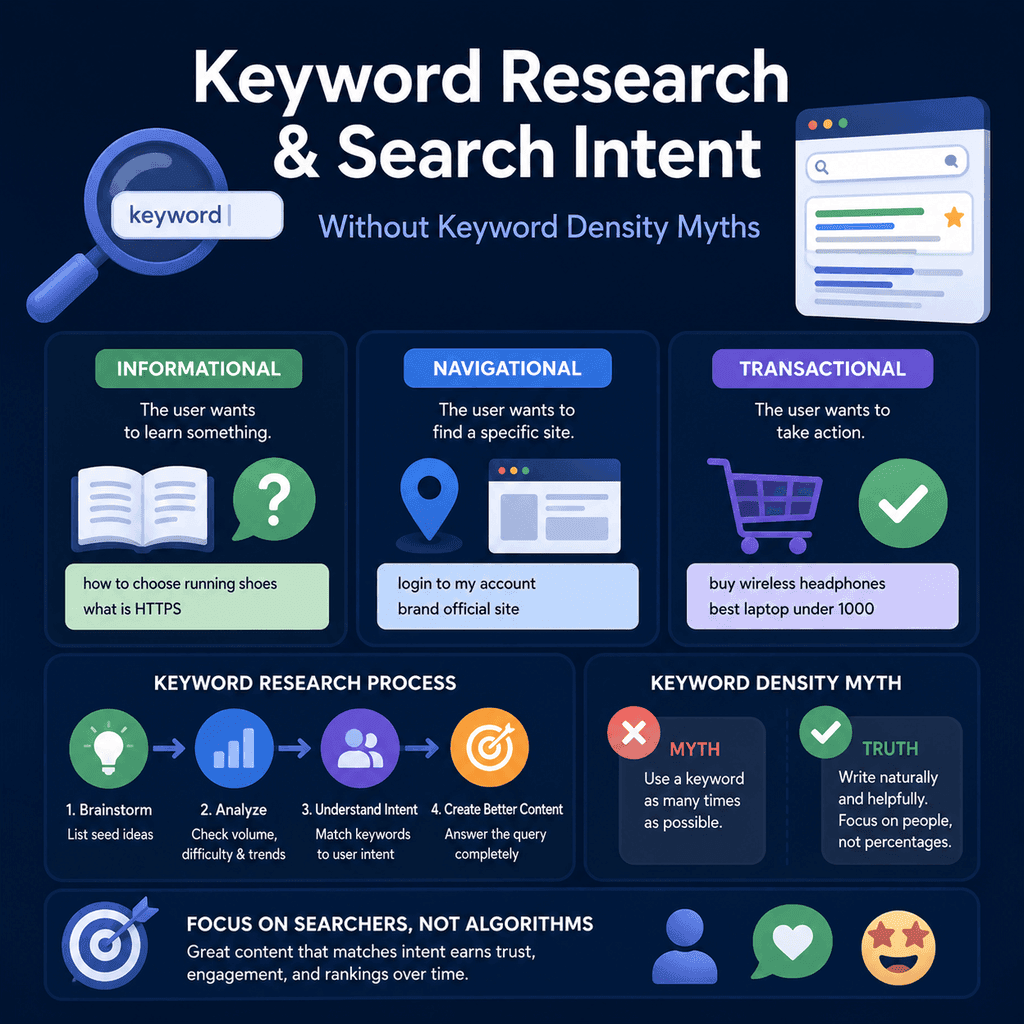
Some advice makes it sound as if SEO is mainly about choosing one phrase, repeating it a fixed number of times, and trying to hit a keyword-density target. That is not a reliable way to plan useful pages in 2026.
A better way to use keyword research is as evidence gathering. Search queries can show what people are trying to do, what language they use, what kind of page they expect, and where they may be in the buying journey.
This guide explains how to use keyword research and search intent without relying on keyword-density myths, exact-match repetition, or oversimplified “one keyword per page” rules.
Keyword research is not just a list of phrases to place into a page. It is a way to understand demand.
Good keyword research helps answer questions such as:
- What is the person trying to solve?
- Are they looking for information, a service, a local provider, a comparison, or proof?
- What words do they naturally use?
- What type of page would satisfy the search?
- How close are they to contacting, buying, booking, or requesting a quote?
- What should this page explain that competing pages often miss?
Google’s own SEO guidance is not built around keyword-density targets. It says site owners should help search engines understand content, use words people would naturally use to find the page, and create helpful, reliable, people-first content. That is a much stronger foundation than trying to force a phrase into a page a certain number of times.
Why Keyword-Density Thinking Is a Problem
Keyword density is the percentage of words on a page that match a target phrase.
For example, if a page has 1,000 words and a phrase appears 20 times, someone might say the density is 2%.
The problem is not that word choice is irrelevant. The problem is pretending there is a universal percentage that makes a page rank. That kind of thinking often leads to unnatural copy, repeated phrases, weak page structure, and content that sounds like it was written for a machine instead of a person.
Google’s spam policies describe keyword stuffing as the practice of filling a page with keywords or numbers in an attempt to manipulate rankings. Repeating a phrase because a spreadsheet told you to hit a target density is not the same as writing a clear page that answers a customer’s question.
Important words should still appear on the page. The page title, main heading, introduction, useful subheadings, image alt text where relevant, and internal link text can all help explain what the page is about. But the purpose is clarity, not repetition for its own sake.
What to Use Instead
Use keyword research to build a picture of the searcher.
A query is evidence. It may suggest a problem, a goal, a level of knowledge, a preferred format, or a decision stage.
For example:
| Search pattern | What it may suggest | Better page approach |
|---|---|---|
| “how much does web design cost” | The user is researching budget, scope, and expectations. | A pricing guide or service page section explaining cost factors clearly. |
| “web designer near me” | The user likely wants a local provider and may be close to making contact. | A strong service or location page with local proof, service details, and clear contact options. |
| “wordpress vs shopify for small business” | The user is comparing options and wants help making a decision. | A comparison page that explains trade-offs honestly. |
| “website redesign case study” | The user wants proof, examples, and evidence of competence. | A case study showing the starting problem, work done, reasoning, and outcome. |
The phrase matters, but the job behind the phrase matters more.
Search Intent in Plain English
Search intent means the purpose behind a search.
A well-known information retrieval distinction separates many web searches into informational, navigational, and transactional goals. Informational searches are about learning something. Navigational searches are about finding a specific site, brand, or page. Transactional searches are about doing something, such as buying, booking, downloading, comparing, or contacting.
Those categories are useful, but in real SEO work they are only a starting point. A small business owner does not usually need to label every keyword perfectly. They need to understand what the person probably needs next.
For small business SEO, ask:
- Do they need an explanation?
- Do they need a service provider?
- Do they need a local page?
- Do they need a comparison?
- Do they need reassurance?
- Do they need pricing context?
- Do they need proof that the business can do the work?
Search intent should guide the page format, not just the wording of the title.
Intent Is Not Always One Simple Label
Many searches carry mixed intent.
Someone searching “best website platform for trades business” may want information, comparison, reassurance, and a buying path. Someone searching “web design Manchester” may want a local provider, examples of work, service details, pricing context, and proof of trust.
Do not force every query into a single simplistic bucket. Instead, look at the likely task.
A useful page often satisfies the primary intent and supports the next likely question. That does not mean every page should answer everything. It means the page should be complete enough that the visitor can make progress without immediately returning to the search results.
User Language Matters
Keyword research shows how people describe their problems.
A business may say “conversion-focused website design”. A customer may say “website that gets more enquiries”. A developer may say “technical SEO migration”. A small business owner may say “keep my Google rankings when I launch a new website”.
Good SEO copy often connects expert language with customer language.
That does not mean dumbing the page down. It means using words people recognise, then explaining the topic accurately. A page can be accessible to a novice and still be technically sound for an advanced reader.
Keyword Research as Evidence Gathering
Treat each useful query as evidence about one or more of these areas:
- Problem: What issue is the user trying to solve?
- Language: What words do they use?
- Expectation: What kind of page are they likely hoping to find?
- Stage: Are they learning, comparing, validating, or ready to act?
- Objection: What worry might stop them from contacting or buying?
- Proof need: What evidence would make the page more trustworthy?
This turns keyword research into a content planning process rather than a repetition exercise.
Where Search Volume Fits
Search volume can be useful, but it should not control every decision.
A phrase with high search volume may be broad, competitive, and vague. A lower-volume phrase may show clearer intent and be more valuable for a specific business.
For example, “SEO” is broad. “technical SEO checklist before website launch” is narrower, but the intent is clearer. For a service business, the narrower query may be easier to satisfy with a genuinely useful page.
Use volume as one signal, not the only signal. A keyword that brings ten qualified enquiries can be more commercially useful than a broad keyword that brings thousands of visits from people who were never likely to buy, book, call, or request a quote.
Where Google Trends Fits
Google Trends can help compare search interest patterns across time, locations, and related topics. It is useful for spotting seasonality, terminology changes, and broad demand shifts.
However, it should not be treated as a complete keyword database. Google Trends data is normalised, and Google explains that Trends uses a sample of searches. That means it is useful for comparing relative interest, but it is not the same thing as exact search volume.
Google Trends also does not replace Search Console, customer conversations, internal site search, sales questions, support emails, analytics data, or manual review of search results.
Use it to understand patterns, not to manufacture content for every trending phrase.
Do Not Build One Page for Every Phrase
The “one keyword per page” rule is too simplistic.
Sometimes one page can naturally cover a topic and several related query variations. For example, a service page about “website maintenance” can reasonably cover “website support”, “WordPress maintenance”, “security updates”, “backups”, and “monthly website care” if those ideas belong together.
Other times, different intents deserve different pages. “Website maintenance pricing” may need a pricing section or pricing guide. “Emergency WordPress support” may need a separate urgent-service page. “What is website maintenance?” may need an informational guide.
The question is not “Is this a separate keyword?” The better question is “Would a separate page better satisfy a different task?”
How to Decide Whether a Query Needs Its Own Page
A query may deserve its own page when:
- the user’s goal is clearly different
- the expected page format is different
- the buying stage is different
- the page needs different proof, examples, or calls to action
- combining the topic would make the page unfocused
- the query represents a distinct service, product, location, or comparison
A query may belong inside an existing page when:
- it is a natural subtopic
- it answers a supporting question
- it uses different wording for the same need
- it does not require a different page format
- it would create a thin page if separated
Page Format Is Part of Intent
Search intent is not just the topic. It is also the format the user expects.
Some queries are best answered by a service page. Others need a guide, comparison, FAQ, case study, pricing explanation, tool, checklist, or local landing page.
If the format is wrong, the page can feel unhelpful even if it uses the right words.
Service Pages
A service page should explain what the service is, who it is for, what problems it solves, what is included, and what the next step is.
Good keyword research for service pages should identify:
- the main service language people use
- common problems that lead someone to need the service
- questions about price, process, timing, and deliverables
- trust signals users may need before enquiring
- related services that should be linked internally
A weak service page says “we provide professional services” in different ways. A strong service page helps the visitor decide whether the service fits their situation.
Location Pages
Location pages should not be copied templates with only the place name changed.
If a page targets a location, it should be useful for people in that location. That may include the services available there, local context, practical travel or service-area details, relevant proof, local examples, and clear contact options.
A page that exists only to repeat a town or city name is not a strong content strategy. If many near-identical pages are created mainly to capture traffic from different location searches, they can drift toward doorway-style behaviour. Google’s spam policies explicitly warn against doorway pages created to rank for similar searches while sending users to substantially similar destinations.
Comparison Pages
Comparison pages help users choose between options.
They work best when they are honest about trade-offs. A useful comparison page might cover:
- who each option suits
- cost differences
- maintenance requirements
- setup complexity
- limits and risks
- decision criteria
- clear recommendations for different situations
Comparison pages should not pretend every answer points to the same product or service. If the page is biased, users can usually tell.
Informational Guides
Informational guides help users understand a topic before they are ready to act.
They are useful when keyword research shows questions such as:
- “what is…”
- “how does…”
- “why does…”
- “how much…”
- “how long…”
- “what happens if…”
A guide should explain the topic clearly enough that the reader feels more confident. It can link to relevant service pages, but it should not be a disguised sales page with a thin introduction.
FAQs
FAQs are useful when they answer real questions.
They are weak when they are used as a dumping ground for keyword variants.
A good FAQ answer should be specific, direct, and helpful. If a question needs a long explanation, it may deserve a full guide or a dedicated section on a service page.
Case Studies
Case studies support trust.
They are especially useful when users need proof that a service provider can solve a real problem. A good case study explains:
- the starting situation
- the problem or constraint
- the work done
- the reasoning behind important choices
- the outcome
- what a similar client can learn from it
Keyword research can reveal what types of proof matter, but the strength of a case study comes from real detail.
Problem-Aware Landing Pages
Some users are aware of a problem but do not yet know the solution.
For example, they may search for “why has my website traffic dropped after launch” rather than “technical SEO migration service”.
A problem-aware page can explain the issue, possible causes, warning signs, and next steps. It can then introduce the relevant service naturally, after the reader understands the problem.
This type of page should be careful and accurate. Do not exaggerate risks just to create urgency.
Search Results Are Evidence Too
Manual review of search results can help you understand what Google currently considers useful for a query.
Look for:
- the types of pages appearing
- whether results are local, informational, commercial, or mixed
- the depth of content
- common subtopics covered
- questions shown in related features
- whether results are guides, service pages, directories, tools, videos, product pages, or local listings
Do not simply copy the top results. Use them to understand expectations, then create something clearer, more useful, and better matched to your audience.
How to Map Keywords to Pages
A practical keyword map should connect search demand to page purpose.
| Page type | Typical query evidence | Main job of the page |
|---|---|---|
| Service page | Service terms, problem terms, provider terms. | Explain the service and encourage a qualified enquiry. |
| Location page | Service plus place terms, “near me” behaviour. | Show local relevance and service availability. |
| Comparison page | “vs”, “best”, “alternative”, “which is better”. | Help the user make a choice. |
| Guide | “what”, “how”, “why”, “explained”, “checklist”. | Teach the topic and answer the full question. |
| FAQ section | Specific short questions. | Answer supporting concerns quickly. |
| Case study | Proof, examples, results, project-type queries. | Demonstrate experience and credibility. |
| Problem-aware landing page | Symptom, risk, troubleshooting, concern queries. | Explain the problem and introduce suitable next steps. |
This is much more useful than a spreadsheet that only says “target keyword”.
Titles and Meta Descriptions Still Matter, But Not in the Same Way
Title links and snippets help users decide whether a result is worth clicking.
Page titles are important because they help describe the content of the page. Google’s title link guidance recommends clear, concise, descriptive title text, although Google may generate a different title link in search results if it thinks another source better represents the page.
Meta descriptions need more careful explanation. A meta description is not a magic ranking lever. Writing a meta description does not automatically make a page rank higher.
However, meta descriptions can still matter because they may be used as search result snippets. Google says snippets are primarily created from page content, but Google may use the <meta name="description"> element when it gives users a more accurate description of the page. A good snippet can influence whether a person chooses to click your result, so meta descriptions can affect search performance through relevance, clarity, and click-through behaviour rather than by directly forcing rankings upward.
A good page title should describe the page accurately. A good meta description should summarise why the page is useful.
Weak title:
SEO SEO Services SEO Expert SEO Agency
Better title:
SEO Services for Small Business Websites
Weak meta description:
SEO, SEO services, SEO expert, SEO company, SEO help, SEO agency.
Better meta description:
Practical SEO support for small business websites, including technical checks, content planning, local visibility, and launch protection.
The better versions are clearer for people. They also make it easier for search engines to understand the page without relying on keyword stuffing.
URL Structure Should Be Clear, But It Does Not Need to Carry the Whole Site Hierarchy
Google recommends simple, descriptive URLs that use readable words and hyphens between words where possible. That does not mean every article URL must include every category and subcategory.
For many WordPress sites, a clean post-name URL can be a sensible choice:
/keyword-research-search-intent/
A category-based URL can also be acceptable:
/seo/keyword-research-search-intent/
Neither structure is automatically superior in isolation. The better choice depends on the site. If categories are stable and genuinely useful to users, including them can be fine. If categories may change, or if posts naturally belong to more than one section, a shorter post-name structure is often more durable.
Search engines can understand page relationships through internal links, breadcrumbs, navigation, XML sitemaps, structured data, and the content itself. The URL is only one signal among many.
Breadcrumbs and Structured Data Can Support Site Understanding
Breadcrumbs help users understand where a page sits within a website. They also help users move back up the site hierarchy.
Breadcrumb structured data can help Google categorise page information in search results, provided the markup represents visible page content and follows Google’s structured data guidelines.
Structured data should not be used to describe something that is not actually present on the page. It should reflect the real page, not an invented version of the page created only for search engines.
Internal Links Help Clarify Page Relationships
Keyword research can show which pages belong together.
For example, a guide about website launch SEO can link to:
- a technical SEO service page
- a website redesign service page
- a case study about a migration
- a checklist about redirects and indexing
Internal links should help users move to the next useful page. Avoid adding links only because you want to force exact-match anchor text into a paragraph.
Good internal linking is usually practical and editorial. It answers the question: “What would the reader reasonably need next?”
Content Quality Is More Than Word Count
Google’s helpful content guidance encourages content that is useful, reliable, people-first, and created to benefit users rather than to manipulate search rankings.
A page should be as long as it needs to be to do its job well. Some pages need a short, direct answer. Others need examples, comparison tables, process explanations, FAQs, evidence, and proof.
The better question is: after reading the page, can the user make progress?
For a small business website, that may mean the reader understands the service, knows whether it fits their situation, trusts the business enough to enquire, and can easily take the next step.
How to Avoid Keyword Stuffing While Still Being Clear
You do not need to avoid important terms. You need to use them naturally.
Good pages usually include:
- a clear title
- a direct introduction
- headings that describe real sections
- natural language variations
- answers to related questions
- examples and evidence
- internal links to relevant next steps
They do not need:
- repeated exact-match phrases in every heading
- lists of towns with no useful local detail
- awkward phrases forced into sentences
- near-duplicate pages for every tiny keyword variation
- hidden text or content written only for search engines
A Practical Research Workflow
Use this workflow when planning a page.
1. Start with the business goal
Decide what the page is meant to support. Is it meant to win enquiries, explain a service, support an existing customer question, compare options, or build trust?
2. Gather query evidence
Collect search queries from reliable places where possible: Search Console, Google Trends, customer questions, sales calls, internal site search, support emails, and manual search result review.
3. Group by intent
Group queries by task, not just by shared words.
For example, “cost”, “pricing”, and “how much” queries may belong together even when the wording differs.
4. Choose the page format
Decide whether the intent needs a service page, location page, guide, FAQ, case study, comparison page, or problem-aware landing page.
5. Define the page promise
Write one sentence explaining what the page will help the user do.
For example: “This page helps small business owners understand what affects website redesign cost and what they should budget for before requesting a quote.”
6. Plan the evidence
Decide what proof, examples, screenshots, case studies, process details, credentials, data, or explanations the page needs.
7. Write naturally
Use the language from your research, but write for the person reading the page. If a phrase sounds unnatural, rewrite the sentence.
8. Review the page against the search task
Ask whether the page fully satisfies the likely intent. If the user would still need to search again immediately, the page probably needs improvement.
Example: Turning Keywords into a Service Page
Suppose a business offers website maintenance.
Keyword research may reveal phrases such as:
- website maintenance service
- WordPress maintenance
- website security updates
- website backup service
- monthly website support
- how much does website maintenance cost
A keyword-density approach would repeat “website maintenance service” many times.
An intent-led approach would build a service page that explains:
- what website maintenance includes
- why updates, backups, and security checks matter
- who the service is for
- what is included monthly
- what is not included
- how support requests work
- pricing or pricing factors
- related services
- how to enquire
That page can naturally include the relevant language without awkward repetition.
Example: Turning Keywords into a Comparison Page
Suppose research shows people compare WordPress and Shopify.
A useful comparison page should not simply repeat “WordPress vs Shopify” throughout the copy. It should help people choose.
It might compare:
- ease of editing
- ownership and flexibility
- ecommerce features
- maintenance needs
- cost structure
- design flexibility
- who each option suits
The page should be structured around decision criteria, not density.
Example: Turning Keywords into a Location Page
Suppose research shows searches for a service in a specific town or region.
A weak location page swaps the town name and repeats the service phrase.
A stronger location page explains:
- which services are available in that area
- who the business commonly helps there
- local proof, projects, or relevant context
- how the service is delivered
- clear contact details
- nearby areas served, where genuinely relevant
The goal is local usefulness, not city-name repetition.
Signs a Page Is Search-Engine-First
Review the page for warning signs:
- the same phrase appears unnaturally often
- headings are written for keywords instead of readers
- the page exists only because a keyword tool found a phrase
- the content repeats what every competitor says
- there is little evidence, explanation, or practical detail
- the page promises an answer but does not fully answer it
- location or service pages are near-duplicates
- the reader would need to return to search results to get the real answer
If several of these are true, the problem is not keyword density. The problem is usefulness.
Signs a Page Is People-First
A people-first page is usually clearer and more complete.
It tends to:
- state who the page is for
- answer the main question directly
- use natural language
- explain trade-offs where relevant
- include evidence, examples, or experience
- link to useful next steps
- avoid exaggerated claims
- help the reader make a decision or understand the issue
This is the kind of content keyword research should support.
What to Measure After Publishing
After publishing or improving a page, monitor evidence rather than guessing.
Useful signals include:
- Search Console queries and impressions
- click-through rate for relevant queries
- which pages attract relevant search visibility
- enquiries, bookings, calls, or form completions
- engagement with important page sections
- customer questions before and after publication
- whether the page needs clearer next steps
Search Console’s Performance report can show clicks, impressions, click-through rate, average position, and queries that bring users to your site. That makes it useful for reviewing whether a page is attracting relevant search visibility, not just whether one exact target phrase improved.
Do not judge a page only by whether one exact phrase improved. A strong page may earn visibility for a cluster of related queries.
Common Mistakes
Mistake one: chasing density. A fixed keyword percentage does not prove the page is useful.
Mistake two: one exact keyword per page. Some topics naturally include many related phrases. Some distinct intents need separate pages. Decide by user task, not phrase count.
Mistake three: copying search results. Search results help you understand expectations. They are not a template to rewrite.
Mistake four: making every page commercial. Some users need education before they are ready to enquire. Informational guides can be valuable when they are genuinely useful.
Mistake five: creating thin location pages. Local pages need real local usefulness, not only place-name substitution.
Mistake six: ignoring proof. For services, examples, case studies, process detail, credentials, and clear contact routes often matter as much as wording.
Mistake seven: treating meta descriptions as ranking buttons. Meta descriptions can help when they are used as snippets and encourage the right users to click, but they do not automatically make a page rank higher.
A Better Keyword Research Checklist
Before writing a page, answer these questions:
- What problem, task, or decision does this search represent?
- What language does the audience naturally use?
- What page format would best satisfy the search?
- Where is the user in the buying journey?
- What would make the page trustworthy?
- What related questions should be answered?
- What should the user do next?
- Which existing pages should this page link to?
- Does this need a separate page, or should it support an existing page?
- Would the page still be useful if search engines did not exist?
Evidence and Source Quality
SEO advice varies widely in quality. Some of it is based on official documentation, research, and direct measurement. Some of it is based on anecdotes, outdated tests, sales material, or repeated claims that were never well evidenced.
For important SEO decisions, use the strongest available sources first:
- Official search engine documentation, especially Google Search Central and Search Console documentation.
- Primary data from your own site, such as Search Console, analytics, enquiries, call tracking, sales questions, and customer support records.
- Peer-reviewed or academically credible information retrieval research where the topic is about search behaviour or user intent.
- Careful manual review of current search results, used as observational evidence rather than as something to copy.
Be more cautious with generic SEO blog posts, news articles, social media threads, and tool-provider claims. They can still be useful, but they should not be treated as the same standard of evidence as official documentation, primary site data, or academic research.
Useful Sources for Further Reading
- Google Search Essentials
- Google SEO Starter Guide
- Google: Creating helpful, reliable, people-first content
- Google Search spam policies
- Google: Control your snippets in search results
- Google: Influencing title links in search results
- Google: URL structure best practices
- Google: Breadcrumb structured data
- Google Search Console: Performance report
- Google Trends data FAQ
- Broder, A. (2002). A taxonomy of web search. SIGIR Forum.
- Rose, D. E. & Levinson, D. (2004). Understanding user goals in web search. Proceedings of WWW 2004.
Quick Summary
Keyword research should not be treated as a keyword-density exercise.
Use it to understand what users are trying to do, what words they use, what format they expect, and where they are in the buying journey.
Service pages, location pages, comparison pages, guides, FAQs, case studies, and problem-aware landing pages all serve different jobs. The right page format depends on the intent behind the query.
Avoid exact-match repetition, keyword stuffing, thin pages, and the idea that every keyword needs its own separate page.
Use meta descriptions properly: they may help searchers understand and choose your result when used as snippets, but they should not be described as a direct ranking shortcut.
The main idea is this: write pages that satisfy real search tasks. Use keywords as evidence, not as a formula.