
Introduction
A website redesign can improve a business, but it can also damage search visibility if the launch is handled casually.
The risk is not usually a mysterious algorithm problem. Most redesign traffic losses come from practical changes that break the relationship between the old site and the new one: URLs change without redirects, important pages are removed, internal links point to dead pages, canonical tags point to the wrong version, staging noindex rules remain live, or tracking is not checked until after enquiries have dropped.
Google’s documentation on site moves with URL changes explains that URL changes should be managed carefully to minimise negative impact on Search. That is the right framing for a redesign. The design can change, the technology can change, and the site can look better, but the launch still needs a controlled migration plan.
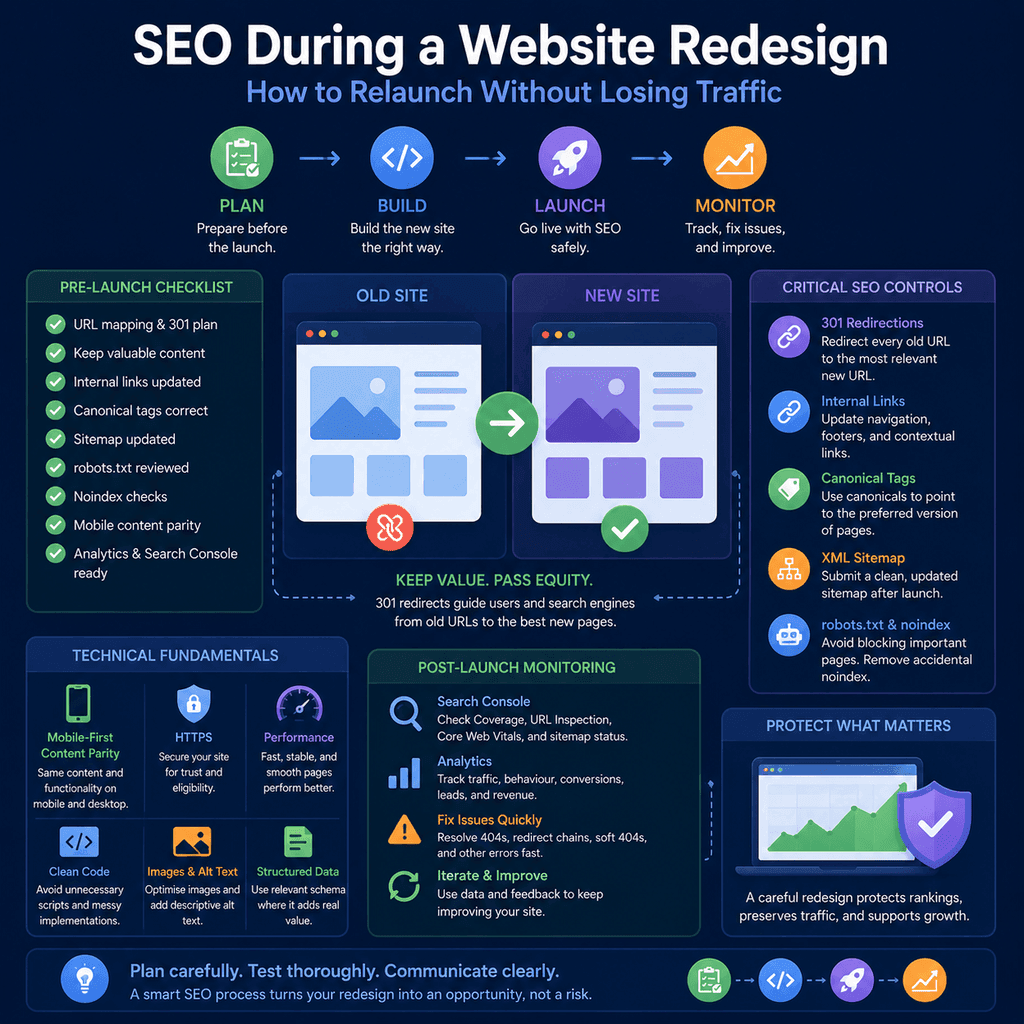
This guide explains the main SEO controls to check before, during, and after a website redesign: URL mapping, 301 redirects, internal links, canonical tags, sitemap updates, robots.txt, noindex checks, mobile content parity, analytics, Search Console verification, and post-launch monitoring.
Why Redesigns Can Damage SEO
Search engines build an understanding of a website over time. They discover URLs, crawl pages, process links, select canonical versions, index useful content, and learn which pages are relevant for different searches.
A redesign can change many of those signals at once. The site may move to a new CMS. Page URLs may change. Navigation may be rebuilt. Content may be shortened to fit a new design. Old blog posts may be deleted. The mobile layout may hide important content. The live site may accidentally inherit settings from staging.
None of those changes is automatically bad. The problem is unmanaged change. When search engines and users request old URLs, they need clear routes to the new equivalent pages. When important pages still exist, they need to remain crawlable, indexable, internally linked, and useful.
Think of a redesign as a controlled handover rather than a visual refresh. The new site should preserve what was already working and improve what was weak.
Start with a URL Inventory
Before building the new site structure, create a list of the current website’s important URLs.
This inventory is the foundation of the redesign SEO plan. Without it, pages can disappear by accident. A service page that brings enquiries, a guide that earns organic visits, or a page with useful backlinks may be missed because it is not prominent in the new design brief.
A practical URL inventory should include:
- the current URL;
- the new URL, if it will change;
- the page type, such as service, product, category, guide, location, or contact page;
- whether the page should remain live;
- whether the page should remain indexable;
- the closest new destination if the old URL is being removed;
- notes about important content that should be preserved or improved;
- available performance data, such as organic visits, enquiries, or conversions;
- known backlinks or important internal links where available.
For a small brochure site, this can be a simple spreadsheet. For a larger site, it may need exports from the CMS, analytics platform, Search Console, sitemap files, backlink tools, and a crawler.
Map Old URLs to New URLs
URL mapping is the process of deciding what happens to every important old URL when the new site launches.
The most important rule is relevance. If an old page has a clear replacement, it should redirect to the closest equivalent new page. Do not redirect every old URL to the homepage just because it is easy. A user looking for a specific service, guide, category, or product should land on the most relevant replacement.
A simple redirect map might look like this:
| Old URL | New URL | Reason |
|---|---|---|
/boiler-service/ |
/services/boiler-servicing/ |
Closest new service page. |
/emergency-callouts/ |
/services/emergency-plumbing/ |
Updated page for the same urgent service. |
/about-us/ |
/about/ |
Same page purpose, cleaner URL. |
/blog/home-heating-checklist/ |
/resources/home-heating-checklist/ |
Useful guide retained under a new resources section. |
This document should be prepared before launch, not written under pressure after broken links have already appeared.
If there is no close replacement and the old content is genuinely gone, a true 404 or 410 response can be more honest than a misleading redirect. However, high-value pages should not be removed lightly. If the page had search traffic, enquiries, backlinks, or customer value, consider improving and migrating it rather than deleting it.
Use 301 Redirects for Permanent URL Changes
A redirect tells users and search engines that a URL has moved. Google’s redirect documentation explains that redirects are useful when content has moved to a new location.
For a normal redesign where an old URL has permanently changed to a new URL, a 301 redirect is usually the appropriate redirect type. Temporary redirects have different meanings and should not be used for permanent moves.
A simple redirect instruction may look like this, depending on the server setup:
Redirect 301 /boiler-service/ /services/boiler-servicing/Redirect 301 /emergency-callouts/ /services/emergency-plumbing/The exact implementation depends on the hosting environment, CMS, server, plugin, framework, or edge platform. The important point is not the specific syntax. The important point is that every important old URL should have a clear, tested destination.
After launch, test redirects directly. Confirm that old URLs resolve to the correct new pages, do not create redirect chains, and do not land on irrelevant pages.
Avoid Redirect Chains and Loops
A redirect chain happens when one URL redirects to another URL, which then redirects again.
/old-service/ -> /new-service-temp/ -> /services/new-service/The cleaner version is direct:
/old-service/ -> /services/new-service/Redirect chains make the user journey slower and create more points of failure. Redirect loops are worse because the page never resolves correctly.
Before launch, test the redirect map in staging where possible. After launch, crawl the old URL list and check that each URL returns the intended final destination.
Preserve Crawlable Internal Links
Internal links help users and search engines find important pages. Google’s link best practices explain that links should be crawlable so Google can discover pages through them.
During a redesign, internal links often break because page slugs change, menus are rebuilt, old blog links are not updated, or interface components are replaced with JavaScript-driven controls.
Use normal links for important navigation and page-to-page links:
<a href=”/services/boiler-servicing/”>Boiler servicing</a>Avoid relying on elements that only behave like links after JavaScript handles a click:
<button data-url=”/services/boiler-servicing/”>Boiler servicing</button>The second example may be usable in a browser if the JavaScript works, but it is not the clearest crawlable pattern for core site architecture.
After launch, internal links should point to the final new URLs, not old URLs that then redirect. Redirects are useful for external links, bookmarks, and old search results, but the new website should link cleanly to its own final destinations.
Check Canonical Tags
A canonical tag helps indicate the preferred version of a page when similar or duplicate URLs exist. Google’s canonical documentation explains that canonical signals can help Google choose the representative URL.
A self-referencing canonical on a live service page might look like this:
<link rel=”canonical” href=”https://www.example.com/services/boiler-servicing/”>Canonical tags are especially important to check during redesigns because templates are often copied from staging. Common mistakes include:
- canonical tags pointing to staging URLs;
- canonical tags pointing to the old domain or old URL structure;
- every page canonicalising to the homepage;
- service pages canonicalising to a generic parent page;
- HTTP canonicals on a site that should use HTTPS;
- canonical tags contradicting redirects or internal links.
Canonicals are not a substitute for proper redirects. If a URL has permanently changed, use a redirect. Use canonical tags to clarify preferred versions where duplicate or very similar pages can be reached through multiple URLs.
Check Robots.txt Before Launch
A robots.txt file tells crawlers which URLs they may access. Google’s robots.txt documentation is clear that robots.txt is mainly for crawler access management, not for keeping private pages out of Google.
During development, a staging site may use a rule like this:
User-agent: *Disallow: /That can be appropriate for a staging environment, but it is dangerous if pushed to the live website. It tells compliant crawlers not to crawl the site.
A live site usually needs a more careful robots.txt file. For many small business websites, it should be simple and should not block important public pages, CSS, JavaScript, or images needed to understand the page.
User-agent: *Disallow: /wp-admin/Allow: /wp-admin/admin-ajax.php Sitemap: https://www.example.com/sitemap.xmlThe exact rules depend on the CMS and site architecture. The launch check is simple: confirm that important public pages and resources are not blocked.
Remove Accidental Noindex Rules
The noindex directive tells search engines not to index a page. Google’s noindex documentation explains that it can be implemented with a robots meta tag or an HTTP header.
A page-level noindex tag looks like this:
<meta name=”robots” content=”noindex”>An HTTP header version can look like this:
X-Robots-Tag: noindexNoindex is useful when intentional. It can be appropriate for some thank-you pages, internal search results, private utility pages, or thin system-generated pages.
The redesign risk is accidental noindex. Development sites are often set to noindex during the build, then the setting remains active after launch. A page can look normal to users and still be excluded from search because of a meta tag or response header.
Before launch, check the homepage, service pages, product pages, category pages, location pages, key guides, and any page that should attract search visits. After launch, use Search Console and direct page checks to confirm that the important pages are indexable.
Do not block a page in robots.txt if you need Google to crawl the page and see its noindex directive. If Google cannot crawl the page, it cannot read the noindex instruction.
Update the XML Sitemap
An XML sitemap helps search engines discover the URLs you want them to know about. Google’s sitemap guidance explains that the sitemap should list the canonical URLs you prefer to show in search results.
After a redesign, the sitemap should not be a mixture of old and new URLs. It should list clean, final, canonical, indexable URLs.
Before submitting the sitemap, check that it does not include:
- old URLs that now redirect;
- 404 pages;
- staging URLs;
- blocked URLs;
- noindex URLs;
- duplicate parameter versions;
- non-canonical URLs;
- thin test pages or template pages.
For most CMS websites, the sitemap is generated automatically. That does not mean it is automatically correct. Check the generated sitemap after launch and submit it in Search Console if appropriate.
A sitemap can help discovery, but it does not replace internal links. Important pages should still be reachable through normal navigation, hub pages, contextual links, or other crawlable internal links.
Keep Mobile and Desktop Content Aligned
Google’s mobile-first indexing guidance recommends keeping important content and metadata equivalent across mobile and desktop versions.
This matters during redesigns because mobile layouts are often simplified. Designers may hide paragraphs, remove sections, shorten service descriptions, or collapse content in ways that make the mobile page less useful than the desktop page.
Collapsing content for usability is not automatically a problem. Removing useful content from the mobile version can be a problem.
Check that mobile pages still include:
- the same primary service or product information;
- important headings and explanatory copy;
- clear contact options and calls to action;
- important internal links;
- title elements and meta descriptions equivalent to desktop;
- structured data where relevant;
- image alt text where the image communicates meaning.
A redesign should make the mobile experience clearer, not thinner.
Do Not Remove Useful Content Just to Make the Design Cleaner
Redesigns often reduce page copy because shorter pages can look cleaner in mockups. That can be sensible when the old content is repetitive, outdated, or unhelpful. It can be harmful when useful explanations are removed.
Google’s guidance on helpful, reliable, people-first content focuses on creating content that benefits people. For service businesses, that often means answering practical questions clearly.
Before cutting content, ask whether it helps a visitor understand:
- what the service includes;
- who the service is for;
- what problems it solves;
- what the process looks like;
- what evidence supports trust;
- where the service is available;
- what the visitor should do next.
Design and content should work together. A stronger redesign often reorganises useful content rather than deleting it.
Verify Analytics Before and After Launch
Tracking should not be treated as a post-launch afterthought. If analytics are missing or broken, it becomes harder to know whether traffic, enquiries, and sales changed because of the redesign or because measurement failed.
Google Analytics uses events to measure user interactions, and its GA4 events documentation explains how recommended and custom events can be configured for website behaviour. For a business website, the important measurements usually include enquiries, form submissions, phone clicks, booking starts, purchases, quote requests, or other actions that represent real business value.
A simple event example might look like this:
gtag(‘event’, ‘generate_lead’, { method: ‘contact_form’});The exact implementation depends on the analytics setup, consent requirements, tag manager configuration, and website platform. The principle is stable: decide what matters before launch, test tracking during staging where possible, and verify it immediately after launch.
At minimum, check:
- the analytics tag is present on all important templates;
- page views are being recorded;
- contact forms trigger the intended event;
- phone links and email links are tracked where appropriate;
- booking, checkout, or enquiry funnels still work;
- internal team visits are filtered or interpreted sensibly;
- consent settings are implemented correctly for the relevant jurisdiction.
Verify Search Console Access
Search Console is essential during a redesign because it shows how Google sees the site. Google’s URL Inspection tool can show information about a specific URL, including indexability, crawl details, rendered page information, and canonical information.
Before launch, make sure the correct people have access to the relevant Search Console property. If the domain, protocol, or hostname changes, confirm that the property setup still covers the live site.
After launch, use Search Console to check:
- whether important pages are indexable;
- whether Google can fetch and render key pages;
- whether Google-selected canonicals match expectations;
- whether submitted sitemap URLs are accepted;
- whether Page Indexing issues increase after launch;
- whether old important URLs are redirecting as expected;
- whether search performance changes are isolated to specific page types or queries.
The Page Indexing report is useful for monitoring broad indexing patterns. The URL Inspection tool is better for diagnosing individual high-value pages.
Run a Pre-Launch SEO Check
The pre-launch check should happen before the old site is replaced. It should not wait until the new design is already live.
Check the new site in staging or preview mode where possible. Some tests cannot be completed until the final live domain is active, but many problems can be caught early.
Pre-Launch Checklist
- The old site has been crawled or exported so important URLs are not lost.
- The new site has a clear page inventory.
- Every important old URL has a mapped destination.
- Important content has been migrated, improved, or deliberately consolidated.
- Navigation links use crawlable links.
- Internal links point to final planned URLs where possible.
- Canonical tags are correct and do not point to staging.
- No important public page has accidental noindex.
- Robots.txt will not block the live public site.
- The sitemap will contain final canonical URLs.
- Mobile pages contain the same important content as desktop pages.
- Analytics and key events are planned and testable.
- Search Console access is available to the right people.
- Contact forms, phone links, bookings, and checkout paths work.
Run a Launch-Day SEO Check
Launch day is when assumptions meet the live site. The goal is to catch serious problems quickly.
Do not only check the homepage. The homepage can work while service pages are noindexed, old URLs return 404s, or the sitemap lists staging URLs.
Launch-Day Checklist
- The live site returns successful responses for important pages.
- Old URLs redirect to their mapped new destinations.
- Redirects use the correct permanent or temporary status for the situation.
- No important redirect creates a chain or loop.
- The live robots.txt file is correct.
- Important pages do not contain accidental noindex tags or headers.
- Canonical tags point to the final live URLs.
- Internal links do not still point to staging URLs.
- The sitemap is live and lists final indexable URLs.
- The sitemap is submitted or resubmitted in Search Console where appropriate.
- Analytics is recording traffic.
- Important key events are firing.
- Contact forms, phone links, email links, and booking flows work on desktop and mobile.
Monitor After Launch
SEO protection does not end when the new site is live. Google needs to crawl and process the changes, users need to reach the right pages, and tracking needs to prove whether the redesign is supporting the business.
Monitor closely for the first few days, then continue checking for several weeks. Larger sites and bigger URL changes need longer monitoring. Google’s site-move documentation notes that significant changes can cause temporary ranking fluctuations while Google recrawls and reindexes the site.
Post-launch monitoring should include:
- crawl errors and 404s;
- unexpected noindex pages;
- unexpected canonical choices;
- redirect failures;
- sitemap errors;
- Search Console Page Indexing changes;
- organic clicks and impressions for important pages;
- rankings for business-critical queries where tracked;
- enquiries, leads, bookings, calls, and sales;
- mobile usability and performance problems;
- feedback from real users and staff.
Do not judge the redesign only by total traffic. A business website should be judged by whether the right users can find the right pages and complete meaningful actions.
Understand What Traffic Changes Mean
Some fluctuation after a redesign is not unusual, especially if many URLs, templates, internal links, or page layouts have changed. The important question is whether the changes are explainable and controlled.
A small temporary fluctuation while search engines process redirects is different from a sitewide indexing problem. A drop on a deleted low-value blog category is different from a drop on a core service page. A traffic drop with stable enquiries may have a different business impact from a smaller traffic drop that removes the most valuable leads.
When reviewing post-launch performance, separate:
- branded traffic from non-branded traffic;
- homepage performance from service page performance;
- local pages from general pages;
- desktop from mobile where relevant;
- informational visits from enquiry-driving visits;
- measurement problems from real user behaviour changes.
The goal is not to panic at every movement. The goal is to identify preventable technical problems quickly and understand whether the redesign is helping the business.
Common Redesign SEO Mistakes
Most redesign SEO damage comes from avoidable mistakes. The following issues are common enough to deserve explicit checks.
Deleting Useful Pages Without a Plan
Removing old pages can be reasonable if they are outdated, duplicated, or no longer useful. Removing valuable pages without checking their traffic, links, and business value is risky.
Redirecting Everything to the Homepage
This is easy to implement but often poor for users. A specific old page should redirect to the closest relevant new page, not automatically to the homepage.
Leaving Staging Rules on the Live Site
Staging noindex tags, robots.txt blocks, staging canonical URLs, and staging internal links can all damage a launch.
Changing URLs Without Need
Clean URLs are useful, but every URL change creates migration work. If an existing URL is already clear, stable, and performing, changing it only for aesthetic reasons may add unnecessary risk.
Making Mobile Pages Thinner Than Desktop Pages
A simplified mobile design should still provide the important content, links, metadata, and calls to action that users need.
Checking Rankings but Not Leads
Search visibility matters, but the redesign should ultimately support business outcomes. Track enquiries, calls, bookings, purchases, and other meaningful actions, not only positions and traffic.
A Practical Redesign SEO Workflow
A controlled redesign does not need to be complicated, but it does need ownership.
Use this workflow as a practical sequence:
- Export or crawl the old site.
- Identify important pages from analytics, Search Console, business knowledge, backlinks, and customer value.
- Decide which pages stay, improve, merge, redirect, or retire.
- Create the redirect map.
- Build the new site with crawlable navigation and stable URL planning.
- Migrate useful content and metadata deliberately.
- Check canonicals, noindex rules, robots.txt, sitemap output, and mobile content parity.
- Verify analytics and business-value events.
- Launch the site and test high-priority pages immediately.
- Monitor indexing, redirects, traffic, and enquiries after launch.
- Fix issues quickly and document what changed.
This is not about making SEO a separate obstacle to design. It is about making sure the new website inherits the value the old site had already earned.
Evidence and Source Quality
SEO migration advice varies in quality. Some guidance is based on official documentation, repeatable technical behaviour, and real site data. Some is based on generic launch checklists or unsupported assumptions.
For redesign decisions, use strong sources first: Google Search Central documentation for site moves, redirects, crawlable links, canonicals, robots.txt, noindex, sitemaps, and mobile-first indexing; Search Console evidence from the actual site; Analytics and conversion data from the business; and crawl data from the old, staging, and live websites.
A good redesign SEO recommendation should identify the affected URL or template, explain the risk, specify the fix, and state how the fix will be tested after launch.
Final Thoughts
A redesign should not reset a website’s search visibility by accident.
The safest launches are planned around continuity. Important old URLs are mapped. Permanent moves use appropriate redirects. Internal links point to the right pages. Canonicals, sitemaps, robots.txt, and noindex rules are checked before launch. Mobile pages keep their useful content. Analytics and Search Console are verified. The site is monitored after launch, not abandoned once it looks correct.
For small business owners, the practical message is simple: a redesigned website should look better, work better, and preserve the search value that already exists. That only happens when SEO controls are included in the redesign process from the beginning.