
Introduction
A sudden drop in Google Search traffic can feel urgent. For a small business website, fewer visits can mean fewer enquiries, fewer bookings, fewer calls, and less confidence that the website is doing its job.
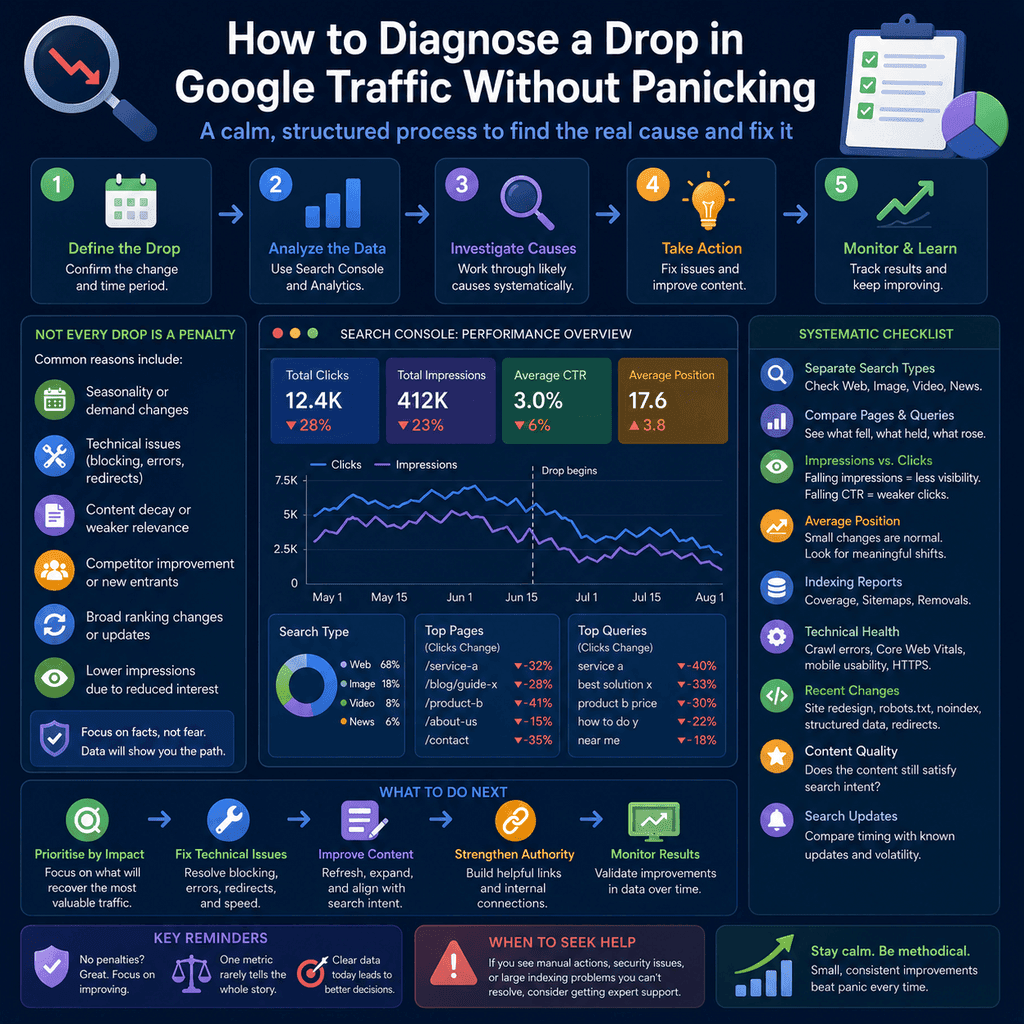
The first mistake is to assume the worst. Not every traffic drop is a penalty. A fall in organic search traffic can come from seasonality, lower search demand, tracking changes, technical errors, indexing changes, content becoming less competitive, competitors improving, changes in how search results are displayed, or a broad ranking-system update.
The useful response is not panic. It is diagnosis. This guide explains a structured way to investigate a drop in Google Search traffic using Search Console, indexing reports, technical checks, content review, demand context, and update timing.
Google has a dedicated guide to debugging drops in Google Search traffic. The main lesson is that traffic changes can have different causes, so the data needs to be separated before conclusions are drawn.
For website owners, the practical goal is to answer six questions:
- Did Google Search visibility drop, or did only recorded website visits drop?
- Did impressions fall, clicks fall, or both?
- Which pages and queries changed?
- Did indexing, crawling, redirects, or canonicalisation change?
- Did the site, content, tracking setup, competitors, or market demand change?
- Did the timing overlap with a known Google Search update?
Those questions keep the investigation grounded. They also reduce the risk of fixing the wrong thing.
Start With the Right Data Source
When diagnosing a Google traffic drop, start with Google Search Console, not only analytics software.
Analytics platforms are useful because they show website behaviour after a person arrives. They can show sessions, conversions, form submissions, purchases, engaged visits, and other business outcomes. But they can also be affected by cookie consent changes, tracking tags, browser privacy behaviour, analytics configuration, spam filtering, or changes to how events are recorded.
Search Console is different. It reports how your site performs in Google Search. The Search results Performance report shows data such as clicks, impressions, click-through rate, queries, pages, countries, devices, search type, and search appearance. That makes it the better first place to check whether the drop is actually a Google Search visibility issue.
Use analytics after that to answer the business question: did fewer search clicks lead to fewer enquiries, calls, bookings, sales, or other meaningful actions? Google’s guide to using Search Console and Google Analytics together explains why combining both sources gives a more complete view.
Do Not Mix Different Types of Search Traffic
Search Console can report different search surfaces and search types. A drop in web search is not the same as a drop in image search, video search, Discover, or Google News.
Before analysing the drop, separate the data. In the Performance report, check the relevant search type and avoid mixing unrelated traffic sources. For most small business websites, the first investigation usually starts with normal web search results. If the business relies heavily on images, videos, news, or Discover, those should be checked separately.
This matters because each traffic source behaves differently. A service page losing visibility in normal web search is a different problem from an image losing visibility in image search. If the data is mixed together, the diagnosis can become unclear.
Choose a Sensible Comparison Window
A traffic drop should be compared against a meaningful period.
Do not compare one unusually quiet day with one unusually busy day and assume there is a serious SEO problem. Daily search traffic naturally fluctuates. Weekends, holidays, school terms, weather, paydays, local events, business opening patterns, and industry seasonality can all change demand.
Start with these comparisons:
- the affected period compared with the previous equivalent period;
- the affected period compared with the same period last year, where seasonality matters;
- the weeks before and after any known website change;
- the dates around any known Google Search update, if the timing matches.
For example, a landscaping business, accountant, physiotherapy clinic, ecommerce shop, and wedding supplier may all have different seasonal patterns. A drop is only meaningful when it is compared against the right context.
Check Whether Impressions Dropped
Impressions show how often pages from the site appeared in search results. If impressions drop sharply, Google is showing the site less often.
That can happen for several reasons:
- fewer people are searching for the topic;
- pages have lost ranking positions;
- pages are no longer indexed;
- Google is choosing different pages from competitors;
- search results have changed shape;
- the site is affected by a technical or quality issue;
- the topic is seasonal, event-driven, or news-driven.
A drop in impressions is usually a visibility or demand problem. It does not automatically prove that the site has been penalised.
Check Whether Clicks Dropped But Impressions Stayed Similar
If impressions are stable but clicks drop, the site is still appearing in search results, but fewer people are clicking.
Possible causes include:
- average ranking positions changed slightly enough to reduce clicks;
- search results now include more competing features;
- the title link or snippet is less attractive or less relevant;
- a competitor now has a clearer or more useful result;
- the query has changed intent;
- brand demand is weaker even though the site still appears;
- more searchers find an answer without clicking any result.
This is why clicks and impressions should be read together. A click drop without an impression drop suggests a different investigation from a click drop caused by pages disappearing from the results.
Read Average Position Carefully
Average position is useful, but it is easy to misread.
Google’s documentation on impressions, position, and clicks explains that position is reported as the topmost position occupied by a link to your property or page, averaged across the queries where it appeared.
That means average position is not a simple fixed ranking. It can change because the same page moved down for one important query. It can also change because the page started appearing for many new long-tail queries where it ranks lower. In that second case, average position might look worse even though the page has gained wider visibility.
Use average position as a clue, not as a final diagnosis. Always check the specific pages and queries behind the average.
Find the Pages That Lost Traffic
The next step is page-level analysis.
In Search Console, open the Performance report and compare the affected period with a previous period. Then look at the Pages tab. Identify whether the drop is site-wide or concentrated on a small number of URLs.
There are two very different scenarios:
- One or a few pages dropped: investigate those URLs specifically. Check indexing, content changes, redirects, canonical tags, internal links, competitors, and query intent.
- Many unrelated pages dropped at the same time: investigate site-wide technical changes, tracking changes, server issues, manual actions, security issues, and possible broad ranking-system effects.
A site-wide diagnosis should not be based on one page. A page-specific diagnosis should not be treated as a site-wide crisis.
Find the Queries That Lost Visibility
After pages, check queries.
The Queries tab shows which searches generated impressions and clicks. Compare the affected period against the previous period and look for the queries that lost the most clicks or impressions.
Group the changed queries by intent:
- brand searches, such as people searching for the business name;
- service searches, such as people searching for a specific service;
- local searches, such as service plus location;
- informational searches, such as people asking a question;
- product or category searches;
- long-tail searches that only bring occasional visits.
This helps separate different problems. A drop in brand searches may reflect lower brand demand, advertising changes, reputation changes, offline business activity, or local awareness. A drop in non-brand service searches may suggest ranking competition, content quality, local relevance, or technical issues. A drop in a seasonal query may be normal for the time of year.
Check Whether the Drop Is Device, Country, or Location Specific
A real SEO problem is not always evenly distributed.
Use filters in Search Console to check whether the drop is stronger on mobile, desktop, a specific country, or a specific region. This is useful because some problems only affect part of the site experience.
For example:
- mobile traffic may drop if the mobile layout hides important content or links;
- traffic from one country may drop if the site changed language, location, hreflang, or service-area information;
- desktop and mobile may behave differently if search result layouts differ by device;
- local businesses may see different patterns across towns, cities, or service areas.
Segmentation prevents overgeneralisation. It is better to say “mobile clicks to three service pages dropped” than “SEO is broken”.
Inspect Indexing Reports
If important pages lost impressions, check whether Google still knows about them and whether they are indexed.
The Page indexing report shows the Google indexing status of URLs that Google knows about in the Search Console property. It can help identify patterns such as pages being excluded, redirected, blocked, duplicated, or not indexed.
For individual pages, use the URL Inspection tool. It can show whether a specific URL is indexed, whether Google can access it, what canonical URL Google selected, and whether there are page-specific issues.
For a traffic drop, inspect the URLs that lost the most impressions or clicks. Do not only inspect the homepage unless the homepage is the page that dropped.
Look for Accidental Noindex and Robots.txt Problems
Technical SEO mistakes can remove pages from search without changing how the page looks to a normal visitor.
Common examples include:
- a
noindexrule left on after development; - a
robots.txtrule blocking important pages or resources; - canonical tags pointing to the wrong URL;
- important pages redirecting unexpectedly;
- server errors affecting Googlebot;
- login walls or security rules blocking crawlers;
- JavaScript changes hiding key content or links;
- mobile pages missing content that exists on desktop.
Google’s noindex documentation explains that Google must be able to crawl a page in order to see a noindex directive. Google’s robots.txt documentation explains that robots.txt controls crawler access, not whether a URL is private or necessarily absent from all search results.
These issues are especially likely after a redesign, CMS migration, plugin update, theme change, hosting move, or developer release. If traffic dropped shortly after a site change, investigate that change before assuming an external Google update caused the problem.
Check Canonical Tags and Redirects
Canonical tags and redirects are common causes of confusing traffic drops.
A canonical tag helps indicate the preferred version of a URL when duplicate or very similar pages exist. Google’s canonicalization documentation explains that canonical signals help Google choose the representative URL, but a canonical tag is not the same as a redirect.
Check whether affected pages:
- canonicalise to themselves or to the correct preferred URL;
- unexpectedly canonicalise to a parent, old, staging, or unrelated URL;
- redirect to the correct final page;
- return a successful 200 status when they are meant to be live;
- appear in the XML sitemap only if they are canonical and indexable.
If a high-value page disappeared after a redesign, migration, or content merge, redirects and canonical tags should be checked early.
Check Manual Actions and Security Issues
A manual action is a specific kind of problem. It is not the same as a normal ranking drop.
The Manual Actions report lists manually detected issues that can cause pages or sites to be ranked lower or omitted from search results. If the report is clear, then the traffic drop is not a manual action.
Also check the Security Issues report, especially if the site may have been hacked, injected with spam, or affected by harmful downloads. Security issues can damage trust and search visibility.
This is one of the fastest ways to reduce panic. If there is no manual action, avoid calling the drop a penalty. Keep diagnosing.
Review Recent Website Changes
Create a timeline of changes made before the drop.
Useful items to record include:
- website launch or redesign date;
- URL changes and redirects;
- content edits or page removals;
- new templates or theme changes;
- SEO plugin changes;
- analytics or tag-manager changes;
- server, DNS, CDN, or hosting changes;
- robots.txt, sitemap, or canonical changes;
- large batches of pages being added, removed, merged, or noindexed;
- changes to navigation, internal links, or footer links.
If the drop started soon after one of these changes, that change becomes a primary suspect. If the drop started before the change, it may be unrelated.
Compare Analytics Data With Search Console Data
Search Console and analytics tools measure different things.
Search Console measures Google Search performance before and at the click. Analytics tools usually measure on-site behaviour after the visitor arrives. This means they can disagree for legitimate reasons.
Use this distinction:
- Search Console clicks dropped and analytics organic sessions dropped: likely a real decline in search visits.
- Search Console clicks are stable but analytics organic sessions dropped: investigate tracking, consent settings, analytics configuration, channel grouping, redirects, landing page loading, or tag firing.
- Search Console clicks dropped but enquiries did not: the lost traffic may have been lower-value, or conversion rate may have improved.
- Search Console clicks are stable but enquiries dropped: investigate website usability, forms, phone numbers, pricing, availability, page intent, and conversion tracking.
The business impact matters. A traffic drop that does not affect leads may still be worth reviewing, but it is not the same urgency as a drop that cuts enquiries in half.
Check Search Demand and Seasonality
Sometimes traffic drops because fewer people are searching.
Google’s traffic-drop guidance recommends using tools such as Google Trends to understand search interest over time. Google Trends can help compare relative search interest, but its data documentation explains that Trends data is normalised and sampled, so it should be treated as directional rather than as exact search volume.
Examples of seasonal or demand-driven patterns include:
- tax advice after a filing deadline;
- landscaping after summer demand falls;
- heating repairs during warmer months;
- wedding services outside booking peaks;
- fitness or nutrition topics after New Year demand fades;
- retail categories after a promotion or holiday period ends.
If impressions drop across an entire topic and competitors appear to be affected too, lower demand may be part of the answer. That does not mean nothing can be improved, but it changes the interpretation.
Assess Content Quality and Content Decay
Content can lose performance even when the site has no technical fault.
A page that was useful two years ago may become less competitive if the market has changed, competitors have published better information, customer expectations have shifted, or the page has not been maintained. This is often called content decay.
Google’s guidance on helpful, reliable, people-first content is a useful standard for review. For a business page, ask whether the page genuinely helps the searcher understand the service, product, process, pricing factors, location, suitability, risks, alternatives, and next step.
Look for common problems:
- the page is too thin to satisfy the query;
- the information is outdated;
- the page no longer matches the search intent;
- the content is generic and could belong to any business;
- important details were removed during a redesign;
- the page lacks evidence, examples, experience, or clear service information;
- competitors now answer the query more completely.
Do not update content only by adding keywords. The better question is: what would make this page more useful, trustworthy, current, and easier to act on?
Check Whether Competitors Improved
Traffic can drop because competitors improved, not because your site became worse.
For important queries, compare the current results with what users need. Look at the pages that now appear above yours. Do they explain the topic better? Are they more specific? Do they have stronger local relevance? Are their titles clearer? Do they answer follow-up questions? Do they show better evidence of experience?
This review should not become copying. The point is to understand whether the bar has moved.
For service businesses, the difference is often practical. A competitor may have clearer service pages, better location pages, stronger reviews, more useful FAQs, better examples of work, clearer pricing guidance, or a more credible contact path.
Compare Against Known Google Updates
If the timing does not match a site change, check whether it overlaps with a known Google Search update.
The Google Search Status Dashboard lists relevant ranking updates and incidents. Google also publishes guidance on core updates, including the important point that search results are dynamic because user expectations and the web itself change over time.
A ranking update can coincide with a traffic drop, but timing alone is not proof. Check whether the drop matches the update window, whether affected pages share a pattern, and whether competitors changed at the same time.
If a broad update appears relevant, the usual response is not a one-line technical trick. Review the affected content, user value, site quality, technical accessibility, and whether the pages still deserve to be competitive for the queries they target.
A Simple Diagnostic Matrix
The table below shows how to turn the data into a working diagnosis.
| Pattern | Likely area to investigate | What to check next |
|---|---|---|
| Impressions and clicks drop for many pages at once | Site-wide technical issue, broad ranking change, manual action, security issue, or major site change. | Indexing reports, manual actions, security issues, recent deployments, robots.txt, noindex, canonical tags, server logs where available. |
| Only one or two pages drop | Page-specific ranking, indexing, content, redirect, or competitor issue. | URL Inspection, page history, query changes, content quality, internal links, canonical selection, competing results. |
| Impressions are stable but clicks fall | Click-through rate, SERP layout, title/snippet communication, ranking movement, intent change. | Queries, pages, CTR, average position, search result appearance, title links, meta descriptions, competing snippets. |
| Search Console clicks stable but analytics sessions fall | Tracking or analytics configuration. | Consent banner, analytics tag, redirects, channel grouping, landing page scripts, tag manager changes. |
| Brand queries drop | Demand, reputation, offline marketing, advertising, seasonality. | Brand query trend, Google Trends, campaign history, reviews, local visibility, public changes around the business. |
| Old informational pages decline gradually | Content decay or competitor improvement. | Freshness, usefulness, depth, search intent, competing pages, outdated examples, missing sections. |
| Traffic drops immediately after a redesign or migration | Migration, redirect, content, indexing, internal linking, or tracking issue. | Old URL redirects, sitemap, canonicals, noindex, robots.txt, mobile parity, analytics tags, Search Console indexing. |
Prioritise Fixes by Risk and Business Value
After diagnosis, prioritise carefully.
Fix urgent technical blockers first. Accidental noindex, broken redirects, blocked important pages, server errors, serious canonical mistakes, hacked content, and missing key pages can directly prevent search performance.
Then focus on high-value pages. A service page that drives enquiries matters more than an old low-value blog post that brought unqualified traffic. A local landing page that supports real leads is usually more important than a broad informational page that never converted.
A sensible priority order is:
- fix manual actions, security issues, and critical indexing blockers;
- restore important pages, redirects, internal links, and canonical signals;
- repair analytics and conversion tracking if measurement is broken;
- improve high-value pages that lost important queries;
- update decayed content where demand still exists;
- monitor results before making another large change.
Avoid making ten major changes at once unless there is a clear emergency. Too many simultaneous changes make it harder to know what worked.
Do Not Treat Every Drop as a Penalty
The word “penalty” is often used too loosely.
A manual action is visible in Search Console. A security issue is visible in Search Console. A normal ranking decline, competitor improvement, demand shift, technical mistake, or broad ranking update is not the same thing as a manual penalty.
Using the wrong label can lead to the wrong response. If a page lost visibility because competitors now satisfy the query better, the solution is not a reconsideration request. If analytics tracking broke, rewriting content will not fix the report. If an important page was accidentally noindexed, a content audit is secondary until indexing is fixed.
Diagnosis should come before tactics.
Monitor After Changes
SEO recovery is rarely instant.
After fixing a problem, monitor the affected pages and queries. Use Search Console to check whether impressions, clicks, indexing status, and average position begin to move in the right direction. Use analytics to check whether enquiries, calls, bookings, purchases, or other business outcomes recover.
Keep a change log. Record what changed, when it changed, which URLs were affected, and what outcome you expected. This makes future traffic drops easier to diagnose.
A useful change log might include:
- date of change;
- pages affected;
- technical issue fixed or content improved;
- Search Console baseline before the change;
- business outcome baseline before the change;
- date for first review;
- date for follow-up review.
When to Bring in Technical Help
Some checks are manageable for a site owner. Others need a developer, SEO specialist, or analytics specialist.
Bring in help if:
- important pages are missing from Google and you cannot identify why;
- Search Console shows manual actions or security issues;
- the drop followed a redesign, migration, or URL change;
- many URLs show unexpected indexing exclusions;
- analytics and Search Console disagree and business reporting is unclear;
- you suspect a crawl, rendering, redirect, canonical, or JavaScript issue;
- leads or revenue dropped and the cause is not obvious.
Good technical help should explain the evidence, not just provide a list of vague SEO tasks.
A Calm Traffic Drop Checklist
Use this checklist before making changes.
- Open Search Console and confirm whether Google Search clicks actually dropped.
- Separate search types so web, image, video, Discover, and other surfaces are not mixed together.
- Compare a sensible date range against the previous equivalent period and the same period last year where relevant.
- Check impressions, clicks, CTR, and average position together.
- Identify the pages that lost the most clicks or impressions.
- Identify the queries that changed and group them by intent.
- Segment by device, country, and location where relevant.
- Inspect affected URLs in the Page indexing report and URL Inspection tool.
- Check for noindex, robots.txt, canonical, redirect, status code, mobile, or template issues.
- Check Manual Actions and Security Issues reports.
- Review recent website, content, hosting, tracking, and plugin changes.
- Compare against demand changes and seasonality.
- Check known Google Search updates only after the site-specific evidence has been reviewed.
- Prioritise fixes by business value and technical risk.
- Monitor pages, queries, and outcomes after changes.
Evidence and Source Quality
Traffic-drop advice varies widely in quality. Some guidance is grounded in Search Console evidence, official documentation, technical testing, and real business outcomes. Some is based on panic, unsupported algorithm theories, or generic checklists.
For a reliable diagnosis, use the strongest available evidence first:
- Search Console Performance data for Google Search impressions, clicks, queries, pages, countries, devices, and search appearance.
- Search Console Page indexing, URL Inspection, Manual Actions, and Security Issues reports for technical and indexing evidence.
- Analytics and conversion data for what happened after users reached the website.
- Google Trends and business records for demand and seasonality context.
- Documented website changes, redirects, content updates, plugin changes, hosting changes, and tracking changes.
- Manual review of affected pages and current competing results for page quality and search intent.
- Google Search Status Dashboard and core update guidance for update timing, without assuming timing alone proves causation.
The aim is not to find a dramatic explanation. The aim is to find the explanation that best fits the evidence.
Final Thoughts
A Google traffic drop is a signal to investigate, not a reason to panic.
The correct response is to separate the data, identify the affected pages and queries, check indexing and technical eligibility, review content usefulness, compare market demand, and consider known update timing. Only then should you decide what to fix.
The aim is not to chase every fluctuation. The aim is to protect the pages that matter, understand what changed, and keep improving the website in ways that help real visitors and real business outcomes.