
Introduction
Google Search can feel mysterious if you only look at the final search results page. In practice, the process is easier to understand when you break it into stages.
Google has to discover that a page exists, crawl it, decide whether it is eligible and useful enough to index, then serve the most relevant results when someone searches. A new website can look polished to visitors and still struggle in search if one of those stages is blocked.
This guide explains the pipeline in plain English, with a focus on the issues that matter before and after a website launch: accidental noindex tags, blocked resources, broken internal links, missing redirects, canonical errors, and pages that are too thin to earn meaningful visibility.
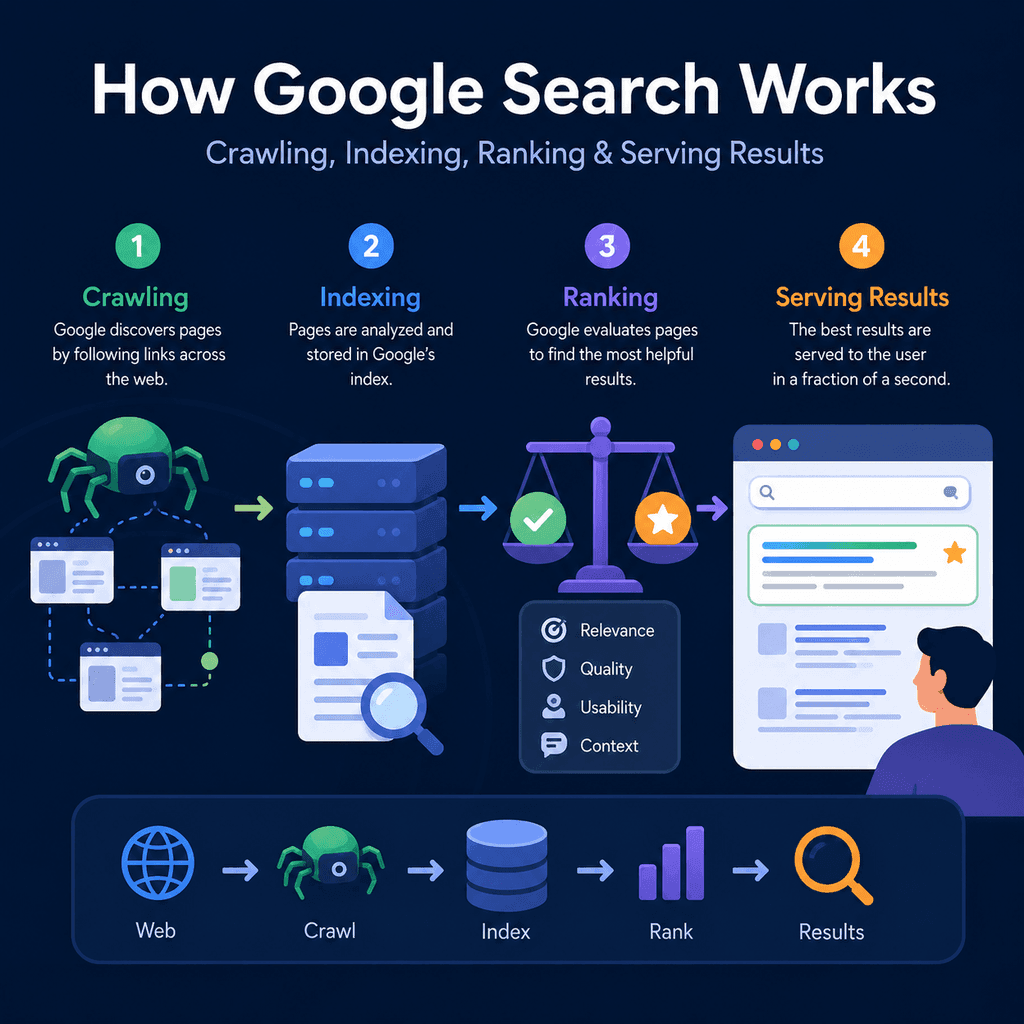
Google describes Search as a process with three broad stages: crawling, indexing, and serving search results. Ranking happens when Google serves results, because Google must choose which indexed pages are most relevant and useful for a particular query.
For a business website, the practical lesson is simple: a page cannot perform in Google Search unless Google can discover it, access it, understand it, index it, and consider it useful for a searcher’s query.
Google’s own explanation is a good reference point: Google Search works by crawling, indexing, and serving results. The important detail for website owners is that not every discovered page gets crawled, not every crawled page gets indexed, and not every indexed page gets visible traffic.
Here is a video from Google themselves discussing how how their search works.
The Search Pipeline in Plain English
Think of Google Search as a pipeline.
- Discovery: Google finds a URL through links, sitemaps, redirects, or previous crawls.
- Crawling: Googlebot requests the URL and downloads the page and important resources.
- Rendering: Google processes the page, including JavaScript where needed, to understand what users may see.
- Indexing: Google analyses the page and decides whether to store it in the index.
- Canonical selection: Google decides which version of similar or duplicate pages should represent the content.
- Ranking and serving: Google selects and orders relevant indexed pages for a user’s query.
Each stage can fail. A launch checklist should therefore check the whole pipeline, not just whether the homepage looks correct in a browser.
Stage One: Discovery
Discovery is the stage where Google learns that a URL exists.
Google can discover pages in several ways. A page may be found through an internal link from another page, an external link from another website, a sitemap, or a URL that Google has seen before.
For a new business website, internal links are especially important. If an important service page is not linked from the navigation, homepage, footer, sitemap, or another crawlable page, Google may take longer to find it. Users may also struggle to find it.
Launch Check: Can Important Pages Be Found?
Before launch, list the important pages that should be discoverable. This often includes:
- the homepage
- main service pages
- location pages
- contact page
- about page
- important guide or resource pages
- key product or category pages for ecommerce sites
Then check whether each page is linked from somewhere sensible. A page that only exists in the CMS but is not linked from the site is easy to forget.
Stage Two: Crawling
Crawling is when Googlebot visits a URL and requests the page.
Googlebot needs to access the page and the resources that help Google understand it. These resources may include CSS, JavaScript, images, and other files that affect the rendered page.
A page can be discovered but still not crawled properly if it is blocked, unavailable, broken, or hidden behind login requirements.
Robots.txt Is About Crawling, Not Guaranteed Privacy
A robots.txt file tells search engine crawlers which URLs they may access. It is mainly a crawler access and traffic management tool, not a reliable way to keep private information out of search.
Google’s robots.txt documentation is clear that robots.txt should not be used as the main method to hide web pages from Google Search. If a blocked URL is linked from elsewhere, the URL may still appear without Google crawling the page content.
Example robots.txt rule:
User-agent: *Disallow: /private-area/This tells compliant crawlers not to crawl URLs under /private-area/. It does not make the content secure. Sensitive content should be protected properly, for example with authentication.
The following is a useful YouTube video posted by Google explaining how the robots.txt file works
Launch Check: Do Not Block Important Pages or Resources
Robots.txt mistakes are common during launches. A staging site may be blocked while it is being built, then the block accidentally remains when the site goes live.
A dangerous launch mistake looks like this:
User-agent: *Disallow: /This tells crawlers not to crawl the site. It may be useful on a private staging environment, but it is usually a serious problem on a live public website.
Also check whether important CSS and JavaScript files are blocked. If Google cannot access resources that are needed to understand the page, it may not see the page as users see it.
Stage Three: Rendering
Rendering is the process of understanding the page after its resources and scripts are processed.
Many modern websites rely on JavaScript to show menus, product listings, reviews, tabs, or page content. Google can render JavaScript, but that does not mean JavaScript implementation is risk-free.
For launch-critical pages, important text, links, titles, and navigation should be available in a way search engines can reliably process.
Launch Check: Are Internal Links Real Links?
Google recommends crawlable links using an <a> element with an href attribute. This matters because Google uses links to discover pages and understand relationships between pages. See Google’s link best practices for the underlying guidance.
Recommended:
<a href=”/services/web-design/”>Web design services</a>Risky:
<span onclick=”goToServicePage()”>Web design services</span>The second example may look clickable to a visitor, but it is not a normal crawlable link. For important navigation, use real links.
Stage Four: Indexing
Indexing is when Google analyses a crawled page and may store it in the Google index.
Indexing is not guaranteed. Google may choose not to index a page because of technical signals, duplication, quality, content usefulness, metadata, canonicalisation, or other issues.
This is why the question “Can Google crawl it?” is not the same as “Will Google index it?” A page can be crawlable and still not earn a place in the index.
Noindex: Useful When Intentional, Damaging When Accidental
noindex tells search engines not to index a page. It can be useful for pages that should not appear in search, such as some internal search results, thin utility pages, or thank-you pages.
Example:
<meta name=”robots” content=”noindex”>Google’s noindex documentation explains that Google must be able to crawl the page to see the noindex rule. If the page is blocked by robots.txt, Google may not see the noindex instruction.
Launch Check: Remove Accidental Noindex Rules
A common pre-launch setup is to place noindex on the whole staging site. That is sensible during development, but it must be removed before launch.
Check:
- the homepage
- all important service pages
- location pages
- blog or resource pages intended for search
- category and product pages
- templates used across the site
Also check HTTP headers for X-Robots-Tag, especially on PDFs or pages controlled by server rules.
X-Robots-Tag: noindexA page can look normal in a browser and still be excluded from indexing because of a robots meta tag or HTTP header.
Stage Five: Canonical Selection
Canonicalisation is the process of deciding which URL should represent a piece of content when duplicate or very similar versions exist.
For example, these may be treated as separate URLs unless the site handles them properly:
https://example.com/servicehttps://example.com/service/https://www.example.com/service/https://example.com/service?source=adGoogle’s canonical documentation explains that canonical hints help Google understand which URL you prefer, but Google may still make its own choice based on the signals it sees. See Google’s guide to specifying canonical URLs.
Here is a video about canonicalization and SEO from Google.
Canonical Tags
A canonical tag sits in the page head and points to the preferred version of the page.
<link rel=”canonical” href=”https://www.example.com/services/web-design/”>Canonical tags are useful, but they must be accurate. A wrong canonical can tell Google that the wrong page should represent the content.
Launch Check: Avoid Canonical Confusion
Check that canonical tags:
- point to the final live URL, not a staging URL
- use the correct protocol, usually HTTPS
- use the correct hostname, such as the chosen www or non-www version
- do not point every page to the homepage
- do not point important service pages to unrelated pages
- are consistent with redirects and internal links
Canonicals are not a magic fix for messy site structure. They are a signal that should align with the rest of the site.
Stage Six: Ranking and Serving Results
Serving results is the point where Google responds to a search query. Google searches its index and returns results that its systems judge to be relevant and useful for that query.
Google’s public explanation says that relevance can depend on many factors, including the user’s query and context such as location, language, and device. This is why two users may see different results for a local search.
For a business website, the important lesson is that being indexed is not the same as ranking well. Indexing means a page is eligible to appear. Ranking depends on how well the page satisfies a real search need compared with other eligible pages.
Thin Pages Rarely Earn Meaningful Visibility
A thin page is a page that technically exists but does not give enough useful information to satisfy the searcher.
For example, a service page with only a heading, a short sentence, and a contact button may be crawlable and indexable. That does not mean it is likely to perform well for competitive searches.
Useful service pages usually answer practical questions, such as:
- what the service includes
- who it is for
- what problems it solves
- what the process looks like
- what makes the provider credible
- what areas are served, where relevant
- what the next step is
This is not about stuffing keywords. It is about making the page genuinely useful for the searcher.
Redirects: What Happens to Old URLs?
Website launches often change URLs. If old URLs are removed without redirects, users and search engines may hit broken pages.
Google’s redirect guidance explains that redirects help send users and search engines from an old URL to a new one. For launch work, redirects are especially important when replacing an old site, changing page slugs, moving from HTTP to HTTPS, or consolidating duplicate URLs.
Example redirect mapping:
Old URL: /website-designNew URL: /services/web-design/ Old URL: /about-usNew URL: /about/The exact redirect implementation depends on the server, CMS, hosting platform, or framework. The important planning step is to create a redirect map before launch.
Launch Check: Build a Redirect Map
A redirect map should include:
- old URLs from the previous site
- new destination URLs
- priority pages with backlinks or existing traffic
- old service pages
- old blog posts or guides worth preserving
- HTTP to HTTPS rules
- www to non-www rules, or the reverse
After launch, test the redirects. A redirect that points to a broken page, irrelevant page, or redirect loop can still damage the user experience.
Broken Internal Links
Broken internal links create dead ends for users and crawlers.
They can happen when:
- a page is deleted
- a URL slug changes
- navigation is rebuilt
- old blog links are not updated
- development links accidentally remain in content
Broken links are not just a technical detail. They can stop users from finding important pages and make it harder for search engines to understand the site’s structure.
Blocked Resources
Blocked resources can make a page harder for Google to understand.
For example, if CSS or JavaScript files needed to render the main content are blocked, the rendered page may not match what visitors see. Google’s robots.txt guide warns against blocking resources when their absence would make the page harder for crawlers to understand.
Before launch, check that essential resources are not blocked by robots.txt, security rules, authentication, or environment-specific settings.
Sitemaps: Helpful, But Not a Substitute for Site Structure
A sitemap can help Google discover important URLs. Google’s sitemap documentation explains that sitemaps can be useful for large sites, new sites, sites with rich media, and sites where pages are not well linked.
However, a sitemap does not replace good internal linking. A page listed in a sitemap can still be ignored, crawled later, or not indexed.
A clean sitemap should include important canonical URLs, not staging URLs, duplicate URLs, blocked URLs, or pages that are intentionally noindexed.
Search Console: Your Main Diagnostic Tool
Google Search Console is the main tool for checking how Google sees a site.
Useful checks include:
- URL Inspection for individual pages
- Page Indexing reports
- Sitemaps reports
- Crawl statistics
- search performance data
- enhancement reports, where relevant
Search Console does not replace a proper launch checklist, but it is essential for confirming whether Google can crawl, index, and understand key pages.
A Practical Launch Checklist
Use this checklist before and after launch.
Discovery and Links
- Important pages are linked from crawlable navigation, body content, footer links, or hub pages.
- Internal links use real
<a href="">links. - Anchor text is descriptive and not stuffed with keywords.
- No important page is orphaned.
Crawling
- Live robots.txt does not block the public site.
- Important pages return successful HTTP responses.
- Important CSS, JavaScript, and image resources are accessible.
- Pages do not require login unless they are intentionally private.
Indexing
- Important pages do not have accidental
noindextags. - HTTP headers do not include accidental
X-Robots-Tag: noindex. - Low-value utility pages that should not appear in search are handled intentionally.
- Search Console URL Inspection confirms that Google can access key pages.
Canonicals
- Canonical tags point to live final URLs.
- Canonical tags do not point to staging URLs.
- Canonical tags do not point every page to the homepage.
- Internal links, sitemaps, redirects, and canonical tags agree where possible.
Redirects
- Old important URLs redirect to relevant new URLs.
- HTTP redirects to HTTPS.
- www and non-www versions are handled consistently.
- Redirect chains and loops are avoided.
- Deleted pages are handled intentionally.
Content Quality
- Important pages answer real customer questions.
- Service pages explain the service clearly.
- Location pages are genuinely useful and not just copied text with a city name changed.
- Thin placeholder pages are improved, noindexed, redirected, or removed.
Common Misunderstandings
“If I submit my site, Google must rank it.” No. Discovery and crawling are not ranking guarantees.
“If a page is indexed, it should get traffic.” No. Indexed means eligible. It still has to be relevant and competitive for real searches.
“Robots.txt removes pages from Google.” Not reliably. Robots.txt controls crawling access. Use noindex or proper access control when you need to prevent indexing.
“A sitemap fixes poor internal linking.” No. A sitemap helps discovery, but users and crawlers still need a coherent site structure.
“SEO is just metadata.” No. Metadata matters, but technical access, content usefulness, internal links, canonical signals, redirects, and user intent all matter too.
What This Means for Small Business Websites
For a small business, technical SEO does not need to be mystical. Most launch-critical issues are practical:
- Can Google find the page?
- Can Google crawl the page?
- Can Google see the important content?
- Is the page allowed to be indexed?
- Does Google understand which URL is the main version?
- Do old URLs redirect properly?
- Is the page useful enough to deserve visibility?
A well-designed site should answer yes to all of these questions for every important page.
Quick Summary
Google Search works as a pipeline: discovery, crawling, rendering, indexing, canonical selection, and serving ranked results.
A technical mistake at any stage can stop a page from appearing or performing in search.
For website launches, the biggest risks are accidental noindex rules, robots.txt blocks, blocked resources, broken internal links, missing redirects, incorrect canonicals, and thin pages.
The best approach is to treat SEO as part of the launch process, not as a task added after the site goes live. Make key pages discoverable, crawlable, indexable, canonicalised correctly, redirected properly, and genuinely useful.