
Introduction
HTML is used to describe the structure and meaning of a web page. Two useful elements for organising page content are:
<section>and:
<article>These elements are both semantic HTML elements. That means they describe the purpose of the content inside them.
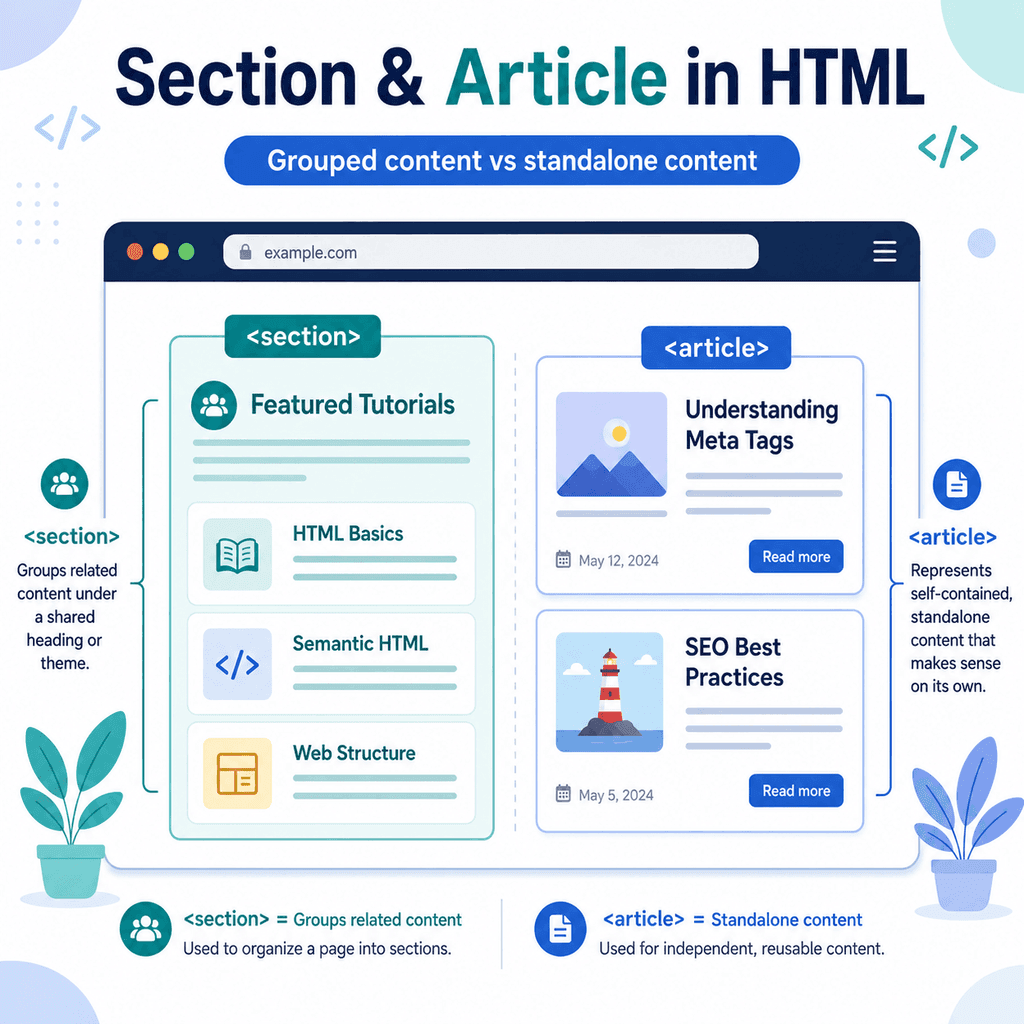
The <section> element is used to group related content.
The <article> element is used for standalone content that could make sense on its own.
They are similar in some ways, so they can be confusing at first. The key difference is whether the content is a grouped part of a larger page or a self-contained piece of content.
What Is the <section> Element?
The <section> element is used to group related content into a distinct section of a page.
For example:
<section> <h2>Our Services</h2> <p>We design and build simple websites for small businesses.</p></section>This creates a section about services.
The heading introduces the section.
The paragraph belongs to that section.
The <section> element tells the browser that these pieces of content are related and form one meaningful part of the page.
What Is the <article> Element?
The <article> element is used for content that can stand on its own.
For example:
<article> <h2>How to Add Images Using HTML</h2> <p>This tutorial explains how the img element works.</p></article>This could be a blog post, tutorial, news item, product card, review, or comment.
The important idea is that an article should make sense independently.
If you copied the article and placed it somewhere else, it would still make sense as its own piece of content.
The Main Difference Between Section and Article
Use <section> when you are grouping related content as part of a larger page.
Use <article> when the content is self-contained and could stand alone.
For example, this is a section:
<section> <h2>Our Services</h2> <p>We offer web design, website maintenance, and content updates.</p></section>It is one part of a larger page.
This is an article:
<article> <h2>Five Tips for Better Website Navigation</h2> <p>Good navigation helps users find what they need quickly.</p></article>It could be a standalone blog post, tutorial, or news item.
A simple way to think about it is:
<section> = a grouped part of a page<article> = a standalone piece of contentA Simple Section Example
A homepage may contain several sections.
For example:
<main> <section> <h2>About Us</h2> <p>We help small businesses create clear and useful websites.</p> </section> <section> <h2>Our Services</h2> <p>We offer web design, content updates, and website support.</p> </section> <section> <h2>Contact Us</h2> <p>Email us to discuss your next project.</p> </section></main>Each <section> groups related content.
The “About Us” content belongs together.
The “Our Services” content belongs together.
The “Contact Us” content belongs together.
Each section is a distinct part of the page.
A Simple Article Example
A blog page may contain several articles.
For example:
<main> <article> <h2>How to Create Links in HTML</h2> <p>Learn how to use the anchor element to create hyperlinks.</p> </article> <article> <h2>How to Add Images Using HTML</h2> <p>Learn how to use the img element, src, alt, width, and height.</p> </article> <article> <h2>Understanding Semantic HTML</h2> <p>Learn why meaning matters in HTML structure.</p> </article></main>Each <article> is a separate content item.
Each one could be opened as its own page.
Each one has its own heading and short description.
This is a good use of <article>.
Articles Can Contain Sections
An <article> can contain <section> elements.
This is common when a long article is divided into several parts.
For example:
<article> <h1>How to Use the Main Element in HTML</h1> <section> <h2>What Is the Main Element?</h2> <p>The main element marks the main content of a page.</p> </section> <section> <h2>Why Main Matters</h2> <p>The main element helps identify the central content of the document.</p> </section> <section> <h2>Common Mistakes</h2> <p>One common mistake is using more than one visible main element.</p> </section></article>In this example, the whole tutorial is an article.
Each major part of the tutorial is a section.
The structure means:
article├── h1├── section├── section└── sectionThe article is the standalone piece of content.
The sections organise the content inside it.
Sections Can Contain Articles
A <section> can also contain multiple <article> elements.
For example, a news section might contain several news articles:
<section> <h2>Latest News</h2> <article> <h3>New Website Launched</h3> <p>Our redesigned website is now live.</p> </article> <article> <h3>New Tutorial Published</h3> <p>We have published a new HTML tutorial.</p> </article></section>In this example, the section groups the latest news area.
Each article is a separate news item.
The structure means:
section├── h2├── article└── articleThis is a common and sensible pattern.
Use Headings Inside Sections and Articles
Sections and articles should usually have headings.
A heading helps identify what the section or article is about.
Good:
<section> <h2>Our Services</h2> <p>We build simple websites for small businesses.</p></section>Less useful:
<section> <p>We build simple websites for small businesses.</p></section>The second example may still work visually, but the section is harder to understand because it has no clear title.
For an article, a heading is especially important:
<article> <h2>How to Use HTML Lists</h2> <p>This article explains unordered, ordered, and description lists.</p></article>The heading tells users and tools what the article is about.
Section vs Div
The <div> element is a generic container.
It does not describe the meaning of the content inside it.
For example:
<div class=”services”> <h2>Our Services</h2> <p>We build websites for small businesses.</p></div>This can work, especially for styling, but the meaning is only suggested by the class name.
A more semantic version is:
<section> <h2>Our Services</h2> <p>We build websites for small businesses.</p></section>The <section> element directly says that this is a section of related content.
However, this does not mean you should never use <div>.
Use <div> when you need a generic wrapper for layout or styling and no more meaningful element fits.
Use <section> when the content forms a real section of the page.
Article vs Div
A <div> can also be used as a generic container for a content card.
For example:
<div class=”post-card”> <h2>How to Add Images Using HTML</h2> <p>Learn how to use the img element.</p></div>This may be fine for layout, but if the card represents a standalone article or tutorial, <article> gives more meaning:
<article class=”post-card”> <h2>How to Add Images Using HTML</h2> <p>Learn how to use the img element.</p></article>This tells the browser that the content is a self-contained item.
Use <article> when the content can stand alone as an independent item.
Article Examples
The <article> element can be used for different types of standalone content.
A blog post preview:
<article> <h2>How to Use the Header Element in HTML</h2> <p>Learn how headers introduce pages, sections, and articles.</p> <a href=”html-header.html”>Read article</a></article>A news item:
<article> <h2>New Website Features Released</h2> <p>We have added new tools to help users manage their pages.</p></article>A product card:
<article> <h2>Starter Website Package</h2> <p>A simple website package for small businesses.</p> <p>From £499</p></article>A user comment:
<article> <h3>Comment from Alex</h3> <p>This tutorial helped me understand semantic HTML.</p></article>Each example is a self-contained item.
Section Examples
The <section> element is useful for dividing a page into meaningful groups.
A services section:
<section> <h2>Services</h2> <p>We offer web design, maintenance, and content support.</p></section>A contact section:
<section> <h2>Contact</h2> <p>Email us to discuss your next project.</p></section>A frequently asked questions section:
<section> <h2>Frequently Asked Questions</h2> <h3>How long does a website take?</h3> <p>Most small websites take two to four weeks.</p> <h3>Do you offer support?</h3> <p>Yes, we offer ongoing website support.</p></section>Each section groups related content under a shared topic.
Deciding Which Element to Use
When choosing between <section> and <article>, ask what the content represents.
Use <section> if the content is a themed part of a larger page.
Use <article> if the content is a standalone item.
Ask yourself:
Would this content make sense if it appeared on its own?If yes, <article> may be appropriate.
Ask yourself:
Is this content a grouped part of a larger page or article?If yes, <section> may be appropriate.
For example:
<section> <h2>Latest Tutorials</h2> <article> <h3>How to Use the Nav Element in HTML</h3> <p>Learn how to create meaningful navigation areas.</p> </article> <article> <h3>How to Use the Footer Element in HTML</h3> <p>Learn how to create useful footer content.</p> </article></section>Here, “Latest Tutorials” is a section.
Each tutorial preview is an article.
Structuring a Blog Page
A blog index page is a good example of sections and articles working together.
<main> <section> <h1>HTML Tutorials</h1> <p>Learn the core building blocks of HTML.</p> <article> <h2>Understanding Semantic HTML</h2> <p>Learn why meaning matters in HTML structure.</p> <a href=”semantic-html.html”>Read more</a> </article> <article> <h2>How to Use the Main Element in HTML</h2> <p>Learn how to mark the main content of a page.</p> <a href=”main-element.html”>Read more</a> </article> </section></main>The <main> element marks the main content area.
The <section> groups the HTML tutorials.
Each <article> is a standalone tutorial preview.
This structure is meaningful and easy to understand.
Structuring a Single Article Page
A single tutorial page might look like this:
<main> <article> <h1>How to Use Section and Article Elements in HTML</h1> <p>This article explains how to structure standalone and grouped content.</p> <section> <h2>What Is the Section Element?</h2> <p>The section element groups related content.</p> </section> <section> <h2>What Is the Article Element?</h2> <p>The article element represents standalone content.</p> </section> <section> <h2>Common Mistakes</h2> <p>One common mistake is using section and article only for styling.</p> </section> </article></main>The <article> represents the full tutorial.
Each <section> represents a major part of the tutorial.
This is a strong pattern for educational articles.
Common Mistake: Using <section> for Every Wrapper
Do not use <section> just because you need a box.
For example:
<section class=”blue-background”> <p>This is just a styled box.</p></section>If the content is not a meaningful section of the page, a <div> may be better:
<div class=”blue-background”> <p>This is just a styled box.</p></div>Use <section> when the content has a real topic or purpose.
Use <div> for generic layout containers.
Common Mistake: Using <article> for Any Large Block
Do not use <article> just because a piece of content is large.
Use <article> when the content is self-contained.
Less appropriate:
<article> <h2>Contact Details</h2> <p>Email us at hello@example.com.</p></article>If this is just one part of a contact page, a section is probably better:
<section> <h2>Contact Details</h2> <p>Email us at hello@example.com.</p></section>But if it is a standalone contact card that could be reused elsewhere, <article> may be reasonable.
The context matters.
Common Mistake: Leaving Sections Without Headings
A section should usually have a heading.
Less clear:
<section> <p>We offer design, development, and support.</p></section>Better:
<section> <h2>Our Services</h2> <p>We offer design, development, and support.</p></section>The heading tells users and tools what the section is about.
Common Mistake: Choosing Based on Appearance
Do not choose <section> or <article> because of how they look.
By default, these elements may not look very different from a <div>.
The reason to use them is meaning.
HTML describes structure.
CSS controls appearance.
For example:
<article class=”card”> <h2>HTML Images</h2> <p>Learn how to add images using HTML.</p></article>The <article> gives the content meaning.
The class="card" gives CSS a hook for styling.
Styling Sections and Articles with CSS
You can style sections and articles just like other HTML elements.
For example:
<section class=”tutorial-list”> <h2>Latest Tutorials</h2> <article class=”tutorial-card”> <h3>HTML Links</h3> <p>Learn how to create hyperlinks.</p> </article> <article class=”tutorial-card”> <h3>HTML Images</h3> <p>Learn how to add images.</p> </article></section>CSS:
.tutorial-list { padding: 32px;} .tutorial-card { border: 1px solid #ddd; padding: 16px; margin-bottom: 16px;}The HTML gives the content structure.
The CSS controls spacing, borders, layout, and visual design.
A Complete Example
Here is a complete page using both <section> and <article>:
<!DOCTYPE html><html lang=”en”><head> <meta charset=”UTF-8″> <title>Section and Article Example</title></head><body> <header> <h1>Web Basics</h1> </header> <main> <section> <h2>HTML Tutorials</h2> <p>Learn how to build clear and meaningful web pages.</p> <article> <h3>Understanding Semantic HTML</h3> <p>Learn why meaning matters in HTML structure.</p> <a href=”semantic-html.html”>Read tutorial</a> </article> <article> <h3>How to Use the Main Element in HTML</h3> <p>Learn how to mark the main content of a page.</p> <a href=”main-element.html”>Read tutorial</a> </article> </section> <section> <h2>Website Services</h2> <p>We offer website design, maintenance, and content support.</p> </section> </main> <footer> <p>© 2026 Web Basics</p> </footer> </body></html>This page uses:
<section>to group related areas of the page,
and:
<article>to mark standalone tutorial items.
Best Practices
Use <section> for meaningful groups of related content.
Use <article> for standalone content that can make sense on its own.
Use headings inside sections and articles.
Place articles inside sections when a section contains multiple standalone items.
Place sections inside an article when a long article needs to be divided into major parts.
Do not use <section> only as a styling wrapper.
Do not use <article> only because a block is large.
Use <div> when you only need a generic layout container.
Use CSS to control appearance.
Choose elements based on meaning, not visual style.
Summary
The <section> and <article> elements help structure HTML content in meaningful ways.
Use <section> for grouped content:
<section> <h2>Our Services</h2> <p>We build websites for small businesses.</p></section>Use <article> for standalone content:
<article> <h2>How to Add Images Using HTML</h2> <p>This tutorial explains how the img element works.</p></article>A section is usually part of a larger page or article.
An article is usually a self-contained item that could make sense on its own.
They can also work together:
<section> <h2>Latest Tutorials</h2> <article> <h3>HTML Links</h3> <p>Learn how to create hyperlinks.</p> </article></section>Used well, <section> and <article> make your HTML clearer, more organised, more meaningful, and easier to maintain.