
Introduction
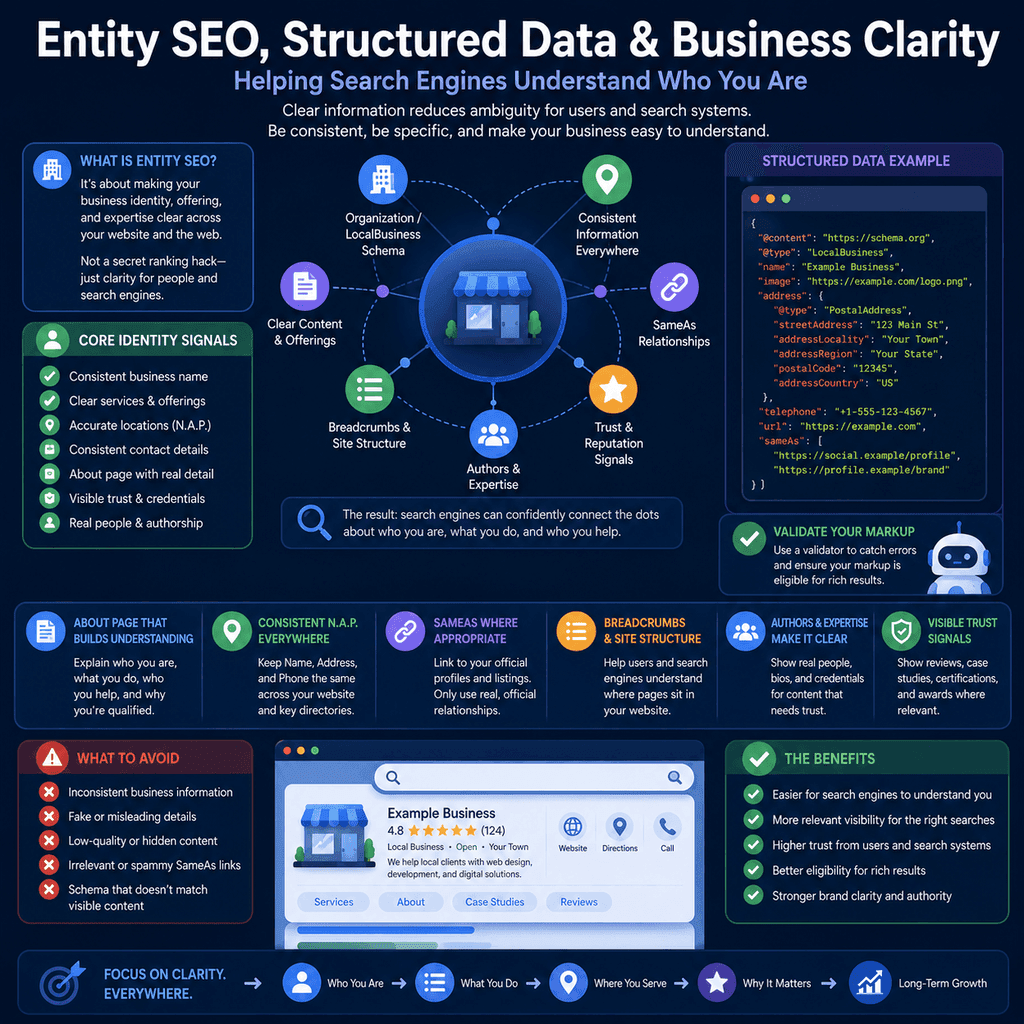
Search engines do not only look at isolated keywords on a page. They also try to understand what a business is, what it offers, where it operates, who is responsible for the content, and how the information on different pages connects together.
This is where “entity SEO” is often mentioned. Unfortunately, the phrase is sometimes made to sound more mysterious than it needs to be. For a normal business website, entity SEO is not a secret ranking hack. It is the practical work of reducing ambiguity.
If your website uses one business name, your social profiles use another, your service pages describe your work vaguely, your About page is thin, your contact details are hard to find, and your structured data says something that is not clearly visible on the page, you make the business harder to understand.
The better approach is simpler: make the business identity, services, locations, people, contact details, and trust signals clear to users first. Then use structured data to reinforce that clarity in a machine-readable format.
What “Entity SEO” Means in Plain English
An entity is a distinct thing that can be identified. For a business website, that may include the business itself, its locations, its services, its products, its authors, and sometimes its brand, organisation, or individual practitioners.
In practical SEO work, entity clarity means answering questions such as:
- What is the business called?
- Is this the official website for that business?
- What does the business actually do?
- Where does it operate?
- How can customers contact it?
- Who created or reviewed important content?
- Which external profiles genuinely represent the same business?
- How do the pages on the site relate to one another?
That is not the same as trying to “game” search engines. It is closer to good information architecture and honest business communication.
Business Clarity Comes Before Schema
Structured data is useful, but it should not be used to patch over a confusing website.
Google describes structured data as a standardised format for providing information about a page and classifying its content. Google can use structured data to better understand the page and, where eligible, show richer search appearances. However, Google’s general structured data guidance also says that structured data should describe the content on the page and should not be added for information that is not visible to users. See Google’s guide to how structured data works in Google Search and its general structured data guidelines.
For a business owner, the order of work should be:
- Make the visible website clear.
- Make the site structure logical.
- Make business details consistent.
- Add structured data that accurately reflects the visible page.
- Validate and monitor the markup.
If the visible content is weak, vague, or contradictory, schema markup will not turn it into a trustworthy business identity.
Use a Consistent Business Name
Your business name should be consistent across the places users and search systems may encounter it.
That includes:
- the website header or footer;
- the homepage title and About page;
- contact page details;
- structured data;
- Google Business Profile, where relevant;
- social profiles;
- business directories and local citations;
- invoices, proposals, and public-facing documents where they are indexed or shared.
This does not mean every sentence must repeat the business name. It means the core identity should not drift between different versions without a reason.
A common mistake is adding service keywords into the business name in some places but not others. For example, a business might be officially called “Harbour Studio Ltd” but list itself somewhere as “Harbour Studio Best Web Design Bristol”. That creates inconsistency and can look manipulative.
Google’s Business Profile guidelines say the business name should reflect the real-world name used consistently on signage, website, stationery, and as known to customers. Those guidelines also warn against including unnecessary information in the business name.
Use the real business name. Explain the services separately.
Make Services Clear and Specific
A service business should not make visitors guess what it does.
Each important service page should clearly explain:
- what the service includes;
- who the service is for;
- what problems it solves;
- what is not included, where that matters;
- what the process looks like;
- what the visitor should do next.
Vague wording such as “digital solutions”, “growth services”, or “bespoke support” can sound polished but fail to explain the actual offer. Clear service names help users and search systems understand the business faster.
For example, “WordPress website maintenance for small businesses” is clearer than “complete digital care package”. The clearer phrase describes the service, the platform, and the intended audience.
Make Locations Clear Without Creating Doorway Pages
Local businesses should make their location and service area easy to understand.
For a business with a physical premises, this may include a visible address, opening hours, contact information, accessibility details, parking information, and directions. For a service-area business, it may include the areas served, practical travel limits, remote availability, and any location-specific constraints.
Google’s Business Profile guidelines say businesses should make their address or service area accurate and precise, and that service-area businesses should use a profile for the central office or location with a designated service area where appropriate. See Google’s guidelines for representing your business on Google.
Location clarity does not mean creating dozens of near-identical pages with only the town name changed. If a page targets a location, it should contain useful information specific to that location or service context.
A location page is more defensible when it answers real user questions:
- Do you actually serve this area?
- Is there a physical office, branch, clinic, shop, or service point?
- What services are available there?
- Are opening hours different?
- Are prices, travel charges, or appointment options different?
- Is there local experience, evidence, or case work?
If the page does not answer anything location-specific, it may not need to exist separately.
Build a Useful About Page
An About page is not just filler. It helps users understand who is behind the business.
A useful About page may include:
- the business name and background;
- what the business does;
- who it serves;
- where it operates;
- who owns, runs, or leads the business;
- relevant qualifications, registrations, awards, or memberships;
- how long the business has operated, if relevant;
- what makes the business credible;
- clear links to contact, service, and location pages.
For some industries, this information matters more because users are making higher-trust decisions. Health, finance, legal, safety, home services, and professional advice websites should be especially careful about making expertise and accountability visible.
Show Authorship Where It Helps Users
Authorship is not only for news sites. It can help users judge whether content is credible.
Google’s guidance on helpful, reliable, people-first content encourages site owners to ask “Who, How, and Why” about content. The “Who” part means it should be clear to visitors who created the content where that information would help them understand reliability.
For a small business website, authorship may be useful on:
- technical guides;
- health or exercise advice;
- financial or legal explainers;
- product advice;
- case studies;
- research-led articles;
- opinion or analysis pieces.
Authorship does not need to be overcomplicated. A byline, short author bio, relevant credentials, review date, and link to an author profile may be enough. The key is that the information is real, visible, and helpful.
Make Contact Information Easy to Verify
Contact details are basic business clarity.
Depending on the business, useful contact information may include:
- email address;
- phone number;
- physical address;
- service area;
- opening hours;
- contact form;
- booking link;
- support route;
- company registration details, where appropriate.
Do not hide essential contact details behind vague calls to action. A visitor should be able to tell whether the business is real, relevant, and reachable.
Consistency matters. If your website says one phone number, your business profile says another, and your structured data contains an old address, you are creating avoidable ambiguity.
Use the Right Schema Type for the Right Job
Not every page needs every schema type. Use structured data where it accurately describes the real page and the real business.
| Schema type | Useful when | Main caution |
|---|---|---|
Organization |
The page identifies the organisation behind the website, usually the homepage or About page. | Do not use it to invent identity details that are not visible or verifiable. |
LocalBusiness |
The page describes a real local business, branch, shop, clinic, office, or service location. | Do not use it to imply a physical location, opening hours, or service area that is not real. |
BreadcrumbList |
The page has a visible breadcrumb trail or clear hierarchy. | Do not mark up a hierarchy that users cannot actually navigate. |
Product |
The page is genuinely about a product and shows product information to users. | Do not mark up services or generic business pages as products unless the page genuinely fits. |
Article |
The page is an article, guide, blog post, or editorial page. | Keep author, date, headline, and publisher information accurate. |
The aim is not to add more markup than competitors. The aim is to add accurate markup that helps classify the page correctly.
Use Organization Schema for the Main Business
Organization structured data can help describe the business or organisation behind the website. Google’s Organization structured data documentation explains that adding Organization markup to the homepage can help Google understand administrative details and disambiguate the organisation in search results.
For many businesses, Organization markup belongs on the homepage or a central About page. It should describe the actual organisation, not every service page separately.
A simplified Organization example might look like this:
<script type=”application/ld+json”>{ “@context”: “https://schema.org”, “@type”: “Organization”, “@id”: “https://www.example.com/#organization”, “name”: “Example Business”, “url”: “https://www.example.com/”, “logo”: “https://www.example.com/images/logo.png”, “contactPoint”: { “@type”: “ContactPoint”, “contactType”: “customer support”, “email”: “hello@example.com” }, “sameAs”: [ “https://www.linkedin.com/company/example-business”, “https://www.facebook.com/example-business” ]}</script>This example is deliberately simple. Real markup should use the properties that accurately apply to the business and should match visible, verifiable information.
Use LocalBusiness Schema Where There Is a Local Business
LocalBusiness structured data is more specific than Organization. Schema.org describes LocalBusiness as a particular physical business or branch of an organisation. Google’s Local Business structured data documentation explains that this markup can provide details such as hours, departments, and other business information where relevant.
LocalBusiness markup is appropriate when the page is genuinely about a local business, branch, premises, or service location. It should not be used just because the business wants local rankings.
Google recommends defining each local business location as a LocalBusiness type and using the most specific subtype possible where appropriate.
A simplified LocalBusiness example might look like this:
<script type=”application/ld+json”>{ “@context”: “https://schema.org”, “@type”: “LocalBusiness”, “@id”: “https://www.example.com/#localbusiness”, “name”: “Example Business”, “url”: “https://www.example.com/”, “telephone”: “+44 20 0000 0000”, “address”: { “@type”: “PostalAddress”, “streetAddress”: “10 Example Street”, “addressLocality”: “Example Town”, “postalCode”: “EX1 1AA”, “addressCountry”: “GB” }, “openingHoursSpecification”: [ { “@type”: “OpeningHoursSpecification”, “dayOfWeek”: [“Monday”, “Tuesday”, “Wednesday”, “Thursday”, “Friday”], “opens”: “09:00”, “closes”: “17:00” } ]}</script>Do not invent an address, phone number, review rating, or opening hours just to fill schema fields. Missing markup is better than inaccurate markup.
Use sameAs Links Carefully
The Schema.org sameAs property is used for a URL that unambiguously indicates the identity of the item. In business markup, it is commonly used to connect the organisation to official external profiles or identity references.
Use sameAs for profiles that genuinely represent the same business, such as official social profiles, verified business profiles, or authoritative organisation pages.
Do not use sameAs for:
- random directory listings you do not control;
- unofficial mentions;
- competitor pages;
- old profiles for a previous business name;
- profiles that represent a different branch, franchise, or person;
- pages that only mention the business but are not identity references.
The goal is not to add as many links as possible. The goal is to reduce ambiguity about which external profiles belong to the same entity.
Use Breadcrumbs to Show Site Structure
Breadcrumbs help users understand where they are in a website. Google’s breadcrumb structured data documentation says a breadcrumb trail indicates a page’s position in the site hierarchy and may help users understand and explore a site effectively.
Even when breadcrumbs are not displayed in every search result or on every device, visible breadcrumbs can still help users navigate the website.
A simple breadcrumb trail might be:
<nav aria-label=”Breadcrumb”> <ol> <li><a href=”/”>Home</a></li> <li><a href=”/services/”>Services</a></li> <li>Website Maintenance</li> </ol></nav>The matching BreadcrumbList structured data might be:
<script type=”application/ld+json”>{ “@context”: “https://schema.org”, “@type”: “BreadcrumbList”, “itemListElement”: [ { “@type”: “ListItem”, “position”: 1, “name”: “Home”, “item”: “https://www.example.com/” }, { “@type”: “ListItem”, “position”: 2, “name”: “Services”, “item”: “https://www.example.com/services/” }, { “@type”: “ListItem”, “position”: 3, “name”: “Website Maintenance”, “item”: “https://www.example.com/services/website-maintenance/” } ]}</script>The visible breadcrumb and the structured data should tell the same story. Do not use breadcrumb markup to imply a site structure that users cannot actually navigate.
Make Trust Signals Visible
Trust signals are details that help users judge whether a business is credible.
Depending on the business, useful trust signals may include:
- real team information;
- professional qualifications;
- registrations or accreditations;
- case studies;
- portfolio examples;
- client testimonials that are real and verifiable;
- clear policies;
- privacy and terms pages;
- refund, cancellation, or complaints information;
- clear pricing or pricing guidance where appropriate.
These details should be visible to users. Do not hide important claims only in schema markup. If a qualification, rating, award, or review matters, users should be able to see and verify it on the page.
Structured Data Is Not a Ranking Hack
Structured data can help Google understand pages and may make pages eligible for certain rich results when guidelines are met. That is not the same as saying schema markup automatically improves rankings.
Google’s structured data documentation focuses on understanding content and eligibility for richer search appearances. Google also states that it does not guarantee that features using structured data will appear in search results.
For business clarity, schema should be treated as supporting evidence. It helps label the information that already exists. It does not replace helpful content, technical accessibility, site quality, user experience, or real-world business credibility.
Common Mistakes to Avoid
Entity and schema work can go wrong when it becomes detached from the real business.
- Inventing details: do not create fake reviews, ratings, opening hours, addresses, awards, or qualifications.
- Marking up hidden content: structured data should represent visible page content where Google’s guidelines require it.
- Using the wrong schema type: do not use
LocalBusinessmarkup for a page that is not about a local business or location. - Adding every possible property: more markup is not automatically better. Use relevant, accurate properties.
- Creating inconsistent identities: avoid different business names, phone numbers, logos, and URLs across different profiles.
- Using
sameAstoo broadly: only connect official or clearly identifying profiles. - Forgetting maintenance: update schema when addresses, phone numbers, hours, logos, or services change.
- Expecting instant results: search systems need to crawl, process, and evaluate updated information.
A Practical Business Clarity Checklist
Use this checklist before adding or revising structured data.
- The business name is consistent across the website and key external profiles.
- The homepage clearly explains what the business does.
- The About page explains who is behind the business.
- Important services have clear, useful pages.
- Locations and service areas are accurate and visible.
- Contact information is easy to find.
- Authorship is visible where it helps users judge reliability.
- Trust signals are real, visible, and verifiable.
OrganizationorLocalBusinessschema reflects the real business.sameAslinks point only to genuine identity references.- Breadcrumbs reflect the actual site structure.
- Structured data has been tested with Google’s Rich Results Test or the Schema Markup Validator, depending on what you are checking.
- Business details are reviewed when the business changes.
When to Review Your Entity and Schema Signals
Business clarity is not a one-time setup task.
Review your identity and structured data when:
- the business changes name;
- you move premises;
- phone numbers or email addresses change;
- opening hours change;
- you add or remove services;
- you open or close a location;
- you redesign the website;
- you change your logo;
- you add authors, reviewers, or professional contributors;
- you merge or split businesses, brands, or websites.
Outdated details can be worse than missing details because they create confusion for both users and search systems.
Evidence and Source Quality
Entity SEO and schema advice varies widely in quality. Some advice is based on official documentation, structured data standards, and visible business information. Some advice is speculative or treats schema as if it were a ranking shortcut.
For business identity and schema decisions, use the strongest available sources first:
- Google Search Central documentation for structured data, Organization markup, Local Business markup, breadcrumb markup, and general structured data guidelines.
- Schema.org definitions for vocabulary meaning, such as
sameAsandLocalBusiness. - Google Business Profile guidelines for business name, address, service area, phone number, categories, and local business representation.
- Visible information on the real website, such as the About page, contact page, service pages, team pages, and policies.
- Official business records, professional registrations, and controlled social profiles where relevant.
Be cautious with advice that says adding schema automatically improves rankings, that more properties are always better, or that hidden claims in markup can compensate for weak visible content. Those claims do not reflect Google’s structured data guidance.
Final Thoughts
Entity SEO is best understood as clarity work.
A clear business identity helps users decide whether they are in the right place. It helps search systems connect the website to the right business, services, locations, people, and external profiles. Structured data can reinforce that understanding, but only when it accurately reflects the real, visible website.
Do not treat entity SEO as a shortcut. Treat it as a disciplined way to make the business easier to understand. Consistent names, clear services, accurate locations, visible authorship, reliable contact details, useful About pages, appropriate schema, careful sameAs links, breadcrumbs, and real trust signals all point in the same direction: less ambiguity and more confidence.