
Introduction
Headings are one of the most important parts of an HTML page. They help organise content, make pages easier to read, and give browsers, search engines, and assistive technologies a clearer understanding of the page structure.
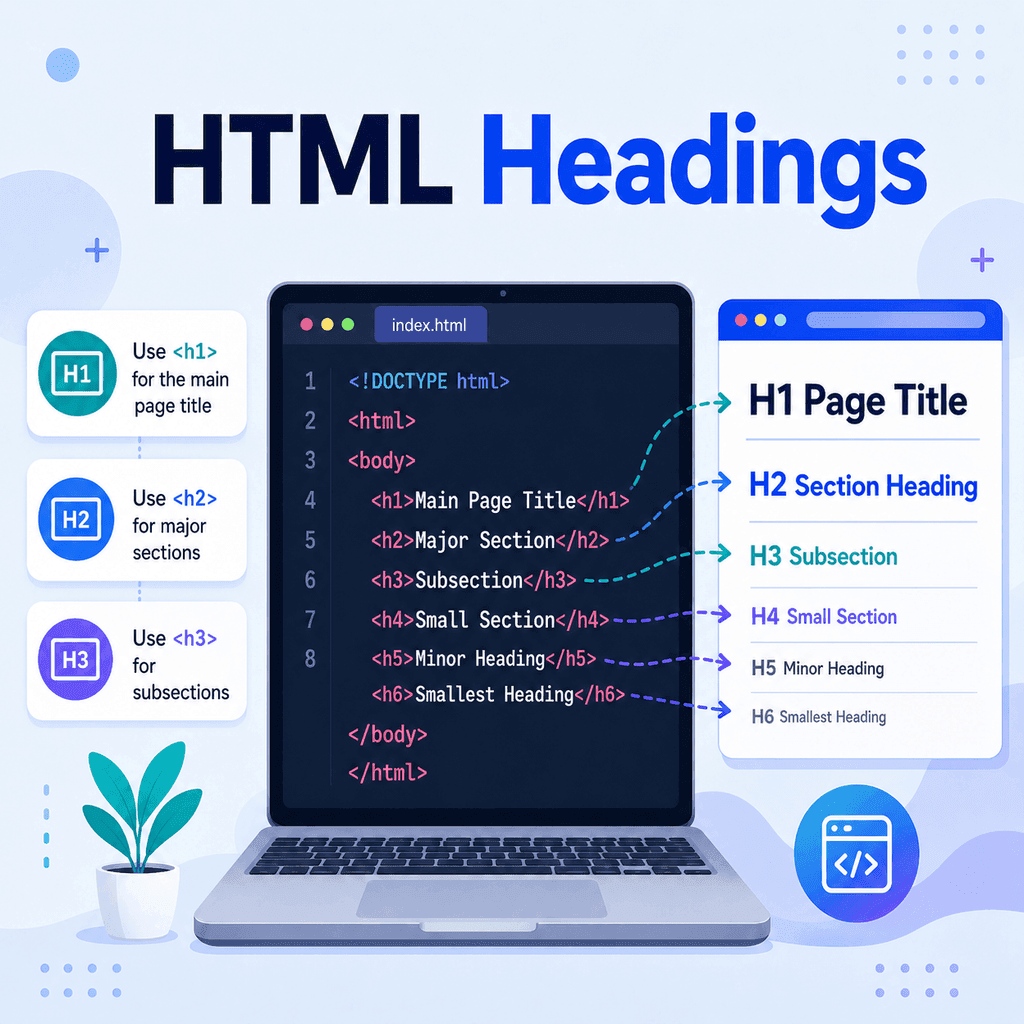
HTML has six heading elements:
<h1><h2><h3><h4><h5><h6>These headings create a hierarchy, from the most important heading to the least important heading.
What Are HTML Headings?
HTML headings are used to define titles and section headings on a web page.
For example:
<h1>About Our Company</h1>This creates a main heading that says:
About Our CompanyThe opening tag is:
<h1>The text between the tags is the heading content:
About Our CompanyThe closing tag is:
</h1>Together, the full heading looks like this:
<h1>About Our Company</h1>The Six HTML Heading Levels
HTML gives you six heading levels.
The most important heading is <h1>.
The least important heading is <h6>.
<h1>Main Page Heading</h1><h2>Major Section Heading</h2><h3>Subsection Heading</h3><h4>Smaller Subsection Heading</h4><h5>Minor Heading</h5><h6>Least Important Heading</h6>By default, browsers usually display <h1> headings as the largest and <h6> headings as the smallest. However, heading levels should not be chosen just because of their default size.
The heading number should describe the structure of the content.
Using an <h1> Heading
The <h1> element is usually used for the main title of the page.
For example:
<h1>Beginner’s Guide to HTML</h1>A page should normally have one clear main heading that describes the main topic of the page.
For a blog article, the <h1> is often the article title:
<h1>How to Create Lists in HTML</h1>For a business page, it might describe the main page subject:
<h1>Professional Web Design Services</h1>The <h1> should make it obvious what the page is about.
Using <h2> Headings
The <h2> element is used for major sections within the page.
For example, an article about HTML headings might use an <h1> for the article title and several <h2> elements for the main sections:
<h1>A Beginner’s Guide to HTML Headings</h1> <h2>What Are HTML Headings?</h2><h2>The Six Heading Levels</h2><h2>Common Mistakes to Avoid</h2><h2>Summary</h2>Each <h2> heading introduces a major section that belongs under the main <h1> topic.
Using <h3> Headings
The <h3> element is used for subsections inside an <h2> section.
For example:
<h1>A Beginner’s Guide to HTML Headings</h1> <h2>Common Mistakes to Avoid</h2> <h3>Skipping Heading Levels</h3><p>Do not jump from an h1 directly to an h4 just because you want smaller text.</p> <h3>Choosing Headings Based on Size</h3><p>Use heading levels for structure, then use CSS to control visual appearance.</p>In this example, the <h3> headings belong under the <h2> section called “Common Mistakes to Avoid”.
Using <h4>, <h5>, and <h6> Headings
The <h4>, <h5>, and <h6> elements are used for deeper levels of structure.
Many simple pages only need <h1>, <h2>, and sometimes <h3>.
However, longer or more complex pages may need more heading levels.
For example:
<h1>Website Accessibility Guide</h1> <h2>Page Structure</h2> <h3>Headings</h3> <h4>Heading Order</h4> <h5>Special Cases</h5> <h6>Technical Notes</h6>This kind of structure may be useful in documentation, technical guides, policies, or long educational resources.
For most beginner projects, avoid using heading levels too deeply unless the content genuinely needs them.
Heading Levels Create a Structure
Think of headings like the contents page of a book.
The <h1> is like the book title.
The <h2> headings are like chapter titles.
The <h3> headings are like sections inside a chapter.
The <h4> headings are like smaller sections inside those sections.
Here is a simple structure:
<h1>Learning HTML</h1> <h2>HTML Basics</h2><h3>Elements</h3><h3>Attributes</h3> <h2>Text Content</h2><h3>Paragraphs</h3><h3>Headings</h3><h3>Lists</h3> <h2>Links and Images</h2><h3>Hyperlinks</h3><h3>Image Elements</h3>This structure makes the page easier to understand.
Do Not Choose Headings Just for Their Size
A common beginner mistake is choosing a heading level because of how big or small it looks in the browser.
For example, this is not a good reason to use <h4>:
<h4>Main Page Title</h4>If it is the main page title, it should probably be an <h1>:
<h1>Main Page Title</h1>If you want the heading to look smaller, use CSS instead of changing the heading level.
For example:
<h1 class=”small-heading”>Main Page Title</h1>.small-heading { font-size: 28px;}HTML should describe the meaning and structure of the content. CSS should control how it looks.
Do Not Skip Heading Levels Without a Good Reason
Another common mistake is skipping heading levels.
For example:
<h1>My Website</h1><h4>About Me</h4>This can make the page structure harder to understand.
A better structure would usually be:
<h1>My Website</h1><h2>About Me</h2>Then, if “About Me” has smaller subsections, you could use <h3> headings underneath it.
<h1>My Website</h1> <h2>About Me</h2> <h3>My Background</h3><h3>My Skills</h3><h3>My Projects</h3>In general, move through heading levels in order.
Headings and Accessibility
Headings are important for accessibility.
Many screen reader users navigate web pages by jumping between headings. A clear heading structure helps them understand what the page contains and move quickly to the section they need.
For example, a screen reader user may move through the headings on a page like this:
A Beginner’s Guide to HTML HeadingsWhat Are HTML Headings?The Six Heading LevelsCommon Mistakes to AvoidSummaryIf headings are missing, unclear, or out of order, the page becomes harder to navigate.
Using real HTML heading elements is better than making normal text look like a heading.
Avoid this:
<p><strong>About Our Services</strong></p>Use this instead:
<h2>About Our Services</h2>The second version gives the browser meaningful structure.
Headings and Search Engines
Search engines use many signals to understand a web page. Headings can help communicate the structure and main topics of the page.
The <h1> heading often describes the main subject.
The <h2> and <h3> headings can describe important sections and subtopics.
For example:
<h1>Beginner’s Guide to HTML</h1> <h2>What Is HTML?</h2><h2>Basic HTML Elements</h2><h2>HTML Links</h2><h2>HTML Lists</h2>This makes the page topic and structure clear.
However, headings should be written for people first. Do not fill headings with repeated keywords just for search engines.
Good heading:
<h2>How to Create an Ordered List</h2>Poor heading:
<h2>HTML list HTML ordered list HTML list tutorial</h2>Clear, natural headings are better for both users and search engines.
A Simple HTML Page with Headings
Here is a complete example of a basic HTML page using headings correctly:
<!DOCTYPE html><html lang=”en”><head> <meta charset=”UTF-8″> <title>HTML Headings Example</title></head><body> <h1>Learning HTML</h1> <h2>What Is HTML?</h2> <p>HTML is the language used to structure content on the web.</p> <h2>Basic HTML Elements</h2> <p>HTML elements are used to mark up different types of content.</p> <h3>Paragraphs</h3> <p>Paragraphs are created using the p element.</p> <h3>Headings</h3> <p>Headings are created using h1 to h6 elements.</p> <h3>Lists</h3> <p>Lists are used to group related items.</p> <h2>Summary</h2> <p>Headings help organise web page content into a clear structure.</p> </body></html>This page uses:
<h1>for the main page heading,
<h2>for major sections,
and:
<h3>for subsections.
Styling Headings with CSS
You can style headings using CSS.
For example:
<h1 class=”page-title”>Learning HTML</h1><h2 class=”section-title”>Basic HTML Elements</h2>.page-title { font-size: 42px; color: darkblue;} .section-title { font-size: 28px; color: navy;}This changes how the headings look without changing their meaning.
You can also adjust spacing:
h2 { margin-top: 40px; margin-bottom: 10px;}This can make the page easier to scan visually.
Using Headings in Blog Articles
A blog article usually has a simple heading structure.
For example:
<h1>How to Make Hyperlinks Using HTML</h1> <h2>What Is a Hyperlink?</h2><h2>The Basic HTML Link</h2><h2>Opening Links in a New Tab</h2><h2>Common Mistakes to Avoid</h2><h2>Summary</h2>If one section needs more detail, use <h3> headings:
<h2>Common Mistakes to Avoid</h2> <h3>Forgetting the href Attribute</h3><h3>Using Unclear Link Text</h3><h3>Forgetting the Closing Tag</h3>This creates a clear and logical article structure.
Common Mistakes to Avoid
One common mistake is using headings only to make text bigger.
Incorrect:
<h1>Welcome</h1><h5>This should look smaller</h5>Better:
<h1>Welcome</h1><h2>About This Page</h2>Then use CSS if you need to adjust the visual size.
Another mistake is using bold paragraphs instead of headings.
Incorrect:
<p><strong>Contact Information</strong></p>Correct:
<h2>Contact Information</h2>Another mistake is skipping levels without a clear structural reason.
Incorrect:
<h1>Services</h1><h3>Web Design</h3>Usually better:
<h1>Services</h1><h2>Web Design</h2>Best Practices for HTML Headings
Use one clear <h1> for the main page topic.
Use <h2> elements for major sections.
Use <h3> elements for subsections inside <h2> sections.
Use heading levels in a logical order.
Do not choose headings just because of their default size.
Use CSS to control the appearance of headings.
Write headings that clearly describe the content that follows.
Use real heading elements instead of bold paragraphs when the text is acting as a section heading.
Summary
HTML headings are used to organise content on a web page.
There are six heading levels:
<h1><h2><h3><h4><h5><h6>The <h1> element is usually used for the main page heading. The <h2> element is used for major sections. The <h3> element is used for subsections, and <h4> to <h6> are used for deeper levels of structure.
Headings should describe the structure of the content, not just how big the text should look.
Good heading structure makes pages easier to read, easier to navigate, better for accessibility, and clearer for search engines.