
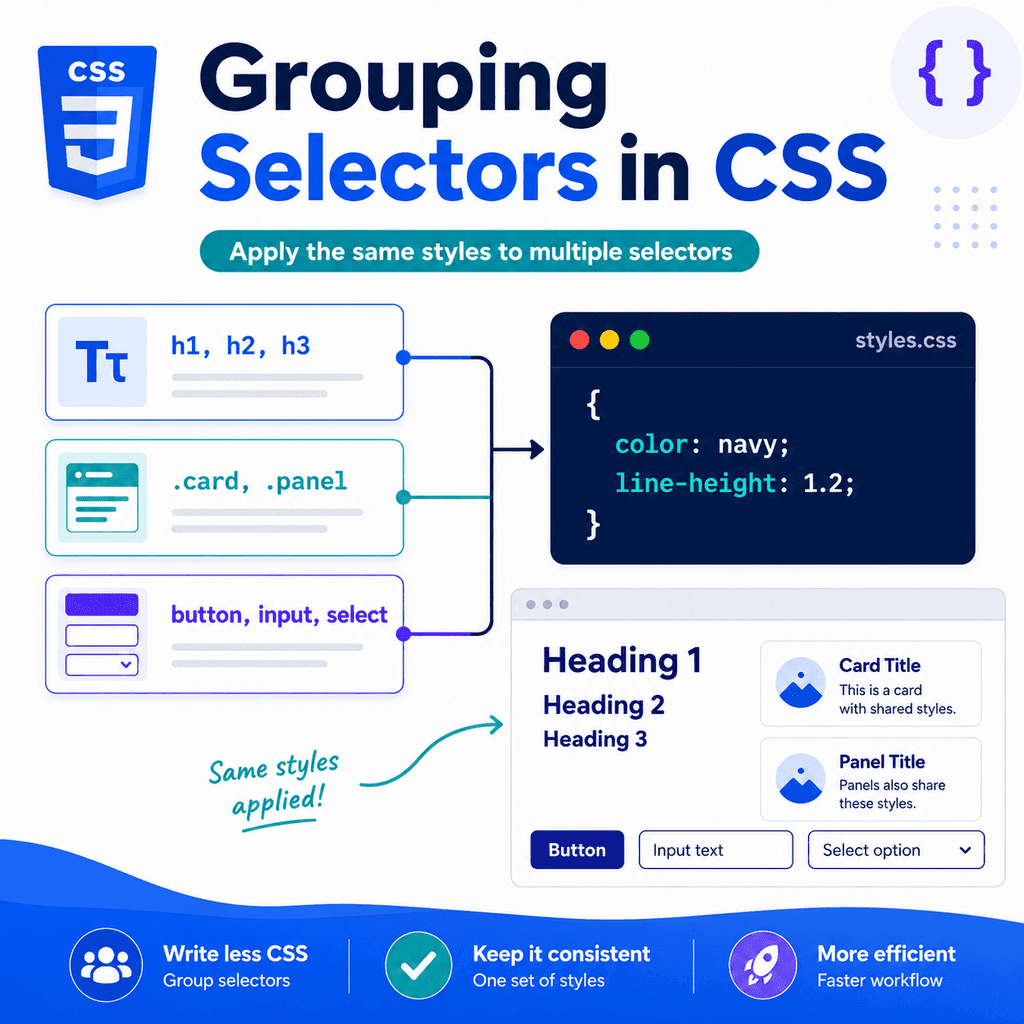
Introduction
CSS selectors tell the browser which HTML elements to style.
Sometimes, several different selectors need the same styles.
For example, you may want all headings to use the same line height:
h1 { line-height: 1.2;} h2 { line-height: 1.2;} h3 { line-height: 1.2;}This works, but it repeats the same declaration several times.
CSS lets you group selectors together so they can share one declaration block:
h1,h2,h3 { line-height: 1.2;}This is called a selector list.
Grouping selectors helps reduce repetition, keep CSS shorter, and make shared styles easier to maintain.
What Does Grouping Selectors Mean?
Grouping selectors means writing several selectors before one declaration block.
Each selector is separated by a comma.
Example:
h1,h2,h3 { color: navy;}This applies the same declaration to all three selectors.
It means the same thing as writing:
h1 { color: navy;} h2 { color: navy;} h3 { color: navy;}The grouped version is shorter and easier to update.
If you later change the colour, you only change it in one place.
Selector List Syntax
A selector list uses commas.
The basic structure is:
selector-one,selector-two,selector-three { property: value;}For example:
h1,h2,h3 { margin-top: 0;}The commas are important.
They tell the browser that each selector is separate.
Without commas, CSS may read the selector as something completely different.
Why Commas Matter
This CSS groups three selectors:
h1,h2,h3 { color: navy;}It selects:
all h1 elementsall h2 elementsall h3 elementsThis CSS does not group selectors:
h1 h2 h3 { color: navy;}This means:
select h3 elements inside h2 elements inside h1 elementsThat is probably not what you want.
When applying the same styles to multiple selectors, separate them with commas.
Grouping Type Selectors
You can group type selectors.
Type selectors target elements by tag name.
Example:
h1,h2,h3,h4,h5,h6 { line-height: 1.2;}This applies the same line height to all heading levels.
Another example:
p,li,blockquote { line-height: 1.6;}This gives paragraphs, list items, and blockquotes the same line height.
Grouping type selectors is useful for broad base styles.
Grouping Class Selectors
You can group class selectors too.
Example:
.alert,.notice,.message { padding: 16px; border-radius: 6px;}This applies the same padding and border radius to elements with any of these classes.
HTML:
<p class=”alert”>Important alert.</p><p class=”notice”>Helpful notice.</p><p class=”message”>General message.</p>All three elements receive the shared styles.
You can then add separate styles for each one:
.alert { border: 1px solid red;} .notice { border: 1px solid orange;} .message { border: 1px solid blue;}This is a common pattern.
Use grouped selectors for shared styles.
Use separate selectors for differences.
Grouping ID Selectors
You can group ID selectors.
Example:
#site-header,#main-content,#site-footer { width: 90%; max-width: 1100px; margin: 0 auto;}This applies the same layout rule to three unique elements.
HTML:
<header id=”site-header”>…</header><main id=”main-content”>…</main><footer id=”site-footer”>…</footer>This is valid CSS.
However, IDs should be used carefully because they are meant to be unique.
For repeated styling, classes are usually more flexible:
<header class=”container”>…</header><main class=”container”>…</main><footer class=”container”>…</footer>CSS:
.container { width: 90%; max-width: 1100px; margin: 0 auto;}This is usually cleaner for reusable layout styles.
Grouping Mixed Selectors
A selector list can contain different selector types.
For example:
h1,.page-title,#main-heading { line-height: 1.2;}This applies the same declaration to:
all h1 elementselements with class=”page-title”the element with id=”main-heading”This is valid.
However, mixed groups should be used carefully.
If the selectors are unrelated, the rule can become harder to understand.
Group selectors when they share the same styling purpose.
Avoid grouping selectors only because they happen to need the same value today.
Grouping for Typography
Selector lists are often useful for typography.
Example:
h1,h2,h3 { font-family: Georgia, serif; line-height: 1.2;}This applies the same font family and line height to three heading levels.
Another typography example:
p,li { line-height: 1.6;}This gives paragraphs and list items the same line spacing.
Grouping typography selectors can help create consistency across text elements.
Grouping for Layout
You can use grouping for shared layout styles.
Example:
.site-header,.main-content,.site-footer { width: 90%; max-width: 1100px; margin-inline: auto;}HTML:
<header class=”site-header”>…</header><main class=”main-content”>…</main><footer class=”site-footer”>…</footer>This makes all three areas share the same width and centring.
However, if these elements are all meant to use the same layout container, a reusable class may be simpler:
<header class=”container”>…</header><main class=”container”>…</main><footer class=”container”>…</footer>CSS:
.container { width: 90%; max-width: 1100px; margin-inline: auto;}Grouping is useful, but reusable classes are sometimes better.
Grouping for Form Controls
Form controls often share base styles.
Example:
button,input,select,textarea { font: inherit;}This makes common form controls inherit the page font.
Another example:
input,select,textarea { width: 100%; padding: 10px;}This applies the same width and padding to text-like form controls.
Grouping is useful here because several related elements need the same base treatment.
Grouping for Buttons and Links
Sometimes links and buttons are styled similarly.
For example:
.button,button { padding: 10px 16px; border-radius: 6px;}This applies the same base style to real <button> elements and elements with class="button".
HTML:
<button type=”submit”>Save</button><a class=”button” href=”signup.html”>Sign up</a>This can be useful when a link visually behaves like a call-to-action button.
However, choose HTML elements based on purpose.
Use <button> for actions.
Use <a> for navigation.
CSS can make them look similar, but HTML meaning still matters.
Grouping for Components
Components often share some base styles.
For example:
.card,.panel,.callout { padding: 24px; border-radius: 8px;}This gives cards, panels, and callouts common spacing and rounded corners.
Then each component can have its own extra styling:
.card { border: 1px solid #dddddd;} .panel { background-color: #f5f7fb;} .callout { border-left: 4px solid navy;}This keeps shared styles together while allowing each component to be different.
Grouping for States
Sometimes several states need the same style.
Example:
a:hover,a:focus { text-decoration: underline;}This means links are underlined when hovered or focused.
Another example:
button:hover,button:focus { background-color: #eeeeee;}Grouping hover and focus states can help provide consistent mouse and keyboard interaction feedback.
Focus styles are important for keyboard users.
Do not style hover without considering focus.
Grouping Pseudo-Classes
Pseudo-classes can be grouped like other selectors.
Example:
a:hover,a:focus-visible { text-decoration: underline;}This applies the same style when a user hovers over a link or when the link receives visible keyboard focus.
Another example:
input:focus,textarea:focus,select:focus { outline: 2px solid #0055cc;}This gives form controls a clear focus outline.
Grouping pseudo-classes can make interaction styles more consistent.
Grouping Nested Selectors
You can group more complex selectors.
Example:
.card h2,.panel h2,.callout h2 { margin-top: 0;}This targets <h2> elements inside cards, panels, and callouts.
Another example:
.site-header a,.site-footer a { color: inherit;}This targets links inside the site header and site footer.
Grouping works with simple and complex selectors.
Just make sure each selector is separated by a comma.
Selector Lists and Specificity
Each selector in a selector list keeps its own specificity.
Example:
h1,.page-title,#main-title { color: navy;}The h1 selector has type selector specificity.
The .page-title selector has class selector specificity.
The #main-title selector has ID selector specificity.
They share the same declaration block, but each selector still competes with other rules based on its own specificity.
This matters when other CSS rules target the same elements.
Selector Lists and Rule Order
Selector lists follow normal CSS rule order.
Example:
h1,h2 { color: navy;} h2 { color: darkgreen;}The <h1> stays navy.
The <h2> becomes dark green because the later h2 rule overrides the earlier h2 declaration when specificity allows it.
Grouped rules are not special.
They follow the same cascade rules as other CSS.
Selector Lists and Invalid Selectors
Be careful with invalid selectors.
In many cases, if one selector in a selector list is invalid, the whole rule can fail.
For example:
h1,.invalid??,h2 { color: navy;}The invalid selector can cause the browser to ignore the whole selector list.
A better approach is to keep selector lists simple and valid.
If you are using newer or experimental selectors, check browser support and be careful about grouping them with important rules.
Grouping vs Separate Rules
Grouping is useful when selectors share the same declarations.
Good grouping:
h1,h2,h3 { line-height: 1.2;}Separate rules are better when selectors need different styles:
h1 { font-size: 3rem;} h2 { font-size: 2rem;} h3 { font-size: 1.5rem;}Do not force unrelated selectors into one group.
The goal is clearer CSS, not just shorter CSS.
Grouping Shared Styles and Adding Differences
A common pattern is to group shared styles first, then add differences separately.
Example:
.alert,.success,.info { padding: 16px; border-radius: 6px; margin-bottom: 16px;} .alert { border: 1px solid red;} .success { border: 1px solid green;} .info { border: 1px solid blue;}HTML:
<p class=”alert”>There was a problem.</p><p class=”success”>Your changes were saved.</p><p class=”info”>You can update this later.</p>This avoids repetition while keeping each message type distinct.
A Complete Example
HTML:
<!DOCTYPE html><html lang=”en”><head> <meta charset=”UTF-8″> <title>Grouping Selectors Example</title> <link rel=”stylesheet” href=”styles.css”></head><body> <header class=”site-header container”> <h1>CSS Selector Lists</h1> <nav> <a href=”index.html”>Home</a> <a href=”lessons.html”>Lessons</a> </nav> </header> <main class=”container”> <p class=”intro”> Grouping selectors lets several selectors share the same styles. </p> <section class=”card”> <h2>Shared Styles</h2> <p>Selectors can be grouped when they need the same declarations.</p> </section> <section class=”panel”> <h2>Clearer CSS</h2> <p>Grouping can reduce repetition and make styles easier to maintain.</p> </section> <form> <label for=”email”>Email address</label> <input type=”email” id=”email” name=”email”> <button type=”submit”>Subscribe</button> </form> </main> <footer class=”site-footer container”> <p>© 2026 CSS Learning Hub</p> </footer> </body></html>CSS:
/* Shared typography */h1,h2,p { margin-top: 0;} h1,h2 { line-height: 1.2;} /* Shared layout */.container { width: 90%; max-width: 1000px; margin-inline: auto;} /* Shared component styles */.card,.panel { padding: 24px; border-radius: 8px; margin-bottom: 24px;} .card { border: 1px solid #dddddd;} .panel { background-color: #f5f7fb;} /* Shared form control styles */button,input,select,textarea { font: inherit;} input,button { padding: 10px 16px;} /* Shared link states */a:hover,a:focus-visible { text-decoration: underline;}This example uses grouping for typography, components, form controls, and interaction states.
How the Complete Example Works
This grouped rule removes top margins from several text elements:
h1,h2,p { margin-top: 0;}This grouped rule applies the same line height to headings:
h1,h2 { line-height: 1.2;}This grouped rule applies shared component styles:
.card,.panel { padding: 24px; border-radius: 8px; margin-bottom: 24px;}Then .card and .panel get their own differences.
This grouped rule applies font inheritance to form controls:
button,input,select,textarea { font: inherit;}The grouped selectors reduce repetition while keeping the stylesheet organised.
Common Mistake: Forgetting Commas
Incorrect:
h1 h2 h3 { color: navy;}Correct:
h1,h2,h3 { color: navy;}The incorrect version does not select all three headings.
It selects an h3 inside an h2 inside an h1.
Use commas when grouping selectors.
Common Mistake: Grouping Selectors That Should Be Separate
Less clear:
h1,button,.card,footer { margin-bottom: 20px;}These selectors do not clearly belong together.
Better:
h1 { margin-bottom: 20px;} button { margin-bottom: 20px;} .card { margin-bottom: 20px;} footer { margin-bottom: 20px;}Or better, organise spacing based on layout and component rules.
Grouping should make CSS clearer, not more confusing.
Common Mistake: Repeating the Same Declarations Instead of Grouping
Less efficient:
h1 { line-height: 1.2;} h2 { line-height: 1.2;} h3 { line-height: 1.2;}Better:
h1,h2,h3 { line-height: 1.2;}Grouping reduces repeated code when the declarations are genuinely shared.
Common Mistake: Grouping Too Much
A very long selector list can become hard to read:
h1,h2,h3,p,li,blockquote,button,input,textarea,.card,.panel,.notice,.alert,.site-header,.site-footer { margin-bottom: 16px;}This is hard to understand and may affect too much.
A better approach is to use smaller, purpose-based groups:
h1,h2,h3 { line-height: 1.2;} p,li,blockquote { line-height: 1.6;} .card,.panel { margin-bottom: 24px;}Shorter, meaningful groups are easier to maintain.
Common Mistake: Not Realising One Invalid Selector Can Break the Group
This can fail:
h1,.bad??selector,h2 { color: navy;}If one selector in the list is invalid, the browser may ignore the whole rule.
Keep selector lists valid.
If you are unsure about a selector, test it separately.
Common Mistake: Grouping When a Reusable Class Would Be Better
This works:
.site-header,.main-content,.site-footer { width: 90%; max-width: 1000px; margin-inline: auto;}But this may be cleaner:
<header class=”container”>…</header><main class=”container”>…</main><footer class=”container”>…</footer>.container { width: 90%; max-width: 1000px; margin-inline: auto;}If several elements share a repeated layout pattern, a class can be more flexible than a grouped selector.
Common Mistake: Grouping Hover but Forgetting Focus
Less accessible:
a:hover { text-decoration: underline;}Better:
a:hover,a:focus-visible { text-decoration: underline;}Mouse users get hover feedback.
Keyboard users get focus feedback.
When grouping interaction states, consider both pointer and keyboard interaction.
Best Practices
Use selector lists to apply the same declarations to multiple selectors.
Separate selectors with commas.
Group selectors only when they genuinely share the same styling purpose.
Use grouping to reduce repetition.
Keep selector lists readable.
Prefer smaller, purpose-based groups over very long mixed groups.
Use separate rules when selectors need different styles.
Use reusable classes when several elements share the same component or layout pattern.
Remember that each selector in a list keeps its own specificity.
Remember that one invalid selector can affect the whole group.
Use browser developer tools to check which grouped rules are active.
Summary
Grouping selectors means applying the same CSS declarations to several selectors.
The syntax uses commas:
h1,h2,h3 { line-height: 1.2;}This means the same declarations apply to h1, h2, and h3.
Without commas, the selector means something different:
h1 h2 h3 { line-height: 1.2;}Grouped selectors are useful for shared typography, layout, components, form controls, and interaction states.
For example:
button,input,select,textarea { font: inherit;}and:
a:hover,a:focus-visible { text-decoration: underline;}The main idea is simple:
Group selectors when the same styles belong to all of them.Keep selectors separate when their styles or purpose differ.Used well, grouping selectors makes CSS shorter, clearer, and easier to maintain.