
Introduction
CSS specificity is one of the main reasons one CSS rule can override another.
For example:
p { color: black;} .intro { color: navy;}HTML:
<p class=”intro”>Welcome to the page.</p>Both rules apply to the paragraph.
The paragraph is a <p> element, so the p selector applies.
The paragraph also has class="intro", so the .intro selector applies.
The browser must decide which colour to use.
In this case, the paragraph becomes navy because .intro is more specific than p.
Specificity is the system CSS uses to compare selectors when more than one rule targets the same element and property.
Understanding specificity helps explain why some selectors override others and why some CSS rules appear crossed out in browser developer tools.
What Is CSS Specificity?
Specificity is the weight or strength of a CSS selector.
When two or more declarations apply to the same element and the same property, the browser compares their specificity.
Example:
p { color: black;} .highlight { color: blue;}HTML:
<p class=”highlight”>Important paragraph.</p>Both rules set color.
The .highlight selector is more specific than the p selector.
So the paragraph becomes blue.
The more specific selector wins unless another part of the cascade changes the result.
Why Specificity Matters
Specificity matters because CSS often has several rules affecting the same element.
For example:
body { color: #222222;} p { color: #333333;} .intro { color: navy;}HTML:
<p class=”intro”>This is the introduction.</p>The paragraph may receive colour information from several places.
The body sets a general inherited colour.
The p rule sets a paragraph colour.
The .intro rule sets a class-specific colour.
The browser uses the cascade and specificity to decide the final value.
In this case, .intro is the most specific direct selector, so the text becomes navy.
Specificity Works Per Property
Specificity is compared per CSS property.
Example:
p { color: black; font-size: 18px;} .intro { color: navy;}HTML:
<p class=”intro”>Welcome.</p>The paragraph gets:
color from .introfont-size from pThe .intro selector overrides only the color property because that is the property both rules define.
The p rule still provides font-size because .intro does not set a competing font size.
Specificity does not make an entire rule disappear.
It decides individual property conflicts.
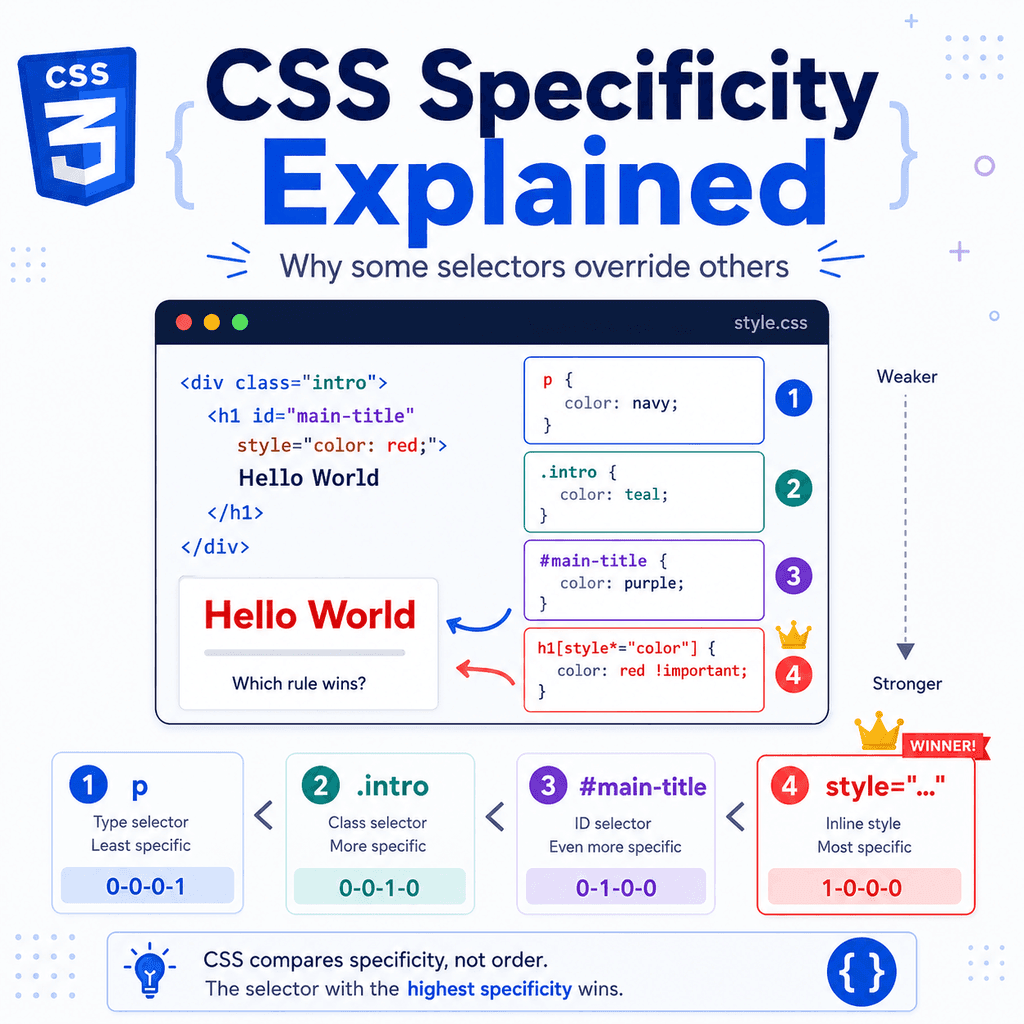
A Simple Specificity Order
A simplified order from weaker to stronger is:
type selectorclass selectorID selectorinline styleExamples:
p { color: black;}.intro { color: navy;}#main-intro { color: green;}<p style=”color: red;”>In general:
class selectors override type selectorsID selectors override class selectorsinline styles override normal stylesheet rulesThis simplified model explains many common CSS conflicts.
Type Selector Specificity
A type selector targets an HTML element by tag name.
Examples:
p { color: black;}h1 { font-size: 2rem;}button { padding: 10px 16px;}Type selectors have low specificity.
They are useful for broad base styles.
For example:
body { font-family: Arial, sans-serif;} p { line-height: 1.6;}Because type selectors are low specificity, they are usually easy to override later with classes.
Class Selector Specificity
A class selector targets elements with a specific class.
Example:
.card { padding: 24px;}HTML:
<article class=”card”> <h2>CSS Selectors</h2></article>Class selectors are more specific than type selectors.
Example:
p { color: black;} .intro { color: navy;}HTML:
<p class=”intro”>Welcome.</p>The paragraph becomes navy.
The .intro selector is stronger than the p selector.
Classes are usually the most useful selectors for reusable styling.
ID Selector Specificity
An ID selector targets an element with a specific id.
Example:
#main-title { color: green;}HTML:
<h1 id=”main-title”>Welcome</h1>ID selectors are more specific than class selectors.
Example:
.page-title { color: navy;} #main-title { color: green;}HTML:
<h1 id=”main-title” class=”page-title”>Welcome</h1>The heading becomes green because #main-title is more specific than .page-title.
IDs are powerful.
Use them carefully in CSS because they can make styles harder to override.
Inline Style Specificity
Inline styles are written directly in the HTML with the style attribute.
Example:
<p style=”color: red;”>This paragraph is red.</p>Inline styles are usually stronger than normal stylesheet rules.
Example:
<p class=”intro” style=”color: red;”>Welcome.</p>CSS:
.intro { color: navy;}The paragraph becomes red.
The inline style wins over the class selector.
Inline styles can be useful in rare cases, but they usually make CSS harder to maintain.
For normal website styling, use stylesheets and classes instead.
Specificity as a Score
Specificity is often explained as a scoring system.
A common simplified format is:
IDs – classes/attributes/pseudo-classes – types/pseudo-elementsFor example:
phas:
0 IDs0 classes1 typeSo it can be thought of as:
0-0-1This selector:
.introhas:
0 IDs1 class0 typesSo it is:
0-1-0This selector:
#main-introhas:
1 ID0 classes0 typesSo it is:
1-0-0A higher value in the leftmost column wins.
Specificity Score Examples
This selector:
pSpecificity:
0-0-1This selector:
.cardSpecificity:
0-1-0This selector:
.card pSpecificity:
0-1-1This selector:
#main-content pSpecificity:
1-0-1The ID selector column is stronger than the class column.
That means #main-content p is much harder to override than .card p.
Comparing Specificity
Example:
p { color: black;} .card p { color: navy;}HTML:
<article class=”card”> <p>This paragraph is inside a card.</p></article>The paragraph becomes navy.
Why?
The selector p has specificity:
0-0-1The selector .card p has specificity:
0-1-1Because .card p includes a class selector, it is more specific.
Specificity Beats Source Order When Selectors Differ
Source order means later rules can win when specificity is equal.
But a more specific selector can beat a later less-specific selector.
Example:
.intro { color: navy;} p { color: black;}HTML:
<p class=”intro”>Welcome.</p>The paragraph becomes navy.
Even though the p rule comes later, .intro is more specific.
Source order does not automatically beat specificity.
The later rule wins only when the competing declarations have equal specificity or when other cascade factors allow it.
When Source Order Wins
If specificity is equal, the later rule wins.
Example:
.message { color: green;} .message { color: blue;}HTML:
<p class=”message”>Your settings were saved.</p>Both rules use the same selector.
They have equal specificity.
The second rule comes later, so the message becomes blue.
Specificity decides first.
If specificity is tied, order decides.
Specificity with Multiple Classes
Multiple classes in a selector increase specificity.
Example:
.button { background-color: gray;} .button.primary { background-color: navy;}HTML:
<button class=”button primary”>Save</button>The button becomes navy.
The selector .button.primary has two class selectors.
It is more specific than .button.
This means .button.primary can override .button even if .button appears later in some cases.
Specificity with Type and Class Selectors
A class selector combined with a type selector is more specific than the class alone.
Example:
.note { color: navy;} p.note { color: green;}HTML:
<p class=”note”>This is a note.</p>The paragraph becomes green.
The selector p.note contains:
one type selectorone class selectorIt is more specific than .note.
However, adding type selectors to classes is not always necessary.
Use them only when you need that extra targeting.
Specificity with Descendant Selectors
Descendant selectors add up the specificity of their parts.
Example:
.card p { color: navy;}This selector includes:
.card = one classp = one typeSo it is stronger than:
p { color: black;}This is useful when styling paragraphs only inside cards.
However, long descendant selectors can become too specific and fragile.
Example:
body main .container article.card p.text { color: navy;}This may be harder to override and maintain.
Attribute Selectors and Specificity
Attribute selectors count like class selectors.
Example:
input[type=”email”] { border-color: blue;}This is more specific than:
input { border-color: gray;}HTML:
<input type=”email”>The email input gets a blue border.
The selector input[type="email"] includes:
one type selectorone attribute selectorAttribute selectors are useful and reasonably specific.
They are not as strong as ID selectors.
Pseudo-Classes and Specificity
Pseudo-classes count like class selectors.
Examples:
a:hover { text-decoration: underline;}li:first-child { font-weight: bold;}input:checked { outline: 2px solid green;}Each pseudo-class contributes specificity like a class.
For example, a:hover is more specific than a.
That is why hover styles can override normal link styles when the element is hovered.
Pseudo-Elements and Specificity
Pseudo-elements count like type selectors.
Examples:
p::first-line { font-weight: bold;}.note::before { content: “Note: “;}Pseudo-elements are generally low specificity.
They target parts of elements rather than element states.
They are usually not a major source of specificity problems, but they still contribute to the selector’s specificity.
Universal Selector Specificity
The universal selector has no specificity.
Example:
* { box-sizing: border-box;}The * selector matches every element, but it does not add specificity.
That makes it useful for broad base rules.
For example:
*,*::before,*::after { box-sizing: border-box;}This creates a base rule that is easy to override if needed.
Specificity with :is()
The :is() selector function takes the specificity of the most specific selector inside it.
Example:
:is(h1, .title, #main-title) { color: navy;}The most specific selector inside :is() is:
#main-titleThis can make the whole rule more specific than expected.
Be careful when mixing type, class, and ID selectors inside :is().
If you want low specificity grouping, :where() may be better.
Specificity with :where()
The :where() selector function always has zero specificity.
Example:
:where(h1, h2, p) { margin-top: 0;}This rule matches headings and paragraphs, but the :where() part adds no specificity.
That makes it useful for base styles and resets.
For example:
:where(h1, h2, h3, p, ul, ol) { margin-top: 0;}Later class selectors can easily override these low-specificity defaults.
Specificity with :not()
The :not() selector function takes the specificity of the selector inside it.
Example:
.card:not(.featured) { border: 1px solid #dddddd;}This includes:
.card.featured inside :not()Both contribute to specificity.
Be careful with selectors such as:
.card:not(#featured-card) { border: 1px solid #dddddd;}The ID inside :not() makes the selector more specific.
That may make it harder to override later.
Specificity with :has()
The :has() selector function also takes specificity from its argument.
Example:
.card:has(img) { border-top: 4px solid navy;}This includes the .card class and the img type selector inside :has().
Another example:
.card:has(.featured-image) { border-top: 4px solid navy;}The class inside :has() contributes to specificity.
:has() is powerful, but it can make selectors more complex.
Use it when it improves clarity.
Inline Styles and Specificity
Inline styles are stronger than normal stylesheet selectors.
Example:
<p class=”intro” style=”color: red;”>Welcome.</p>CSS:
.intro { color: navy;}The paragraph becomes red.
The inline style wins.
To override inline styles from a stylesheet, authors sometimes use !important.
However, this should be avoided where possible.
If you control the HTML, removing the inline style is usually cleaner.
!important and Specificity
The !important flag changes normal cascade behaviour.
Example:
p { color: red !important;} .intro { color: navy;}HTML:
<p class=”intro”>Welcome.</p>The paragraph may become red because the p declaration is marked !important.
Even though .intro is more specific, the important declaration has higher priority.
Use !important sparingly.
It can make CSS difficult to override and debug.
Competing !important Rules
If two declarations are both marked !important, specificity matters again.
Example:
p { color: red !important;} .intro { color: navy !important;}HTML:
<p class=”intro”>Welcome.</p>Both declarations are important.
The .intro selector is more specific than p.
So the paragraph becomes navy.
If specificity is tied between two important declarations, source order can decide.
Why High Specificity Causes Problems
High-specificity selectors can make CSS hard to maintain.
Example:
body main .content article.card p.description { color: navy;}This selector is very specific.
To override it, you may need an even more specific selector.
That can lead to a specificity battle.
Example:
body main .content article.card.featured p.description { color: green;}This makes the stylesheet increasingly complex.
It is usually better to use clear class selectors.
Avoiding Specificity Battles
A specificity battle happens when you keep making selectors stronger to override earlier selectors.
Less ideal:
.card p { color: navy;} main .card p { color: green;} body main .card p { color: red;}Better:
.card-text { color: navy;} .card-text-featured { color: green;}HTML:
<p class=”card-text card-text-featured”>Featured card text.</p>Clear classes reduce the need for increasingly specific selectors.
Use Classes for Predictable Specificity
Classes are usually the best tool for predictable styling.
Example:
<button class=”button button-primary”>Save</button><button class=”button button-secondary”>Cancel</button>CSS:
.button { padding: 10px 16px;} .button-primary { background-color: navy; color: white;} .button-secondary { background-color: white; color: navy;}This creates predictable, reusable styles.
The base class gives shared styling.
Modifier classes provide variations.
This is easier to maintain than relying on long descendant selectors or IDs.
Keep Specificity Low Where Possible
Low-specificity CSS is easier to override.
For example:
.card { padding: 24px;}is easier to work with than:
main .content section.article-list article.card { padding: 24px;}The first selector clearly styles cards.
The second selector depends on a very specific HTML structure.
If the structure changes, the selector may break.
If another style needs to override it, the selector may be unnecessarily difficult to beat.
Use Source Order Intentionally
When selectors have equal specificity, source order decides.
This can be useful.
Example:
.button { background-color: gray;} .button-primary { background-color: navy;}HTML:
<button class=”button button-primary”>Save</button>Both selectors are class selectors.
They have equal specificity.
Because .button-primary comes later, it overrides the background colour.
This is a common and clean pattern:
base styles firstvariation styles laterA Complete Example
HTML:
<!DOCTYPE html><html lang=”en”><head> <meta charset=”UTF-8″> <title>CSS Specificity Example</title> <link rel=”stylesheet” href=”styles.css”></head><body> <main class=”container”> <h1 id=”page-title” class=”title”>CSS Specificity</h1> <p class=”intro”> Specificity explains why some selectors override others. </p> <article class=”card featured-card”> <h2 class=”card-title”>Featured Lesson</h2> <p class=”card-text”> More specific selectors can override less specific selectors. </p> <a class=”button button-primary” href=”lesson.html”>Read more</a> </article> </main> </body></html>CSS:
/* Type selector: low specificity */h1 { color: black;} /* Class selector: stronger than h1 */.title { color: navy;} /* ID selector: stronger than .title */#page-title { font-size: 2.5rem;} /* Base paragraph style */p { color: #333333;} /* Class selector overrides p colour */.intro { color: navy;} /* Component base */.card { padding: 24px; border: 1px solid #dddddd;} /* Variation comes later */.featured-card { border-color: navy;} /* Clear class for card text */.card-text { line-height: 1.6;} /* Button base */.button { padding: 10px 16px; background-color: gray; color: white;} /* Button variation */.button-primary { background-color: navy;}This example shows type, class, ID, and source order working together.
How the Complete Example Works
This rule targets all <h1> elements:
h1 { color: black;}This rule targets elements with class="title":
.title { color: navy;}The title becomes navy because .title is more specific than h1.
This rule targets the unique element with id="page-title":
#page-title { font-size: 2.5rem;}The ID selector applies the font size.
This rule targets all paragraphs:
p { color: #333333;}This rule targets the intro paragraph:
.intro { color: navy;}The intro paragraph becomes navy because .intro is more specific than p.
This rule gives all buttons a base background:
.button { background-color: gray;}This later rule changes primary buttons:
.button-primary { background-color: navy;}Because both selectors have equal specificity and .button-primary comes later, the primary button becomes navy.
Debugging Specificity Problems
Browser developer tools are the best way to debug specificity.
Inspect the element and check the Styles panel.
Look for:
which rules applywhich declarations are crossed outwhich selector is more specificwhich rule appears laterwhether an inline style is presentwhether !important is being usedA crossed-out declaration usually means the browser read the rule, but another rule won.
For example:
p { color: black;}may be crossed out because:
.intro { color: navy;}is more specific.
Developer tools show this directly.
Common Mistake: Thinking the Last Rule Always Wins
The last rule does not always win.
Example:
.intro { color: navy;} p { color: black;}HTML:
<p class=”intro”>Welcome.</p>The paragraph becomes navy.
Even though the p rule comes later, .intro is more specific.
The later rule wins only when specificity is equal or when higher cascade rules allow it.
Common Mistake: Using IDs for Everyday Styling
This works:
#site-nav { background-color: navy;}But it can be harder to override than a class:
.site-nav { background-color: navy;}Use IDs when uniqueness is important, such as page anchors or JavaScript hooks.
Use classes for most styling.
Classes are easier to reuse and easier to override.
Common Mistake: Making Selectors Too Long
Less maintainable:
body main .container section.article-list article.card p.card-text { color: navy;}Better:
.card-text { color: navy;}Long selectors can create high specificity and depend too much on exact HTML structure.
Short, meaningful class selectors are usually easier to maintain.
Common Mistake: Adding !important Instead of Fixing Specificity
Less ideal:
.card-text { color: navy !important;}Better:
.card-text-featured { color: navy;}or place the override later:
.card-text { color: #333333;} .card-text-featured { color: navy;}!important can be useful in limited situations, but it should not be the default solution.
Common Mistake: Forgetting That Attribute Selectors Count Like Classes
This selector:
input[type=”email”] { border-color: blue;}is more specific than:
input { border-color: gray;}The attribute selector adds specificity.
If your general input style is being overridden, check whether an attribute selector is involved.
Common Mistake: Confusing Inheritance with Specificity
Inheritance is not the same as specificity.
Example:
body { color: black;} p { color: navy;}The paragraph becomes navy.
The paragraph may inherit black from body, but the p rule directly applies navy.
Directly applied styles beat inherited styles.
Specificity compares selectors that directly apply to the element.
Inheritance provides values when no direct value is set.
Common Mistake: Over-Specifying Component Styles
Less flexible:
main .card .card-title { color: navy;}Often better:
.card-title { color: navy;}or:
.card .card-title { color: navy;}Use only as much specificity as the component needs.
Over-specific selectors make future changes harder.
Best Practices
Use type selectors for broad base styles.
Use classes for reusable component styles.
Use IDs sparingly in CSS.
Avoid inline styles for normal styling.
Avoid !important unless there is a clear reason.
Keep selectors as short as practical.
Avoid deep descendant selector chains.
Use modifier classes for variations.
Place base styles before variation styles.
Use source order intentionally when specificity is equal.
Use :where() for low-specificity base rules when appropriate.
Use browser developer tools to inspect which selector is winning.
Summary
CSS specificity explains why some selectors override others.
A type selector has low specificity:
p { color: black;}A class selector is more specific:
.intro { color: navy;}An ID selector is more specific again:
#main-intro { color: green;}Inline styles are usually stronger than normal stylesheet selectors:
<p style=”color: red;”>The simplified order is:
type selector < class selector < ID selector < inline styleIf selectors have equal specificity, the later rule usually wins.
If one selector is more specific, it can override a later but weaker selector.
The main idea is simple:
Specificity is the weight of a selector.The heavier selector usually wins.Once you understand specificity, it becomes much easier to predict, organise, and debug CSS.