
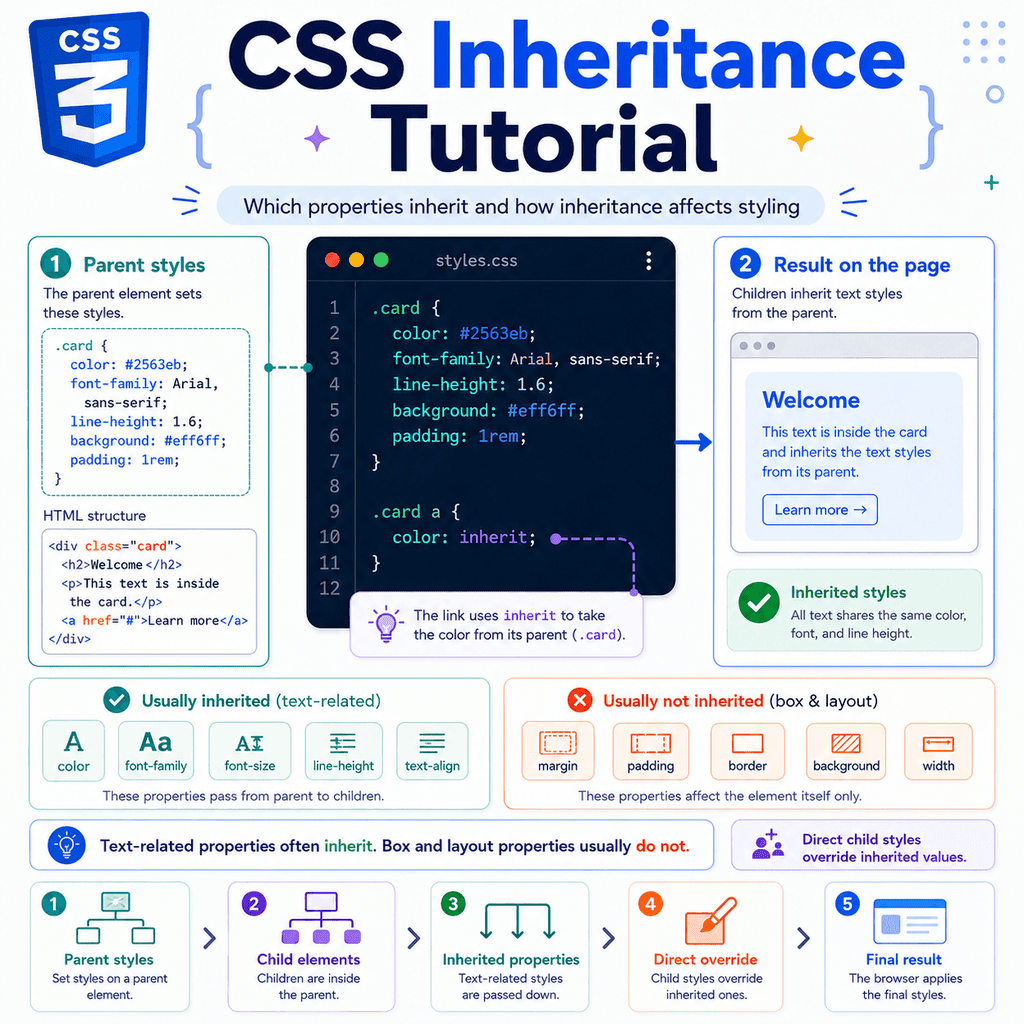
Introduction
CSS does not style every element in isolation.
Some CSS properties can pass from a parent element down to its child elements.
This is called inheritance.
For example:
body { color: navy;}HTML:
<body> <h1>Welcome</h1> <p>This is a paragraph.</p></body>The <h1> and <p> elements can both become navy.
Why?
Because the color property is inherited.
The body element sets the text colour.
The child elements inherit that text colour unless another rule changes it.
Inheritance is one reason CSS can be efficient.
You do not need to set the same font, colour, or text styling on every element manually.
You can set broad text styles on a parent element, and many child elements will use them automatically.
What Is CSS Inheritance?
Inheritance is the process where some CSS property values pass from a parent element to its children.
A parent element is an element that contains another element.
A child element is an element inside another element.
Example:
<div class=”card”> <h2>CSS Basics</h2> <p>Learn how CSS styles web pages.</p></div>Here, the <div> is the parent.
The <h2> and <p> are children.
If you write:
.card { color: darkblue;}the text inside the card can become dark blue.
That happens because color is inherited.
The <h2> and <p> inherit the color value from .card.
A Simple Inheritance Example
HTML:
<section class=”intro”> <h1>Welcome</h1> <p>This is the introduction.</p></section>CSS:
.intro { color: green;}The <section> has color: green.
The <h1> and <p> are inside the section.
Because color inherits, both child elements use green text.
The result is similar to this:
section.intro h1 inherits color: green p inherits color: greenYou only wrote one CSS rule.
The child text still received the style.
Inheritance Moves Down the HTML Tree
HTML documents have a tree structure.
Elements can contain other elements.
Example:
<body> <main> <article> <h1>CSS Inheritance</h1> <p>Some properties pass down to child elements.</p> </article> </main></body>The structure looks like this:
body main article h1 pIf you write:
body { color: #333333;}the color can pass down through the tree.
The <main> inherits it.
The <article> inherits it.
The <h1> and <p> inherit it.
The browser does not need the colour to be written on every element.
It can pass the inherited value down from parent to child.
Inherited Values Can Come from Any Parent
Inheritance does not only come from the <body> element.
Any parent can pass inherited properties to its children.
Example:
<div class=”card”> <h2>Profile</h2> <p>This user is active.</p></div>CSS:
.card { color: purple;}The <h2> and <p> inherit color: purple from .card.
Another example:
<nav class=”site-nav”> <a href=”/”>Home</a> <a href=”/about”>About</a></nav>CSS:
.site-nav { font-family: Arial, sans-serif;}The links inherit the font family from the navigation element.
Inheritance follows the element hierarchy.
A child looks to its parent for inherited property values.
Not Every CSS Property Inherits
This is one of the most important details.
Some CSS properties inherit.
Some do not.
For example, this inherits:
body { color: navy;}Child elements usually inherit color.
But this does not usually inherit:
body { border: 2px solid red;}Child elements do not automatically get the same border.
If borders inherited by default, every element inside the body would have a red border.
That would usually be unwanted.
So CSS only inherits some properties by default.
Why Some Properties Inherit
Text-related properties often inherit.
That is useful because text styling usually should be consistent across a section or page.
For example:
body { font-family: Arial, sans-serif; color: #333333; line-height: 1.6;}This gives the whole page a consistent text style.
You usually want paragraphs, list items, links, headings, and other text elements to share these values unless you override them.
So properties like these commonly inherit:
colorfont-familyfont-sizefont-stylefont-weightline-heightletter-spacingtext-aligntext-transformvisibilityLayout and box properties usually do not inherit.
That is also useful.
You usually do not want every child element to automatically copy its parent’s margin, padding, border, width, or background.
Properties like these usually do not inherit:
marginpaddingborderbackgroundwidthheightdisplaypositiontoprightbottomleftgapgrid-template-columnsflex-directionInheritance is designed to make common styling easier without making layout unpredictable.
Common Properties That Inherit
Many inherited properties are related to text.
Here are common inherited properties:
colorfont-familyfont-sizefont-stylefont-weightfont-variantline-heightletter-spacingword-spacingtext-aligntext-indenttext-transformwhite-spacevisibilitycursordirectionYou do not need to memorise every inherited property immediately.
Start with the most common ones:
colorfont-familyfont-sizefont-weightline-heighttext-alignThese appear often in everyday CSS.
Common Properties That Do Not Inherit
Many non-inherited properties are related to spacing, layout, and boxes.
Examples:
marginpaddingborderborder-radiusbackground-colorbackground-imagewidthheightmin-widthmax-widthdisplaypositionz-indexoverflowbox-shadowopacitytransformExample:
.card { padding: 20px; border: 1px solid #cccccc; background-color: #f5f5f5;}HTML:
<div class=”card”> <h2>Card title</h2> <p>Card text.</p></div>The <h2> and <p> do not automatically inherit the card’s padding, border, or background colour.
They appear inside the card.
But they do not receive those box styles as their own styles.
The parent has the box styling.
The children simply sit inside it.
Inheritance with color
The color property is one of the clearest inheritance examples.
HTML:
<div class=”notice”> <h2>Notice</h2> <p>Your profile was updated.</p></div>CSS:
.notice { color: darkgreen;}Both the heading and paragraph become dark green.
Why?
Because color inherits.
The heading and paragraph do not have their own color rule, so they use the inherited value from .notice.
Direct Styles Override Inherited Styles
An inherited value is weaker than a direct value on the element itself.
Example:
.notice { color: darkgreen;} .notice h2 { color: navy;}HTML:
<div class=”notice”> <h2>Notice</h2> <p>Your profile was updated.</p></div>The paragraph is dark green.
The heading is navy.
Why?
The heading could inherit color: darkgreen from .notice.
But the heading also has a direct rule:
.notice h2 { color: navy;}The direct rule wins for the heading.
The inherited value is only used when the element does not have a stronger value for that property.
Inheritance with Fonts
Font properties commonly inherit.
Example:
body { font-family: Arial, sans-serif;}HTML:
<body> <h1>My Website</h1> <p>This is a paragraph.</p> <button>Click me</button></body>Many text elements can inherit the font family from the body.
This is why developers often set the main font on body.
Example:
body { font-family: “Inter”, Arial, sans-serif;}This gives the page a default font.
Then you can override specific elements if needed:
.logo { font-family: Georgia, serif;}Inheritance with font-size
The font-size property inherits.
Example:
.article { font-size: 18px;}HTML:
<article class=”article”> <p>This paragraph uses the article font size.</p> <ul> <li>This list item also inherits it.</li> </ul></article>The paragraph and list item can inherit font-size: 18px.
However, headings often have browser default styles.
For example, browsers usually give <h1> a larger font size.
So this HTML:
<article class=”article”> <h1>Article title</h1> <p>Article text.</p></article>with this CSS:
.article { font-size: 18px;}may not make the <h1> exactly 18px.
The heading may have its own default font-size rule from the browser.
A browser default rule is still a CSS rule.
If the heading has its own font size, that direct value can override inheritance.
Inheritance with line-height
The line-height property inherits.
This is useful for readable text.
Example:
body { line-height: 1.6;}Paragraphs, list items, and other text can inherit that line height.
This gives text more consistent spacing.
A common page-level text setup is:
body { font-family: Arial, sans-serif; color: #333333; line-height: 1.6;}This sets a basic text style for the whole page.
Then individual components can adjust it when needed.
Unitless line-height Is Usually Better
When setting line-height on a parent, a unitless value is often easier to manage.
Example:
body { line-height: 1.6;}This means the line height is based on the element’s own font size.
If a child has a different font size, the line height scales with it.
Example:
body { line-height: 1.6;} h1 { font-size: 40px;} p { font-size: 16px;}The heading and paragraph can both use a line height based on their own font sizes.
This is usually more flexible than using a fixed pixel value everywhere.
Inheritance with text-align
The text-align property inherits.
Example:
.hero { text-align: center;}HTML:
<section class=”hero”> <h1>Learn CSS</h1> <p>Start with the basics.</p> <a href=”/lessons”>View lessons</a></section>The heading, paragraph, and link text can all be centred.
You do not need to write:
.hero h1 { text-align: center;} .hero p { text-align: center;} .hero a { text-align: center;}The parent can provide the text alignment.
The children inherit it.
Inheritance with Links
Links can inherit some text properties, but links also have browser default styles.
Example:
.card { color: navy;}HTML:
<div class=”card”> <p>Read the <a href=”/guide”>full guide</a>.</p></div>You might expect the link to become navy.
But browsers usually give links their own default colour.
A link may appear blue because the browser has a default rule for links.
To make links inherit the surrounding text colour, you can write:
a { color: inherit;}This tells links to use the inherited color value.
Then this works more predictably:
.card { color: navy;} .card a { color: inherit;}The link uses the card’s text colour.
The inherit Keyword
CSS has an inherit keyword.
It tells an element to use the value from its parent.
Example:
a { color: inherit;}This means:
Use the same color as the parent element.Another example:
button { font-family: inherit;}This tells buttons to inherit the font family from their parent.
This is common because form controls may have browser-specific default fonts.
Using font-family: inherit can make buttons and inputs match the rest of the page more consistently.
Using inherit with Non-Inherited Properties
You can force a property to inherit even if it does not normally inherit.
Example:
.card { border: 2px solid navy;} .card p { border: inherit;}Normally, border does not inherit.
But border: inherit; tells the paragraph to copy the border value from its parent.
This is possible, but it is not common for most layout properties.
Usually, non-inherited properties are non-inherited for a good reason.
Use forced inheritance only when it makes the code clearer.
The initial Keyword
The initial keyword resets a property to its initial CSS value.
Example:
.box { color: green;} .box p { color: initial;}The paragraph does not use the inherited green value.
It uses the initial value for color.
For many browsers, that usually behaves like black text, but the exact result should be understood as the property’s initial value, not simply “black”.
The main idea is:
inherit = use the parent valueinitial = use the property’s initial valueThe unset Keyword
The unset keyword behaves differently depending on whether the property normally inherits.
For inherited properties, unset acts like inherit.
For non-inherited properties, unset acts like initial.
Example with an inherited property:
.card { color: navy;} .card p { color: unset;}Because color normally inherits, unset behaves like inherit.
The paragraph uses navy.
Example with a non-inherited property:
.card { margin: 20px;} .card p { margin: unset;}Because margin does not normally inherit, unset behaves like initial.
The paragraph does not copy the parent’s margin.
The revert Keyword
The revert keyword rolls a property back to the value it would have had from a previous cascade origin.
For everyday use, that often means going back toward browser default styling.
Example:
button { all: unset;} button.default-looking { all: revert;}You do not need revert for most beginner CSS.
But it is useful to know that CSS has several reset-style keywords:
inheritinitialunsetrevertThe most useful one to learn first is usually inherit.
Inheritance and the Cascade
Inheritance is part of how CSS decides final values.
But it is not the same thing as specificity or source order.
The browser considers direct declarations first.
If there is no direct value for an inherited property, the browser can use the inherited value from the parent.
Example:
.parent { color: green;} .child { color: blue;}HTML:
<div class=”parent”> <p class=”child”>This text is blue.</p></div>The child is blue.
The parent provides an inherited value of green.
But the child has a direct value of blue.
The direct value wins.
Inheritance Is Weaker Than Direct Styling
This example shows the same idea clearly:
.article { color: #333333;} .article p { color: purple;}HTML:
<article class=”article”> <p>This paragraph is purple.</p></article>The paragraph is inside .article.
It could inherit color: #333333.
But it has a direct rule:
.article p { color: purple;}So it becomes purple.
Inheritance fills in missing values.
It does not usually beat direct CSS declarations.
Inheritance and Specificity
Specificity compares CSS selectors that directly apply to the same element and property.
Inheritance is different.
Example:
#main { color: green;} p { color: blue;}HTML:
<div id=”main”> <p>This paragraph is blue.</p></div>The paragraph becomes blue.
This can surprise people.
The #main selector is more specific than p.
But #main targets the parent <div>, not the paragraph directly.
The p selector targets the paragraph directly.
The paragraph receives:
inherited color from #main: greendirect color from p: blueThe direct p colour wins.
A direct style on the element usually beats an inherited style, even if the inherited style came from a more specific selector on the parent.
Parent Specificity Does Not Transfer to Children
Specificity does not get inherited.
Example:
#sidebar { color: green;} .note { color: purple;}HTML:
<aside id=”sidebar”> <p class=”note”>This note is purple.</p></aside>The paragraph becomes purple.
The #sidebar rule has high specificity, but it targets the parent.
The .note rule targets the paragraph directly.
The paragraph uses the direct class rule.
The parent’s ID specificity does not make the inherited colour stronger on the child.
Inheritance and Source Order
Source order matters when competing declarations have equal strength.
Inheritance can be affected by source order when parent styles compete.
Example:
.box { color: green;} .box { color: blue;}HTML:
<div class=”box”> <p>This paragraph inherits blue.</p></div>The parent .box ends up with color: blue.
The paragraph inherits the final colour from the parent.
The child is not choosing between green and blue directly.
The parent’s final computed colour is blue.
Then the child inherits that value.
Inheritance Uses the Parent’s Final Value
A child inherits the parent’s final value, not every possible value the parent considered.
Example:
.panel { color: green;} .panel { color: blue;} .panel p { font-weight: bold;}HTML:
<div class=”panel”> <p>This paragraph inherits the final colour.</p></div>The .panel ends up blue because the later .panel rule wins.
The paragraph inherits blue.
The paragraph also gets a direct font-weight: bold.
The final result is:
color: blue;font-weight: bold;Inheritance and Browser Defaults
Browsers have default styles.
These are also called user agent styles.
For example, browsers usually style headings, paragraphs, lists, and links before you write any CSS.
Example:
<h1>Page title</h1><p>Paragraph text.</p><ul> <li>List item</li></ul>The browser usually gives the heading a large bold style.
The paragraph usually has margin.
The list usually has indentation.
These defaults can interact with inheritance.
For example:
body { font-size: 18px;}A paragraph may inherit 18px.
But an <h1> may still appear much larger because the browser has a default heading font size.
The heading’s direct browser default value can override the inherited body font size.
Resetting Browser Defaults
Sometimes developers reset or normalise browser defaults.
Example:
h1,h2,h3,p { margin: 0;}This removes default margins from headings and paragraphs.
This is not inheritance.
Margins do not normally inherit.
This is a direct rule applied to those elements.
A common setup might be:
body { font-family: Arial, sans-serif; color: #222222; line-height: 1.6;} h1,h2,h3,p { margin: 0;}The body rule provides inherited text styling.
The heading and paragraph rule directly resets margins.
Both ideas work together.
Inheritance with Lists
Lists can inherit text styles from their parent.
Example:
.menu { color: navy; font-family: Arial, sans-serif;}HTML:
<ul class=”menu”> <li>Home</li> <li>About</li> <li>Contact</li></ul>The list items inherit the colour and font family.
But list spacing and bullets are controlled by other properties.
For example:
.menu { list-style: none; padding: 0;}The padding does not inherit.
The list-style property can affect list item markers, but the main point is this:
Text styling often inherits.Spacing and layout usually do not.Inheritance with Forms
Form elements can be a little different.
Browsers often give form controls their own default styles.
Example:
<form> <label for=”email”>Email</label> <input id=”email” type=”email”> <button>Submit</button></form>If you write:
body { font-family: Arial, sans-serif;}some form controls may not look like they use the same font in every browser.
A common fix is:
button,input,select,textarea { font: inherit;}This tells form controls to inherit font settings from their parent.
You may also see:
button,input,select,textarea { font-family: inherit;}This helps form controls match the rest of the page.
Inheritance with Buttons
Buttons often have browser default styling.
Example:
body { font-family: Arial, sans-serif; color: #222222;}HTML:
<button>Save</button>The button may not inherit every text style exactly as you expect.
You can make it inherit font styles:
button { font: inherit;}You can also make a button inherit text colour:
button { color: inherit;}Or combine them:
button { font: inherit; color: inherit;}This is useful when building custom button styles.
Inheritance with Headings
Headings inherit some properties, but they also have browser defaults.
Example:
.article { color: #333333; font-family: Arial, sans-serif;}HTML:
<article class=”article”> <h1>Article Title</h1> <p>Article text.</p></article>The heading can inherit the colour and font family.
But it may not inherit the same font size or margin.
Browsers usually give headings their own font sizes and margins.
If you want full control, write direct heading styles:
.article h1 { font-size: 2rem; margin-bottom: 1rem;}The inherited values still help.
But direct styles are used for specific heading design.
Inheritance with Nested Elements
Inheritance continues through nested elements.
Example:
<div class=”content”> <p> This paragraph has <strong>important text</strong> and <em>emphasised text</em>. </p></div>CSS:
.content { color: #333333; font-family: Arial, sans-serif;}The paragraph inherits from .content.
The <strong> and <em> elements can inherit through the paragraph.
However, <strong> has browser default bold styling.
<em> has browser default italic styling.
So the final result may be:
p inherits color and font-familystrong inherits color and font-family, but is boldem inherits color and font-family, but is italicInheritance provides the base.
Element defaults and direct rules can add or change specific styles.
Inheritance with em Units
Inheritance can affect relative units such as em.
The em unit is based on font size.
Example:
.card { font-size: 20px;} .card p { margin-bottom: 1em;}The paragraph can inherit font-size: 20px.
Then 1em equals the paragraph’s font size.
So the bottom margin becomes 20px.
If the font size changes, the em-based spacing changes too.
This can be useful, but it can also be confusing if font sizes are nested deeply.
Inheritance with rem Units
The rem unit is based on the root element’s font size.
The root element is usually <html>.
Example:
html { font-size: 16px;} .card { font-size: 20px;} .card p { margin-bottom: 1rem;}Here, 1rem is based on the root font size.
It is not based on the .card font size.
So 1rem is usually 16px in this example.
Inheritance affects em more directly than rem.
Both units are useful.
The main difference is:
em = relative to the element’s font sizerem = relative to the root font sizeInheritance and Custom Properties
CSS custom properties are variables.
They usually start with two hyphens:
:root { –brand-color: #2563eb;}Custom properties inherit by default.
Example:
.card { –card-color: navy;} .card h2 { color: var(–card-color);}HTML:
<div class=”card”> <h2>Card title</h2></div>The custom property --card-color is set on .card.
The heading can use it because custom properties inherit.
This makes custom properties useful for component themes.
Custom Property Inheritance Example
HTML:
<section class=”theme-dark”> <button>Save</button></section> <section class=”theme-light”> <button>Cancel</button></section>CSS:
.theme-dark { –button-bg: navy; –button-text: white;} .theme-light { –button-bg: #eeeeee; –button-text: #222222;} button { background-color: var(–button-bg); color: var(–button-text);}Each button uses the custom properties from its parent section.
The first button gets dark theme values.
The second button gets light theme values.
This works because custom properties inherit.
Inheritance and all
The all property can reset many properties at once.
Example:
.special-box { all: unset;}This resets most properties on the element.
It can remove inherited styles too, depending on the values involved.
You may also see:
.special-box { all: inherit;}This makes many properties inherit from the parent.
Use all carefully.
It affects many properties at once and can create unexpected results.
For normal beginner CSS, direct property rules are usually clearer.
Inheritance and box-sizing
The box-sizing property does not normally inherit.
But many projects intentionally make it inherit.
A common pattern is:
html { box-sizing: border-box;} *,*::before,*::after { box-sizing: inherit;}This sets box-sizing: border-box on the root element.
Then all elements and pseudo-elements inherit it.
This is a deliberate use of inheritance.
It makes element sizing easier to manage across the page.
Inheritance with opacity
The opacity property does not inherit in the normal property-value sense.
But it affects the whole rendered element, including its children.
Example:
.card { opacity: 0.5;}HTML:
<div class=”card”> <h2>Card title</h2> <p>Card text.</p></div>The card and its children appear faded.
This is not the same as the children inheriting opacity: 0.5.
The parent is rendered with opacity, and its contents are part of that rendering.
This distinction matters because setting a child back to opacity: 1 will not make it fully opaque if the whole parent is faded.
Example:
.card { opacity: 0.5;} .card p { opacity: 1;}The paragraph is still inside a faded parent.
The visual result is still affected by the parent opacity.
Inheritance with background-color
background-color does not normally inherit.
Example:
.card { background-color: #e0f2fe;}HTML:
<div class=”card”> <h2>Card title</h2> <p>Card text.</p></div>The card has a light blue background.
The heading and paragraph do not each receive their own background colour.
They simply sit on top of the card’s background.
If the children have transparent backgrounds, the parent’s background shows through.
That can look like inheritance, but it is not the same thing.
The child’s background is still transparent.
The parent’s background is visible behind it.
Inheritance with visibility
The visibility property inherits.
Example:
.panel { visibility: hidden;}HTML:
<div class=”panel”> <p>This text is hidden.</p></div>The paragraph is hidden because visibility inherits.
However, visibility has a special behaviour.
A child can be made visible again:
.panel { visibility: hidden;} .panel p { visibility: visible;}This is different from display: none.
If a parent has display: none, the children are not displayed either, and you cannot make one child visible with display while the parent remains hidden.
Inheritance with display
The display property does not inherit.
Example:
.container { display: flex;}HTML:
<div class=”container”> <div>One</div> <div>Two</div></div>The parent becomes a flex container.
The children become flex items because of their relationship to the flex container.
But the children do not inherit display: flex.
They do not automatically become flex containers themselves.
If you want a child to also be a flex container, you must style it directly:
.child { display: flex;}This distinction is important.
Some parent properties affect how children are laid out, but that does not always mean the property is inherited.
Parent Properties Can Affect Children Without Inheriting
A property can affect children even if it does not inherit.
Example:
.container { display: flex;}The children are arranged by the flex layout.
But they do not inherit display: flex.
Another example:
.grid { display: grid; gap: 20px;}The children are arranged in a grid with gaps.
But the children do not inherit display: grid or gap: 20px.
The parent controls the layout context.
The children participate in that layout.
That is not the same as inheritance.
Inheritance and Descendant Selectors
A descendant selector directly targets nested elements.
Example:
.card p { color: navy;}This selects paragraphs inside .card.
That is not inheritance.
It is a direct rule applied to the paragraph.
Compare this:
.card { color: navy;}This sets the colour on .card.
The paragraph may inherit it.
The two rules can produce a similar result, but they work differently.
Direct descendant selector:
.card p { color: navy;}Inheritance from parent:
.card { color: navy;}The first directly targets the paragraph.
The second styles the parent and lets inheritance pass the value down.
When to Use Inheritance
Use inheritance for broad text styles.
Good examples:
body { font-family: Arial, sans-serif; color: #222222; line-height: 1.6;}.article { color: #333333;}.sidebar { font-size: 0.875rem;}Inheritance is useful when child elements should share a common text style.
It keeps CSS shorter and more consistent.
When Not to Rely on Inheritance
Do not rely on inheritance for layout.
This will not make every child have padding:
.card { padding: 20px;}The card has padding.
The children do not inherit padding.
If you want spacing between children, use direct child styles or layout properties:
.card > * + * { margin-top: 1rem;}or:
.card { display: grid; gap: 1rem;}Do not expect margin, padding, border, width, or display to inherit automatically.
Inheritance and Component Design
Inheritance is useful for component styling.
Example:
.alert { color: #7f1d1d; background-color: #fee2e2; border: 1px solid #fecaca; padding: 1rem;}HTML:
<div class=”alert”> <h2>Error</h2> <p>Please check the form and try again.</p></div>The color can inherit to the heading and paragraph.
The background-color, border, and padding stay on the alert box.
This is usually what you want.
The container controls the box.
The text inside inherits the text colour.
Component Example with Overrides
HTML:
<div class=”card”> <h2>Account</h2> <p>Your settings were saved.</p> <a href=”/settings”>Edit settings</a></div>CSS:
.card { color: #333333; font-family: Arial, sans-serif; background-color: white; border: 1px solid #dddddd; padding: 1rem;} .card h2 { color: navy;} .card a { color: inherit; font-weight: bold;}The card sets the base text colour and font.
The heading gets a direct navy colour.
The link inherits the card’s text colour and becomes bold.
The box styles stay on the card.
This combines inheritance and direct styling.
Inheritance and Page-Level Defaults
A common CSS pattern is to set page-level defaults on body.
Example:
body { margin: 0; font-family: Arial, sans-serif; color: #222222; line-height: 1.6; background-color: #ffffff;}This rule contains both inherited and non-inherited properties.
Inherited properties:
font-familycolorline-heightNon-inherited properties:
marginbackground-colorThe body margin affects the body itself.
The body background affects the page background.
The font, colour, and line-height can pass to child elements.
A single rule can include both inherited and non-inherited properties.
Each property behaves according to its own rules.
Inheritance Is Property-Based
Inheritance is decided property by property.
This rule:
body { margin: 0; color: #333333; font-family: Arial, sans-serif;}does not mean every property inherits.
Only inherited properties pass down automatically.
In this example:
margin does not normally inheritcolor inheritsfont-family inheritsCSS inheritance is not about whether a selector inherits.
It is about whether a property inherits.
The Browser Computes a Value for Every Property
Every element ends up with a value for every CSS property.
For some properties, the value comes from a direct rule.
For some, it comes from inheritance.
For some, it comes from the property’s initial value.
Example:
<p>Hello world</p>Even if you write no CSS, the paragraph still has values for properties such as:
displaycolorfont-sizemarginline-heightSome come from browser defaults.
Some come from inheritance.
Some come from initial values.
CSS always resolves a final value.
How the Browser Chooses an Inherited Property Value
For an inherited property such as color, the browser can follow this simplified process:
1. Does the element have a direct color declaration?2. If yes, use that direct value.3. If no, inherit color from the parent.4. If there is no parent value, use the initial value or browser default.Example:
body { color: #333333;} p { color: navy;}HTML:
<p>This paragraph is navy.</p>The paragraph has a direct color.
So it uses navy.
It does not need to inherit the body colour.
How the Browser Handles a Non-Inherited Property
For a non-inherited property such as margin, the process is different.
Example:
section { margin: 40px;}HTML:
<section> <p>This paragraph does not inherit the section margin.</p></section>The section has margin.
The paragraph does not inherit that margin.
The paragraph may have its own margin from browser defaults or direct CSS.
But it does not copy the section margin just because it is inside the section.
Inheritance and currentColor
The currentColor keyword uses the current value of the color property.
Example:
.button { color: navy; border: 2px solid currentColor;}The border becomes navy because currentColor refers to the element’s text colour.
This can work nicely with inheritance.
Example:
.card { color: teal;} .card button { color: inherit; border: 2px solid currentColor;}The button inherits teal from the card.
Then the border uses currentColor, so the border becomes teal too.
This is useful for keeping text, borders, and icons visually connected.
Inheritance and SVG Icons
SVG icons often use currentColor.
Example:
<button class=”icon-button”> <svg aria-hidden=”true” viewBox=”0 0 24 24″> <path d=”…”></path> </svg> Save</button>CSS:
.icon-button { color: navy;} .icon-button svg { fill: currentColor;}The icon fill uses the button’s text colour.
If the button colour changes, the icon colour changes too.
This is a practical use of inheritance and currentColor.
Inheritance Can Reduce Repetition
Without inheritance, you might write:
.card h2 { color: #333333; font-family: Arial, sans-serif;} .card p { color: #333333; font-family: Arial, sans-serif;} .card a { color: #333333; font-family: Arial, sans-serif;}This is repetitive.
With inheritance, you can write:
.card { color: #333333; font-family: Arial, sans-serif;}Then add only the exceptions:
.card a { font-weight: bold;}Inheritance helps avoid repeated CSS.
It also makes style changes easier.
If you change the card colour once, the inherited text colour changes across the card.
Inheritance Can Create Surprises
Inheritance can also cause unexpected styling.
Example:
.warning { color: red;}HTML:
<div class=”warning”> <p>This is a warning.</p> <a href=”/help”>Get help</a></div>The paragraph may become red.
Depending on your link styles, the link may or may not become red.
If you also have this rule:
a { color: inherit;}then the link becomes red too.
That may be what you want.
Or it may make links look too similar to warning text.
Inheritance is powerful, but you should be aware of where styles come from.
Debugging Inheritance in Developer Tools
Browser developer tools can show inherited styles.
When you inspect an element, you may see sections for inherited rules.
For example, if you inspect a paragraph, you might see:
Inherited from bodyfont-family: Arial, sans-serif;color: #333333;line-height: 1.6;This tells you the paragraph is receiving those values from an ancestor.
Developer tools can also show crossed-out declarations.
If a direct value overrides an inherited value, the inherited value may appear inactive.
This is useful when debugging why text has a certain colour or font.
Common Inheritance Mistake: Expecting Padding to Inherit
This does not make every paragraph padded:
.article { padding: 2rem;}HTML:
<article class=”article”> <p>First paragraph.</p> <p>Second paragraph.</p></article>The article has padding.
The paragraphs do not inherit padding.
The padding creates space inside the article around its content.
If you want paragraph spacing, write paragraph spacing:
.article p { margin-bottom: 1rem;}or use a layout approach:
.article { display: grid; gap: 1rem;}Common Inheritance Mistake: Expecting Backgrounds to Inherit
This rule gives the card a background:
.card { background-color: #f0f9ff;}It does not give every child its own background.
HTML:
<div class=”card”> <h2>Title</h2> <p>Text</p></div>The heading and paragraph sit on top of the card background.
They do not inherit background-color.
If you want a child to have the same background, you can set it directly:
.card h2 { background-color: #f0f9ff;}or force inheritance:
.card h2 { background-color: inherit;}But most of the time, you do not need to do that.
Common Inheritance Mistake: Confusing Inheritance with Selection
This rule uses inheritance:
.card { color: navy;}This rule uses selection:
.card p { color: navy;}They can look similar on the page.
But they are not the same.
In the first example, the card gets the colour and the paragraph may inherit it.
In the second example, the paragraph is directly selected.
This matters when debugging specificity.
A direct rule on the child can override inherited styling from the parent.
Common Inheritance Mistake: Thinking Parent IDs Always Win
Example:
#main-content { color: green;} p { color: black;}HTML:
<main id=”main-content”> <p>This paragraph is black.</p></main>The paragraph becomes black.
The ID rule styles the parent.
The p rule styles the paragraph directly.
The direct paragraph rule wins over the inherited parent colour.
Parent selector specificity does not transfer to inherited values.
Practical Example: Article Text
HTML:
<article class=”post”> <h1>CSS Inheritance</h1> <p>Inheritance helps child elements reuse parent text styles.</p> <p>Not every property inherits.</p></article>CSS:
.post { color: #333333; font-family: Arial, sans-serif; line-height: 1.7;} .post h1 { color: #111827; line-height: 1.2;} .post p { margin-bottom: 1rem;}The article sets inherited text defaults.
The heading overrides colour and line height.
The paragraphs receive inherited text styles.
The paragraph margin is set directly because margin does not inherit.
This is a common and practical use of inheritance.
Practical Example: Themed Card
HTML:
<div class=”card card-success”> <h2>Success</h2> <p>Your settings were saved.</p> <a href=”/settings”>View settings</a></div>CSS:
.card { font-family: Arial, sans-serif; line-height: 1.5; padding: 1rem; border-radius: 8px;} .card-success { color: #065f46; background-color: #d1fae5; border: 1px solid #a7f3d0;} .card a { color: inherit; font-weight: bold;}The success card sets the text colour.
The heading and paragraph inherit that colour.
The link is told to inherit the colour too.
The background, border, padding, and border radius stay on the card.
This creates a clean theme with very little repeated CSS.
Practical Example: Navigation
HTML:
<nav class=”nav”> <a href=”/”>Home</a> <a href=”/lessons”>Lessons</a> <a href=”/contact”>Contact</a></nav>CSS:
.nav { font-family: Arial, sans-serif; font-size: 1rem; color: navy;} .nav a { color: inherit; text-decoration: none;} .nav a:hover,.nav a:focus-visible { text-decoration: underline;}The navigation sets inherited text styling.
The links inherit the colour.
The hover and focus styles are applied directly to the links.
This keeps the navigation styles predictable.
Practical Example: Form Controls
HTML:
<form class=”signup-form”> <label for=”email”>Email address</label> <input id=”email” type=”email”> <button>Subscribe</button></form>CSS:
.signup-form { font-family: Arial, sans-serif; color: #222222;} .signup-form input,.signup-form button { font: inherit;} .signup-form button { color: white; background-color: #2563eb; border: 0; padding: 0.75rem 1rem;}The form sets the base font and colour.
The input and button inherit the font.
The button gets direct colour, background, border, and padding styles.
This uses inheritance where it helps and direct styling where it is needed.
How to Decide Whether to Use Inheritance
Ask this question:
Should this style naturally apply to most text inside this parent?If yes, inheritance may be a good fit.
Examples:
.article { color: #333333; font-family: Arial, sans-serif; line-height: 1.6;}Ask this question for layout:
Should each child have this exact layout property as its own style?If yes, write direct child styles.
Example:
.card > * + * { margin-top: 1rem;}Do not expect layout properties to inherit automatically.
A Simple Rule of Thumb
Text styling often inherits.
Box styling usually does not.
Inherited examples:
colorfont-familyfont-sizeline-heighttext-alignNon-inherited examples:
marginpaddingborderbackgroundwidthheightdisplaypositionThis rule is not complete, but it helps with most beginner CSS.
How to Override Inherited Styles
There are three common ways to override inherited styles.
First, write a direct rule:
.card { color: green;} .card h2 { color: navy;}Second, use another parent closer to the element:
.card { color: green;} .card-header { color: navy;}HTML:
<div class=”card”> <div class=”card-header”> <h2>Title</h2> </div></div>The heading can inherit navy from .card-header.
Third, use a keyword:
.card a { color: inherit;}or:
.card p { color: initial;}Most of the time, a direct rule is the clearest option.
The Nearest Parent Usually Matters
For inherited properties, the child inherits from its parent.
If several ancestors define the same inherited property, the nearest final parent value usually determines what the child receives.
Example:
body { color: black;} .article { color: navy;} .callout { color: green;}HTML:
<body> <article class=”article”> <div class=”callout”> <p>This paragraph is green.</p> </div> </article></body>The paragraph is inside .callout.
The .callout has color: green.
So the paragraph inherits green from its nearest parent chain.
The body colour and article colour are farther up the tree.
The closer inherited value is the one that reaches the paragraph.
Inheritance Through Multiple Levels
HTML:
<div class=”outer”> <div class=”middle”> <p class=”inner”>Text</p> </div></div>CSS:
.outer { color: blue;}The paragraph can inherit blue through .middle.
The .middle inherits blue from .outer.
Then .inner inherits blue from .middle.
The value passes down level by level.
Now add this:
.middle { color: green;}The paragraph becomes green.
The middle element has its own colour.
The paragraph inherits from the middle element.
Inheritance and Nested Components
Nested components can inherit styles from outer components.
Example:
.dark-section { color: white; background-color: #111827;} .card { background-color: white; color: #222222;}HTML:
<section class=”dark-section”> <div class=”card”> <p>This card text is dark.</p> </div></section>The dark section sets white text.
The card sets dark text.
The paragraph inside the card inherits from .card, not from .dark-section.
This is usually good.
The card can define its own text theme inside a different parent section.
Avoid Overusing Global Inheritance
Global styles are useful.
Example:
body { font-family: Arial, sans-serif; color: #222222;}But too many broad inherited styles can create surprises.
Example:
body { text-align: center;}This centres text across the entire page unless overridden.
That might be unwanted for articles, forms, navigation, and cards.
A narrower rule may be better:
.hero { text-align: center;}Use inheritance at the right level.
Set broad defaults on body.
Set section-specific defaults on section or component parents.
Avoid applying broad inherited styles when only one area needs them.
Inheritance Checklist
When a style appears unexpectedly, check these questions:
Is the property inherited by default?Is the element inheriting from a parent?Does the element have a direct rule?Is a browser default overriding inheritance?Is a closer parent setting a different inherited value?Is color: inherit or font: inherit being used?Is a custom property being inherited?These questions can help you identify where a style is coming from.
Full Example: Inherited and Non-Inherited Properties
HTML:
<section class=”profile-card”> <h2>Profile</h2> <p>This user is active.</p> <button>View profile</button></section>CSS:
.profile-card { color: navy; font-family: Arial, sans-serif; line-height: 1.5; background-color: #eff6ff; border: 1px solid #bfdbfe; padding: 1rem;} .profile-card button { font: inherit; color: inherit; padding: 0.5rem 1rem;}What inherits?
h2 inherits color, font-family, and line-heightp inherits color, font-family, and line-heightbutton is told to inherit font and colorWhat does not inherit?
background-colorborderpaddingThe section has the background, border, and padding.
The text inside inherits the text styles.
The button gets direct padding because padding does not inherit.
Full Example: Parent Style and Direct Child Style
HTML:
<div class=”message”> <h2>Saved</h2> <p>Your changes were saved successfully.</p></div>CSS:
.message { color: green; font-family: Arial, sans-serif;} .message h2 { color: darkgreen;} .message p { font-size: 1rem;}The message sets inherited colour and font family.
The heading inherits the font family but gets a direct colour.
The paragraph inherits the colour and font family but gets a direct font size.
The final result is:
h2: darkgreen text, inherited font familyp: green text, inherited font family, direct font sizeInheritance and direct styling work together.
Full Example: Inheritance and Source Order
HTML:
<div class=”box”> <p>This text inherits the final box colour.</p></div>CSS:
.box { color: red;} .box { color: blue;}The paragraph becomes blue.
The paragraph does not directly compare the red and blue rules.
The .box element first resolves its own colour.
The later .box rule wins, so the box colour is blue.
Then the paragraph inherits blue.
The parent’s final value is what gets inherited.
Full Example: Inheritance and Specificity
HTML:
<div id=”theme”> <p class=”text”>This paragraph is purple.</p></div>CSS:
#theme { color: green;} .text { color: purple;}The paragraph becomes purple.
The ID selector has higher specificity, but it styles the parent.
The class selector styles the paragraph directly.
The direct paragraph style wins over the inherited parent style.
This is a key inheritance lesson:
Inherited values do not carry the parent selector’s specificity.Best Practices for CSS Inheritance
Set broad text defaults on body.
Use inheritance for typography, colour, and readable text defaults.
Do not expect spacing, layout, borders, or backgrounds to inherit.
Use color: inherit for links when you want links to match surrounding text.
Use font: inherit or font-family: inherit for form controls when needed.
Remember that browser defaults can override inherited values on elements such as headings and links.
Use direct rules for specific component parts.
Use inheritance deliberately, not accidentally.
Check browser developer tools when you are unsure where a style is coming from.
Quick Summary
Inheritance lets some CSS property values pass from parent elements to child elements.
Text-related properties commonly inherit.
Common inherited properties include color, font-family, font-size, line-height, and text-align.
Box and layout properties usually do not inherit.
Common non-inherited properties include margin, padding, border, background, width, height, and display.
A child inherits the parent’s final value.
A direct style on the child usually beats an inherited value from the parent.
Parent selector specificity does not transfer to inherited child values.
The inherit keyword forces an element to use its parent’s value.
The initial, unset, and revert keywords can reset or change how a value is resolved.
Inheritance makes CSS shorter and more consistent when used for broad text styling.
It becomes confusing when you expect layout or box properties to inherit automatically.
Understanding inheritance helps you predict why text looks the way it does and where styles are coming from.