
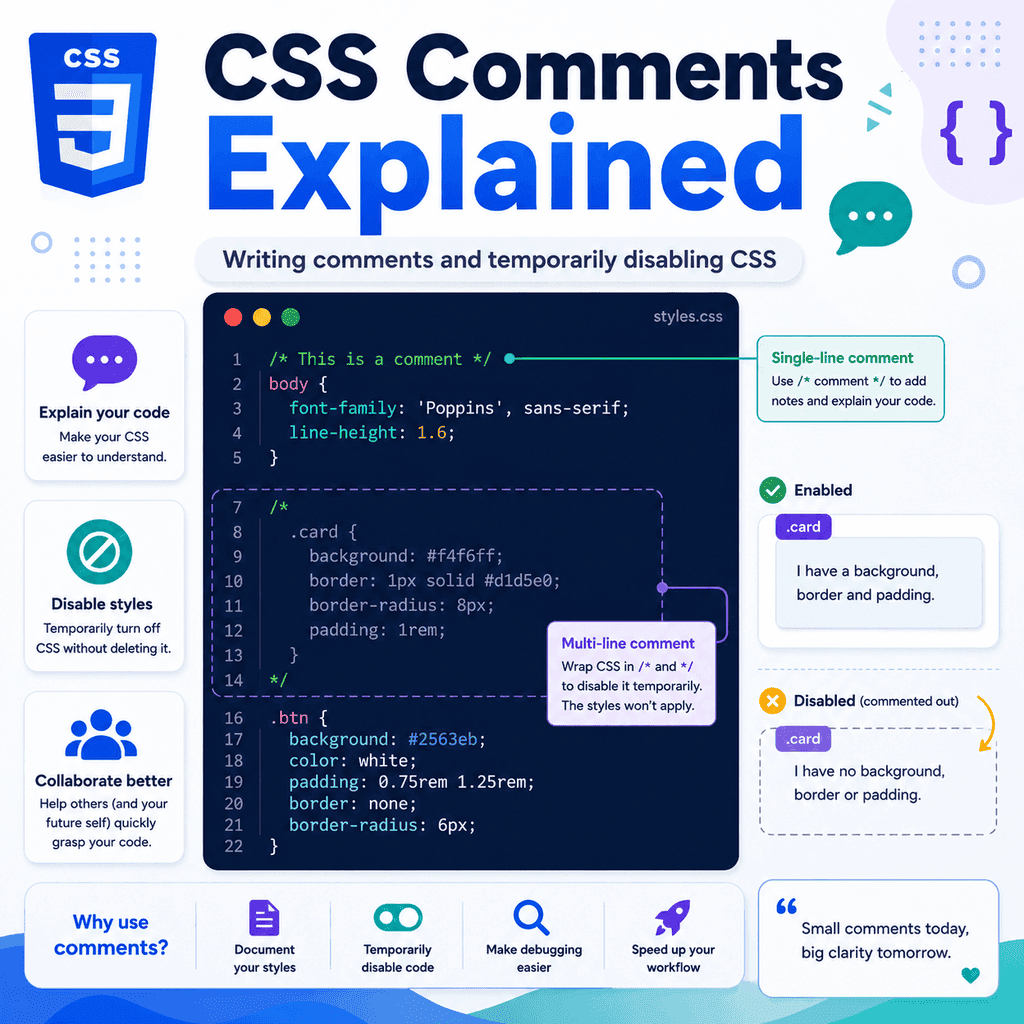
Introduction
CSS comments let you write notes inside a stylesheet.
These notes are ignored by the browser.
They do not change how the page looks.
They are mainly used to help people understand the CSS code.
A CSS comment looks like this:
/* This is a CSS comment */Comments can be useful for:
explaining what a section of CSS doesorganising a stylesheetleaving notes for yourself or other developerstemporarily disabling CSSmarking parts of a layoutmaking code easier to scanCSS comments are simple, but they are very useful when stylesheets start to grow.
What Is a CSS Comment?
A CSS comment is a piece of text in a CSS file that the browser ignores.
For example:
/* Main heading styles */h1 { color: navy; font-size: 2.5rem;}The browser ignores this part:
/* Main heading styles */It still applies this CSS:
h1 { color: navy; font-size: 2.5rem;}The comment is only there to help someone reading the stylesheet.
Why CSS Comments Are Useful
CSS files can start small.
For example:
body { font-family: Arial, sans-serif;} h1 { color: navy;}This is easy to understand.
However, a real stylesheet may contain styles for:
page layoutheadersnavigationbuttonsformscardstablesimagesresponsive designanimationsutility classesAs the stylesheet grows, comments can help divide the code into clear sections.
Example:
/* Base styles */body { font-family: Arial, sans-serif; line-height: 1.6;} /* Navigation */nav a { text-decoration: none;} /* Buttons */button { padding: 10px 16px;}The comments make the file easier to scan.
CSS Comment Syntax
CSS comments start with:
/*and end with:
*/Everything between those markers is treated as a comment.
Example:
/* This text is ignored by the browser */A complete example:
/* Style the main page heading */h1 { color: navy;}The browser reads the h1 rule, but it ignores the comment.
Single-Line CSS Comments
A CSS comment can be written on one line.
Example:
/* Page background */body { background-color: #f5f7fb;}Another example:
p { color: #333333; /* Set paragraph text colour */}Both are valid CSS comments.
However, comments placed on their own line are often easier to read:
/* Paragraph text */p { color: #333333;}Use whichever format makes the stylesheet clearer.
Multi-Line CSS Comments
CSS comments can also span several lines.
Example:
/* These styles control the main page layout. The container keeps content centred and prevents it from becoming too wide on large screens.*/.container { width: 90%; max-width: 1100px; margin: 0 auto;}Multi-line comments are useful when a short note is not enough.
They can explain why a decision was made, not just what the CSS does.
CSS Does Not Use // Comments
Some languages use // for comments.
For example, JavaScript can use:
// This is a JavaScript commentCSS does not use // comments in normal CSS files.
Incorrect CSS:
// This is not a normal CSS commentp { color: blue;}Correct CSS:
/* This is a CSS comment */p { color: blue;}Use /* ... */ for CSS comments.
Comments in a CSS File
Comments are commonly used in external CSS files.
For example, styles.css might contain:
/* Base page styles */body { font-family: Arial, sans-serif; line-height: 1.6; margin: 0;} /* Main layout */.container { width: 90%; max-width: 1000px; margin: 0 auto;} /* Buttons */.button { display: inline-block; padding: 10px 16px;}The comments help separate different parts of the file.
This is useful when returning to the code later.
Comments Inside Internal CSS
CSS comments also work inside a <style> element.
Example:
<!DOCTYPE html><html lang=”en”><head> <meta charset=”UTF-8″> <title>CSS Comments Example</title> <style> /* Basic page styles */ body { font-family: Arial, sans-serif; } /* Main heading */ h1 { color: navy; } </style></head><body> <h1>Welcome</h1> </body></html>The comments are inside the CSS, so they use CSS comment syntax.
Do not use HTML comment syntax inside CSS.
CSS Comments vs HTML Comments
HTML comments and CSS comments use different syntax.
An HTML comment looks like this:
<!– This is an HTML comment –>A CSS comment looks like this:
/* This is a CSS comment */Use HTML comments in HTML:
<!– Site header –><header> <h1>My Website</h1></header>Use CSS comments in CSS:
/* Site header styles */header { padding: 24px;}Do not mix them up.
Incorrect inside CSS:
<!– This is not a CSS comment –>body { font-family: Arial, sans-serif;}Correct:
/* This is a CSS comment */body { font-family: Arial, sans-serif;}Comments Should Explain the Code
A useful comment should make the code easier to understand.
For example:
/* Keep page content readable on wide screens */.container { max-width: 1000px; margin: 0 auto;}This comment explains why the style exists.
A less useful comment would be:
/* Set max width to 1000px */.container { max-width: 1000px;}That comment mostly repeats the code.
Repeating the code is not always helpful.
Good comments often explain purpose, context, or intention.
Organising a Stylesheet with Comments
Comments can divide a stylesheet into sections.
Example:
/* —————————— Base styles—————————— */ body { font-family: Arial, sans-serif; line-height: 1.6;} /* —————————— Layout—————————— */ .container { width: 90%; max-width: 1100px; margin: 0 auto;} /* —————————— Components—————————— */ .card { padding: 24px; border: 1px solid #dddddd;} /* —————————— Forms—————————— */ label { display: block; margin-bottom: 4px;}This makes the stylesheet easier to navigate.
For larger files, section comments can be very helpful.
Common Stylesheet Sections
A stylesheet might use comments to mark sections such as:
base stylestypographylayoutheadernavigationbuttonscardsformstablesutilitiesresponsive stylesExample:
/* Typography */h1,h2,h3 { line-height: 1.2;} /* Navigation */.site-nav a { text-decoration: none;} /* Forms */input,textarea,select { font: inherit;}This helps you find related styles quickly.
Temporarily Disabling CSS
One very useful feature of comments is that they can temporarily disable CSS.
For example, this rule applies normally:
h1 { color: navy;}If you wrap it in a comment, the browser ignores it:
/*h1 { color: navy;}*/The h1 rule is still in the file, but it no longer affects the page.
This can be useful when testing or debugging.
Disabling One Declaration
You can comment out one declaration inside a rule.
Example:
.card { background-color: white; /* border: 1px solid #dddddd; */ padding: 24px;}The browser applies:
background-color: white;padding: 24px;but ignores:
/* border: 1px solid #dddddd; */This is useful if you want to test how the card looks without the border.
Disabling a Whole Ruleset
You can also comment out a whole ruleset.
Example:
/*.alert { background-color: #fff3cd; border: 1px solid #ffeeba; padding: 16px;}*/The browser ignores the entire .alert rule.
This can be useful when you are trying to identify which rule is causing a visual issue.
Instead of deleting the rule, you can temporarily comment it out.
Disabling Several Rules
You can comment out several rules at once.
Example:
/*.card { border: 1px solid #dddddd; padding: 24px;} .card h2 { margin-top: 0;} .card a { font-weight: bold;}*/The browser ignores all of these rules.
This can be useful during testing.
However, do not leave large blocks of disabled CSS in a stylesheet for too long.
They can make the file confusing.
Why Temporarily Disable CSS?
Temporarily disabling CSS can help you test what a rule does.
For example, if a layout is broken, you might comment out one rule at a time.
You might test whether the problem comes from:
widthmarginpaddingdisplaypositionoverflowflexboxgridmedia queriesExample:
.container { width: 90%; /* max-width: 1100px; */ margin: 0 auto;}By disabling max-width, you can see how the layout changes.
This is a simple debugging technique.
Comments Can Help Debug Layout Problems
If a layout behaves strangely, comments can help isolate the problem.
For example:
.sidebar { width: 300px; /* float: right; */}If disabling float: right; fixes the issue, you know that declaration was involved.
Another example:
.card { display: grid; /* grid-template-columns: 1fr 2fr; */ gap: 16px;}If the layout changes after commenting out grid-template-columns, that property was controlling the column structure.
Commenting out CSS is a practical way to test cause and effect.
Comments Are Visible in Source Files
Comments do not display on the web page.
However, users can often view CSS files in the browser.
That means comments are not private.
Do not write sensitive information in CSS comments.
Avoid comments such as:
/* Temporary admin password: example123 */or:
/* Secret API key goes here */This is unsafe.
CSS comments should be treated as public code comments.
Use them for development notes, not secrets.
Comments Do Not Fix Broken CSS
Comments can help explain or disable CSS, but they do not fix errors by themselves.
For example, this CSS is broken because the colon is missing:
p { color blue;}Adding a comment does not fix it:
/* Paragraph colour */p { color blue;}The correct CSS is:
p { color: blue;}Comments are helpful, but the actual CSS syntax still needs to be correct.
Avoid Too Many Obvious Comments
Comments are useful, but too many obvious comments can make CSS harder to read.
Less useful:
/* Make text blue */p { color: blue;} /* Add padding */.card { padding: 24px;} /* Add margin */section { margin-bottom: 32px;}These comments mostly repeat the code.
Better comments explain purpose:
/* Keep cards separated so the page is easier to scan */.card { margin-bottom: 24px;}Use comments when they add useful context.
Do not comment every line automatically.
Good Uses of CSS Comments
CSS comments are useful when they explain:
why a rule existswhat a section of the file controlswhy a workaround is neededwhich styles belong to a componentwhich styles are temporarywhich rules are being testedExample:
/* Prevent long words from breaking the card layout */.card { overflow-wrap: break-word;}This explains the reason behind the rule.
That is more useful than simply saying:
/* overflow wrap */Comments for Temporary Code
If a comment marks temporary code, make that clear.
Example:
/* Temporary spacing while the final layout is being tested */.hero { margin-bottom: 48px;}This tells future you that the rule may need to be reviewed later.
You can also use a marker such as:
/* TODO: Replace this temporary layout after the card grid is finished */.lesson-list { display: block;}Be careful with temporary comments.
If they are never cleaned up, they can become stale and misleading.
Comments for Workarounds
Sometimes CSS includes a rule that exists for a specific reason.
A comment can explain it.
Example:
/* Prevent images from overflowing narrow screens */img { max-width: 100%; height: auto;}Another example:
/* Make form controls inherit the same font as the page */input,button,textarea,select { font: inherit;}These comments explain why the rules are useful.
This can help someone understand the stylesheet later.
Comments for Responsive Styles
Responsive CSS can be easier to read with comments.
Example:
/* Tablet and smaller screens */@media (max-width: 768px) { .layout { display: block; }} /* Small mobile screens */@media (max-width: 480px) { body { font-size: 16px; }}These comments make the purpose of each media query clearer.
This becomes more useful as a stylesheet grows.
Comments for Components
If your stylesheet has component sections, comments can help.
Example:
/* Card component */.card { padding: 24px; border: 1px solid #dddddd; border-radius: 8px;} .card-title { margin-top: 0;} .card-link { font-weight: bold;}The comment marks where the card styles begin.
Another component might follow:
/* Button component */.button { display: inline-block; padding: 10px 16px;}This organisation is helpful in larger stylesheets.
Comments and the Cascade
Comments do not affect the cascade.
For example:
/* First paragraph colour */p { color: blue;} /* Second paragraph colour */p { color: green;}The comments do not change which rule wins.
The browser still applies the normal CSS cascade.
In this example, the later p rule may override the earlier one because both selectors have the same specificity.
The comments are only notes.
They do not change CSS priority.
Comments and Specificity
Comments do not affect selector specificity.
For example:
/* General paragraph style */p { color: blue;} /* Intro paragraph style */.intro { color: green;}HTML:
<p class=”intro”>Welcome to the page.</p>The .intro rule may override the p rule because the class selector is more specific.
The comments do not affect that.
They only help humans understand the code.
Comments and Performance
Small comments in CSS are not usually a concern for learning projects.
However, large production websites often remove comments when CSS is minified.
Minification is a process that removes unnecessary whitespace and comments to reduce file size.
For example, this readable CSS:
/* Main heading */h1 { color: navy;}might become:
h1{color:navy}You do not need to worry about minification when learning CSS.
The important point is that comments are useful while writing and maintaining code.
A Complete CSS Comments Example
Here is a small CSS file with useful comments:
/* —————————— Base styles—————————— */ body { font-family: Arial, sans-serif; line-height: 1.6; margin: 0; color: #222222;} /* Keep images responsive by default */img { max-width: 100%; height: auto;} /* —————————— Layout—————————— */ .container { width: 90%; max-width: 1000px; margin: 0 auto;} /* —————————— Components—————————— */ .card { padding: 24px; border: 1px solid #dddddd; border-radius: 8px; margin-bottom: 24px;} /* Temporarily disabled while testing the new card design *//*.card { box-shadow: 0 4px 12px rgba(0, 0, 0, 0.08);}*/ /* —————————— Forms—————————— */ label { display: block; margin-bottom: 4px;} input,textarea,button { font: inherit;}This example uses comments to:
organise sectionsexplain important rulestemporarily disable a rulemake the stylesheet easier to scanComments in a Complete HTML and CSS Example
HTML:
<!DOCTYPE html><html lang=”en”><head> <meta charset=”UTF-8″> <title>CSS Comments Example</title> <link rel=”stylesheet” href=”styles.css”></head><body> <main class=”container”> <h1>CSS Comments Example</h1> <article class=”card”> <h2>Why Comments Help</h2> <p>Comments make stylesheets easier to understand and maintain.</p> </article> </main> </body></html>CSS:
/* Base page styles */body { font-family: Arial, sans-serif; line-height: 1.6;} /* Centre the main content and limit its width */.container { width: 90%; max-width: 900px; margin: 0 auto;} /* Card component */.card { padding: 24px; border: 1px solid #dddddd; border-radius: 8px;}The comments do not change the page appearance.
They make the CSS easier to understand.
Common Mistake: Using JavaScript Comments in CSS
Incorrect:
// This styles the headingh1 { color: navy;}Correct:
/* This styles the heading */h1 { color: navy;}CSS uses /* ... */ comments.
Do not use // comments in normal CSS.
Common Mistake: Using HTML Comments in CSS
Incorrect:
<!– Button styles –>button { padding: 10px 16px;}Correct:
/* Button styles */button { padding: 10px 16px;}HTML comments and CSS comments are different.
Use the right comment syntax for the language you are writing.
Common Mistake: Forgetting to Close a Comment
Incorrect:
/* Main heading stylesh1 { color: navy;} p { color: #333333;}The comment starts with:
/*but never ends with:
*/This can cause the browser to ignore more CSS than you intended.
Correct:
/* Main heading styles */h1 { color: navy;} p { color: #333333;}Always close CSS comments properly.
Common Mistake: Commenting Out Too Much CSS
During testing, it is common to comment out code.
However, large blocks of old disabled CSS can make a stylesheet messy.
For example:
/*old layoutold card stylesold form stylesold button stylesmany lines of unused CSS*/If code is no longer needed, remove it.
Use comments for temporary testing, but clean them up later.
A stylesheet should not become an archive of old experiments.
Common Mistake: Putting Sensitive Information in Comments
Avoid this:
/* Client login: admin@example.com / password123 */CSS comments can usually be viewed by users.
Do not put passwords, keys, private URLs, internal notes, or confidential information in CSS files.
Comments are not a safe place for secrets.
Common Mistake: Writing Misleading Comments
A comment can become wrong if the code changes.
For example:
/* Make the button blue */button { background-color: green;}The comment says blue, but the CSS says green.
This is confusing.
If you update the code, update the comment too.
Bad comments can be worse than no comments.
Common Mistake: Explaining Every Obvious Line
Less useful:
/* Select the body */body { /* Set the font family */ font-family: Arial, sans-serif; /* Set the margin to zero */ margin: 0;}This can make the file harder to read.
Better:
/* Basic page defaults */body { font-family: Arial, sans-serif; margin: 0;}Use comments to clarify the code, not clutter it.
Best Practices
Use /* ... */ for CSS comments.
Use comments to organise larger stylesheets.
Use comments to explain why a rule exists.
Use comments to mark sections such as layout, typography, navigation, forms, and components.
Use comments to temporarily disable CSS while testing.
Remove old commented-out code when it is no longer needed.
Do not put sensitive information in comments.
Do not use HTML comment syntax in CSS.
Do not use JavaScript // comments in normal CSS.
Always close comments properly.
Keep comments accurate when the CSS changes.
Avoid comments that only repeat obvious code.
Summary
CSS comments are notes inside CSS code.
They start with:
/*and end with:
*/A complete comment looks like this:
/* This is a CSS comment */The browser ignores comments.
Comments are useful for explaining code, organising stylesheets, and temporarily disabling CSS.
For example:
/* Card component */.card { padding: 24px; border: 1px solid #dddddd;}You can also comment out CSS temporarily:
/*.card { border: 1px solid #dddddd;}*/Use comments carefully.
Good comments make CSS easier to understand.
Too many comments, outdated comments, or comments containing private information can cause problems.
The main idea is simple:
CSS comments are for humans, not the browser.They help you write CSS that is easier to read, test, debug, and maintain.